
Kanban vs. To-Do Lists: Which Reduces Stress Better?

Kanban vs. To-Do Lists: Which Reduces Stress Better?
When it comes to managing tasks and reducing stress, Kanban boards and to-do lists take different approaches. To-do lists are simple, linear tools ideal for quick task organization, while Kanban boards use a visual workflow to track progress and limit multitasking. Each method has its strengths and weaknesses, depending on the complexity of your tasks and how you prefer to stay organized.
Key Takeaways:
- To-Do Lists: Best for simple, one-off tasks. Writing tasks down reduces mental clutter, and crossing items off provides a sense of accomplishment. However, long lists can lead to overwhelm if not managed properly.
- Kanban Boards: Ideal for multi-step projects or juggling responsibilities. Visualizing tasks and limiting work-in-progress reduces cognitive overload and keeps you focused. However, they require more setup and maintenance.
Quick Comparison:
| Feature | To-Do Lists | Kanban Boards |
|---|---|---|
| Best For | Simple, one-step tasks | Complex workflows, multi-phase projects |
| Stress Reduction | Writing tasks down, crossing off | Visualizing progress, limiting multitasking |
| Overwhelm Risk | High if overloaded | Low due to work-in-progress limits |
| Setup | Minimal | Moderate |
Bottom Line: For quick and simple task management, stick with to-do lists. For more complex projects, Kanban boards help you stay organized and reduce stress. Combining both can provide the best of both worlds.
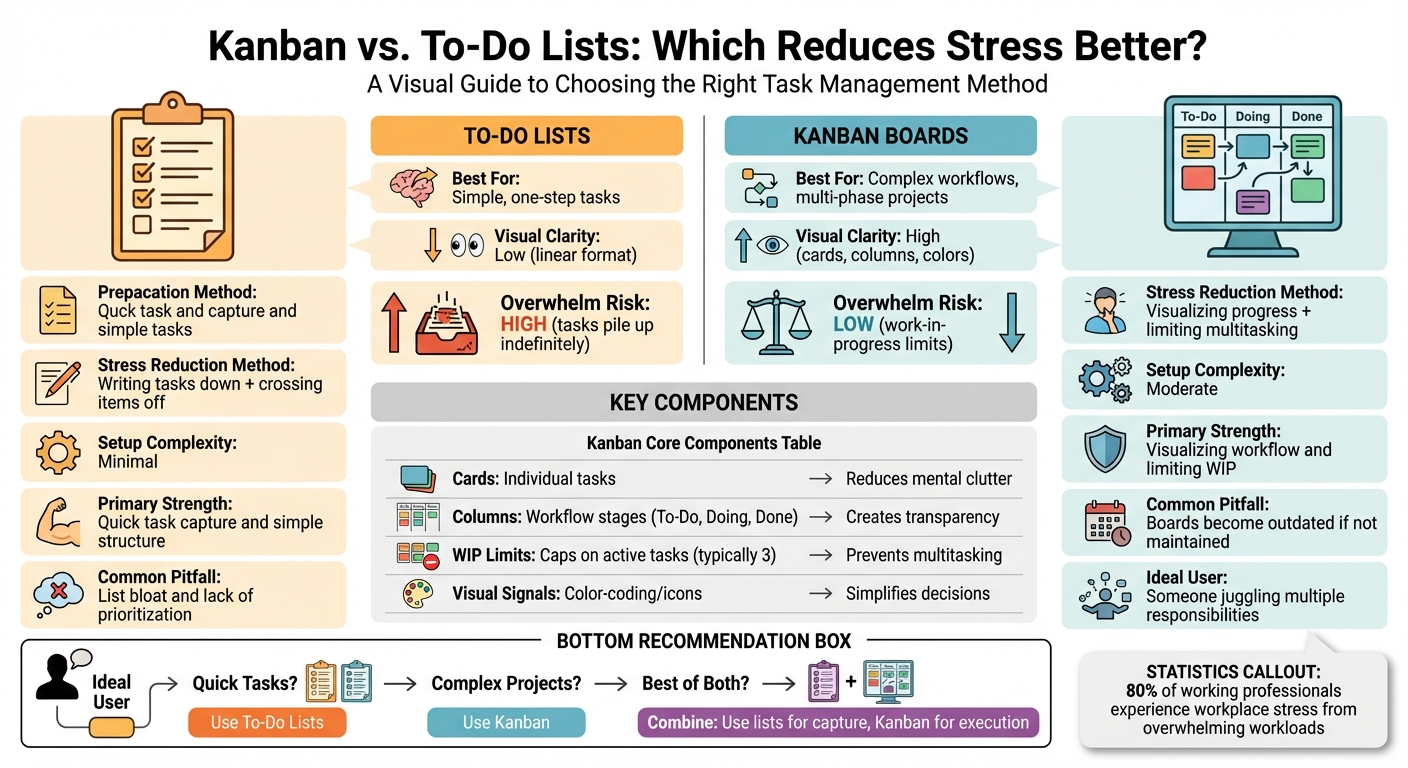
Kanban vs To-Do Lists: Complete Comparison for Stress Reduction
How To-Do Lists Work and Their Impact on Stress
A to-do list is a simple yet powerful tool that organizes tasks, whether on paper or digitally, to bring structure to your day. No matter the format, its main goal is the same: to create a clear plan for tackling your responsibilities.
By breaking down big, vague goals into specific, actionable steps - what David Allen calls "next actions" - to-do lists help overcome the inertia that often comes with overwhelming tasks. For instance, instead of writing "Fix fence", a more effective approach might be "Call Marcus to ask for contractor's number." This level of detail makes daunting tasks feel more manageable.
Writing tasks down also lightens your mental load. It taps into the Zeigarnik Effect, which suggests that unfinished tasks linger in your mind until they’re addressed. By putting them on paper, you free up mental space. Plus, the act of crossing off a completed task releases dopamine, giving you a small but satisfying boost of motivation.
Next, let’s dive into how to-do lists can both help and hinder stress management.
Advantages of To-Do Lists
To-do lists are great for creating order out of chaos. By moving tasks from your brain to a physical or digital list, you instantly reduce mental clutter. This is particularly helpful when you’re juggling multiple responsibilities - like work deadlines, household chores, or long-term goals.
They also provide a clear framework for prioritizing what needs your attention first. When your tasks are laid out in front of you, it’s easier to decide where to focus. Many people use strategies like the ABC Method, the 1–3–5 Rule, or the Eisenhower Matrix to ensure they’re tackling the most important tasks first [14, 16]. This kind of structure can turn feelings of overwhelm into a sense of control.
And let’s not forget the sheer joy of crossing off a task. As Dr. Sarina Schrager, Medical Editor at AAFP, points out:
"Taking an idea and putting it down on paper (or in a digital notes app) has been shown to decrease anxiety, and completing a task and crossing it off the list provides a sense of tangible satisfaction."
Disadvantages of To-Do Lists
While to-do lists can be a great stress reliever, they can also backfire if not managed well. Overloading your list with vague or unrealistic tasks can actually increase stress. E.J. Masicampo, Associate Professor of Psychology at Wake Forest University, explains:
"To-do lists often tend to be mental graveyards... Something that's been sitting there for too long is probably just stated in too big terms."
Tasks like "Organize taxes" are too broad and can lead to procrastination or paralysis, leaving you with an ever-growing backlog.
Another issue is overloading your list, which can create goal conflicts. Jordan Etkin, Associate Professor of Marketing at Duke University, highlights this challenge:
"The more things people put on their lists, the more open they are to creating goal conflict and its sort of negative downstream effects."
When you’re juggling too many priorities, it’s easy to feel overwhelmed. Just looking at a long to-do list can trigger physical stress responses, like increased cortisol levels or a racing heart, which can leave you feeling drained before the day even begins. In these cases, an overloaded to-do list turns into a source of anxiety rather than a helpful tool.
Understanding these strengths and weaknesses prepares us to explore alternatives, like the Kanban method, which offers a different approach to managing tasks and stress.
How Kanban Works and Its Effect on Stress
Kanban, which translates to "visual signal" or "signboard" in Japanese, originated at Toyota in the 1950s as a method to implement "just-in-time" production. Over time, its use has expanded far beyond manufacturing, becoming a popular way to manage personal tasks and workflows.
At its core, Kanban is simple: a board divided into columns representing stages of a workflow - commonly "To Do", "In Progress", and "Done." Tasks are represented as cards that move across the board as progress is made. This visual setup takes abstract tasks and turns them into tangible, trackable items, making it easier to stay on top of your responsibilities.
One of Kanban’s key benefits is how it helps reduce stress by moving tasks out of your head and onto a visual board. Instead of mentally juggling your to-do list, you can rely on the board to organize and display everything clearly. As the Kanban Tool Blog puts it:
"Kanban doesn't just help manage work - it helps to manage the mind doing the work!"
This "cognitive offloading" is especially helpful when you're managing multiple responsibilities. By offering a clear visual of your priorities, Kanban minimizes the anxiety that comes from constantly rethinking what needs to be done.
Core Components of Kanban
A Kanban board is built around a few essential elements that provide structure while remaining flexible. Cards represent individual tasks or work items, making each piece of work easy to track. Columns define the stages of your workflow, showing where each task is in the process.
One of the most impactful features is the Work-in-Progress (WIP) limit, which caps the number of tasks allowed in the "In Progress" column at any time. While it might seem restrictive, this limit is a safeguard against spreading yourself too thin. By focusing on just two or three tasks at once, you avoid the inefficiency and stress caused by constant multitasking. Together, these components create a system that keeps your workload manageable and your mind clear.
| Component | Description | Stress-Reduction Benefit |
|---|---|---|
| Cards | Individual tasks or work items | Reduces mental clutter by externalizing tasks |
| Columns | Workflow stages (e.g., To-Do, Doing, Done) | Creates transparency and highlights bottlenecks |
| WIP Limits | Caps on active tasks in progress | Prevents multitasking and improves focus |
| Visual Signals | Color-coding, icons, or images | Simplifies decisions and clarifies priorities |
Now, let’s explore how these components work together to actively reduce stress.
How Kanban Reduces Stress
Kanban’s structured yet flexible design directly addresses stress by setting clear limits and visualizing progress. It gives you a sense of control by making your workload visible at a glance. Unlike traditional to-do lists, which can grow endlessly, Kanban uses a "pull system" - you only take on new tasks when you have the capacity. This prevents the overwhelming feeling of facing an endless mountain of work.
WIP limits play a particularly important role in this process. Mental health copywriter Tanya Kravchuk explains:
"The brain feels safer and more in control when there's clarity. Kanban provides that structure without rigidity, allowing flexibility while keeping work organized."
By capping how many tasks you can actively work on, WIP limits encourage you to focus on finishing tasks rather than starting new ones. This helps combat the Zeigarnik Effect, which is the brain's tendency to fixate on incomplete tasks, by keeping your active workload manageable.
The visual progress of moving cards from one column to the next also creates a sense of momentum. For long-term or abstract projects, this can be incredibly motivating. Each card that reaches the "Done" column provides a small but tangible feeling of accomplishment. Plus, the board’s design simplifies decision-making - your next task is simply the top card in the "To Do" column, saving you from wasting energy on planning.
Digital tools inspired by Kanban, like malife, take these principles to the next level for personal productivity. Apps like malife use a Today & Next approach to focus your attention on immediate tasks, rather than overwhelming you with a massive backlog. By organizing tasks into manageable "now" and "soon" categories and incorporating WIP limits, these tools help you stay focused and calm, without the stress of seeing every future task at once.
Kanban vs. To-Do Lists: Direct Comparison
After diving into how each method affects stress, let’s put to-do lists and Kanban boards side by side to see how they stack up. While both are designed to manage tasks, they approach stress reduction in very different ways.
To-do lists can grow endlessly, leading to what some call "list bloat." On the other hand, Kanban boards impose limits on how many tasks you can tackle at once, keeping workloads manageable. Zach McDowell, Director of Product Marketing at Planview, puts it this way:
"Handling endless text can overwhelm your mind... Kanban's visual approach naturally highlights priority tasks."
Another key difference lies in how they track progress. To-do lists usually show tasks as either "done" or "pending", which can feel a bit rigid. In contrast, Kanban boards break tasks into stages, offering a clearer view of where everything stands. Here’s a quick breakdown of their differences:
Comparison Table
| Aspect | To-Do Lists | Kanban |
|---|---|---|
| Primary Strength | Quick task capture and simple structure | Visualizing workflow and limiting work-in-progress |
| Visual Clarity | Low, due to its linear format | High, using cards, columns, and colors |
| Overwhelm Risk | Higher, as tasks can pile up indefinitely | Lower, thanks to work-in-progress limits |
| Stress Reduction | Satisfaction from crossing items off | Reduced cognitive load and decision fatigue |
| Best For | Simple, one-off daily tasks | Complex projects and multi-phase workflows |
| Common Pitfalls | Lack of prioritization; risk of "list bloat" | Boards can become outdated if not updated |
Each system has its strengths and weaknesses, and the right choice often depends on the complexity of your tasks and how you prefer to stay organized.
How To-Do Lists Reduce Stress
When it comes to managing stress, to-do lists can be a game-changer. They help lighten your mental load by giving your brain a break from juggling tasks. E.J. Masicampo, an Associate Professor of Psychology at Wake Forest University, explains it well:
"Goals are interesting as they are almost these autonomous agents that kind of live inside you and occupy space in your mind. When a goal is unfinished it might be a weight on your mind in terms of anxiety or worry".
In a 2011 study published in the Journal of Personality and Social Psychology, Masicampo found that unfinished goals can disrupt your ability to focus on other tasks. However, creating a specific plan to tackle those goals can eliminate this mental interference.
By planning, you replace worry with actionable steps. Without a clear plan, stressful tasks can trigger physical responses like elevated cortisol levels and increased heart rate - your body reacts as though you’re already doing the task. Shifting into "planning mode" not only calms your mind but also boosts your energy. And when you prioritize your tasks effectively, you can direct that energy where it’s needed most.
Organizing Tasks by Priority
Prioritization is key to cutting through the chaos. By ranking tasks based on importance, you can focus on what truly matters instead of feeling paralyzed by a long, overwhelming list.
One way to make this easier is by dividing your to-do list into categories like work, home, and personal. This prevents the feeling of being buried under one massive inventory of obligations. Apps such as malife can help by organizing tasks into specific Life Areas and highlighting what needs your attention. Features like Impact/Effort prioritization ensure you focus on tasks that make a real difference, rather than wasting energy on low-priority items. Once you’ve set your priorities, breaking down larger goals into smaller, actionable tasks can further reduce stress.
Breaking Down Large Goals
Big, vague goals can quickly become a source of anxiety if they sit on your list for too long. As Masicampo puts it:
"To-do lists often tend to be mental graveyards... Something that's been sitting there for too long is probably just stated in too big terms".
The fix? Break those big goals into smaller, more specific steps. For instance, instead of writing "Exercise", try "Walk for 30 minutes." Or swap "Taxes" with "Gather documents for 2022 taxes".
This approach helps you avoid what researchers call the "middle slump", where motivation drops off during lengthy projects. By focusing on smaller, manageable steps, you can maintain momentum and reduce the stress that comes with feeling stuck. Use the SMART method - Specific, Measurable, Achievable, Relevant, Time-based - to create clear, actionable goals that keep you on track.
To end your day on a positive note, consider keeping a "done list." Jotting down what you’ve accomplished shifts your focus from what’s left to do to the progress you’ve made, giving you a sense of achievement.
How Kanban Reduces Stress
Kanban helps ease stress by focusing on how you work rather than just what you do. Its visual boards simplify task management and introduce limits that prevent overwhelm. As the Kanban Tool Blog aptly describes:
"At its core, Kanban is a system of constraints - it's ironic, but it is those limitations that offer mental liberation."
Instead of mentally juggling tasks or scrolling through endless to-do lists, Kanban organizes everything into clear columns like "To Do", "Doing", and "Done." This structure keeps you focused by limiting the number of active tasks. Let’s break down how limiting work-in-progress and visual progress tracking work to reduce stress.
Limiting Work-in-Progress
One of Kanban’s standout features is its ability to control how many tasks you tackle at once. The work-in-progress (WIP) limit - essentially a cap on the number of tasks in the "Doing" column - is a game-changer for reducing mental strain. Typically, this limit is set to around three tasks at a time. Why? Because most people can only keep a handful of items in their working memory before cognitive overload kicks in. When you exceed that threshold, you risk inefficiency and stress from constant context-switching.
As Jill Duffy from PCMag puts it:
"WIP limits require you to finish tasks assigned to you rather than put off hard tasks in favor of newer, easier ones."
This system encourages you to focus on completing tasks before starting new ones, which can also help combat the Zeigarnik Effect - the nagging tendency to fixate on unfinished work. By shifting the burden of tracking progress from your brain to the board, Kanban creates a more relaxed and productive workflow. Tools like malife integrate this principle with features like "Today & Next" views, helping users stay organized without the stress of a cluttered backlog.
Visualizing Progress
Another key stress-reliever in Kanban is its emphasis on visual progress tracking. Moving a task from "Doing" to "Done" offers an immediate, satisfying sense of accomplishment. Humans are wired to process visual information faster than text, which makes a Kanban board an intuitive way to grasp priorities and task statuses at a glance. Features like color-coded cards further simplify decision-making by highlighting what needs attention.
When To-Do Lists Work Better for Stress Reduction
Kanban boards shine when tackling complex workflows, but for simple, quick tasks, traditional to-do lists are often the better choice. For straightforward, single-step actions - like sending an email, washing dishes, or taking a walk - a to-do list gets the job done without requiring the setup of a visual board. These lists help offload mental clutter and provide immediate clarity, especially when your workload is light and manageable.
Simple Workflows and Small Task Volumes
To-do lists are perfect for "one-and-done" tasks that don’t need to be tracked through multiple stages or coordinated across teams. When you're dealing with a small number of discrete actions, the visual complexity of a Kanban board can feel unnecessary. A simple list, on the other hand, keeps things clear and helps you focus on getting things done.
The key to making to-do lists effective is keeping them realistic. Research shows that limiting the number of daily tasks reduces mental conflict. E.J. Masicampo, a psychology professor at Wake Forest University, explains:
"You don't have to finish the goal to offload it – you really could just make a specific plan for how to attain it to get it to stop occupying that mental space."
To get the most out of your list, stick to tasks you can realistically accomplish in a day. You might also find it helpful to create separate lists for different areas of your life - like work, home, or personal projects. To-do lists are also great for quickly capturing tasks as they come to mind, without requiring elaborate organization.
Quick Task Capture
One of the biggest strengths of to-do lists is how fast and easy it is to jot down tasks. When something comes up, you can add it to your list instantly, without worrying about sorting it into a specific category or stage. This quick capture acts as an external memory, easing the mental strain caused by the Zeigarnik Effect - a psychological tendency to dwell on unfinished tasks.
Writing tasks as clear, actionable steps makes this process even more effective. For instance, instead of writing "Organize fence repair", you might jot down "Call Marcus at 555-0199". This level of detail helps overcome the hesitation that often comes with vague next steps. As Tom Stafford from BBC Features puts it:
"The mere act of planning how to finish something satisfies the itch that keeps uncompleted tasks in our memory."
Because they require minimal setup, to-do lists are an efficient way to reduce mental load while keeping you organized.
When Kanban Works Better for Stress Reduction
To-do lists are fantastic for handling simple, one-off tasks. But when you're dealing with complex projects or juggling multiple responsibilities, Kanban often emerges as the better option. Its structured approach helps cut through the chaos and eases mental strain.
Let’s dive into how Kanban simplifies complex workflows and organizes tasks visually.
Complex Projects and Multitasking
Kanban thrives in scenarios where tasks naturally progress through different stages. Think about projects like home renovations, wedding planning, or even content creation. These kinds of undertakings can feel overwhelming when viewed as a single, massive to-do. But with Kanban, you can break them down into clear phases - like "Research", "In Progress", and "Done." This breakdown transforms intimidating goals into smaller, more manageable steps, helping you stay focused and productive.
For anyone managing a heavy workload, Kanban's work-in-progress limits are a lifesaver. By setting a cap - say, no more than three tasks in the "Doing" column - you avoid the mental exhaustion caused by constant context-switching. And this isn’t just theory: research shows that 80% of working professionals experience workplace stress, often due to overwhelming workloads. Kanban aligns your current tasks with your actual capacity, leaving extra items in the backlog until you're ready to tackle them.
The Power of Visual Organization
Some people naturally process information better when it’s presented visually rather than in a linear list format. That’s where Kanban boards shine. As Jill Duffy from PCMag explains:
"Kanban boards create a visual representation for something that otherwise isn't visual at all."
This visual layout doesn’t just make things look tidy - it actively reduces mental strain. According to the Kanban Tool blog:
"The visual field takes over some of the burden of memory, freeing up executive function for task execution and problem-solving."
By placing tasks on a board, you no longer have to mentally track them, freeing up brainpower for more important work. Features like color-coding make it even easier to prioritize - imagine using red for urgent tasks and purple for low-priority ones. And there’s something uniquely satisfying about physically moving a task from "Doing" to "Done." It creates a sense of accomplishment and accountability that a simple checkmark on a list just doesn’t match.
For anyone feeling overwhelmed by multitasking or complex workflows, Kanban offers a more visual, structured, and calming way to organize work. Tools like malife embrace this approach with features like Today, Next, and Later views, helping you zero in on what matters now without being distracted by the rest of your backlog.
Combining Kanban and To-Do Lists for Better Stress Management
Pairing Kanban with to-do lists creates a powerful system for managing tasks and reducing stress. To-do lists excel at capturing tasks quickly, while Kanban brings structure and focus to their execution.
E.J. Masicampo, Associate Professor of Psychology at Wake Forest University, highlights a common issue with to-do lists:
"To-do lists often tend to be mental graveyards... Something that's been sitting there for too long is probably just stated in too big terms."
By combining the speed of task capture with the organization of Kanban, you can avoid letting tasks pile up or become overwhelming. This approach blends the best of both systems to streamline your workflow.
Using To-Do Lists for Quick Capture
Start by using a to-do list - or Kanban's "Backlog" column - as a place to quickly jot down tasks, ideas, or requests as they come to mind. This phase acts as a mental release, helping to clear your head and reduce distractions. Research shows that unfinished tasks can create anxiety, but simply writing them down and forming a plan can ease these negative feelings.
Don’t worry about structure at this stage - just focus on getting thoughts out of your head and onto paper or into an app. This step acts as a safety net, ensuring nothing gets lost. Once captured, these tasks can be prioritized and organized for action later.
Using Kanban for Execution
After capturing tasks, shift to Kanban for a more visual and organized execution process. Move up to three tasks into the "Doing" column at a time - this Work-in-Progress (WIP) limit is key for maintaining focus. Overloading your plate is a common contributor to workplace stress, which affects 80% of professionals.
As tasks move from "To-Do" to "Doing" and finally to "Done", you'll feel a sense of progress while keeping your priorities clear. The backlog remains accessible but doesn’t distract from your immediate focus. Tools like malife embody this approach with features like Today, Next, and Later views, offering a calm and organized way to manage tasks. Voice capture even allows you to add tasks on the go, keeping the system flexible and user-friendly.
| Feature | To-Do List Strength | Kanban Strength | Hybrid Advantage |
|---|---|---|---|
| Task Entry | Quick and easy capture | Organized categorization | Ensures no idea is lost and all are sorted |
| Focus | Displays everything at once | Limits Work-in-Progress (WIP) | Balances clarity with reduced overwhelm |
| Progress | Satisfaction of crossing off tasks | Visual movement across columns | Tracks progress while boosting motivation |
| Complexity | Great for simple tasks | Ideal for multi-step projects | Handles both daily tasks and larger goals |
This hybrid system reduces mental clutter while keeping your tasks visible and manageable. By integrating the quick capture of to-do lists with the structured flow of Kanban, you can stay on top of both simple chores and complex projects with ease.
Conclusion
To-do lists and Kanban boards each bring unique benefits to managing stress. Both systems help reduce mental strain by getting tasks out of your head and into a structured format. To-do lists are perfect for quickly jotting down tasks and provide a sense of accomplishment when you check items off. However, they can become overwhelming when too many tasks accumulate or lack organization. In contrast, Kanban boards visually break down tasks, allowing you to track progress and limit work-in-progress, which helps avoid distractions and decision fatigue.
Choosing between the two depends largely on your workflow and the complexity of what you’re managing. For simple, day-to-day tasks, a to-do list might be all you need. But if you’re handling multiple projects or find long lists exhausting, Kanban’s visual layout and focus on limiting active tasks can provide the structure you need to stay on track.
Interestingly, these methods don’t have to be an either-or decision. Combining them can create a balanced, efficient system. To-do lists can capture tasks on the fly, while Kanban boards can help you prioritize and execute them in an organized way.
When it comes to reducing stress, the ultimate goal is to find a system that keeps your mind clear and your tasks manageable. Tools like malife integrate the best of both worlds with a Kanban-based design, offering Today, Next, and Later views to streamline your workflow. By categorizing tasks into Life Areas and focusing on what truly matters, malife helps you stay calm and productive.
FAQs
Should I use a Kanban board or a to-do list to stay organized and reduce stress?
When deciding between a Kanban board and a to-do list, it really comes down to the complexity of your tasks and how you like to organize your work. A to-do list is perfect for handling simple, individual tasks. It’s straightforward - just jot down your items, prioritize them, and check them off as you go.
Kanban boards, however, shine when you’re juggling multiple projects or workflows. Their visual layout breaks tasks into stages, such as "Today", "Next", and "Later", giving you a clear snapshot of where everything stands. This makes it easier to track progress and keep your focus on what’s most important.
If your goal is to reduce stress, consider how you work best. A to-do list keeps things simple and efficient, while a Kanban board offers structure and clarity for managing more intricate projects.
What are the benefits of using Kanban boards with to-do lists?
Combining Kanban boards with to-do lists offers a simple yet powerful way to manage tasks visually. This method lets you see your workflow at a glance, making it easier to spot bottlenecks, monitor progress, and keep everything organized. By breaking tasks into smaller, more manageable steps, it can also help reduce stress and give you a stronger sense of control over your workload.
This approach enhances focus by helping you prioritize tasks based on their impact and effort. It blends the flexibility of a to-do list with the structured framework of Kanban, creating an efficient system that promotes productivity and ensures you stay on track.
How does using Kanban boards reduce stress compared to traditional to-do lists?
Kanban boards are a great way to bring order to your workload and reduce stress. They visually break down tasks into clear stages, making it easier to track progress and focus on what matters most. Unlike traditional to-do lists that can feel overwhelming with endless entries, Kanban boards help you keep things tidy and manageable by limiting work-in-progress.
With columns like To Do, In Progress, and Done, Kanban creates a structured workflow that minimizes mental clutter. This system ensures tasks are tackled in an organized way, preventing the chaos of juggling too many responsibilities at once. By offering a clear snapshot of your tasks, Kanban makes it easier to stay calm, productive, and in control.