
Managing Tasks with Kanban for Remote Work
Managing Tasks with Kanban for Remote Work
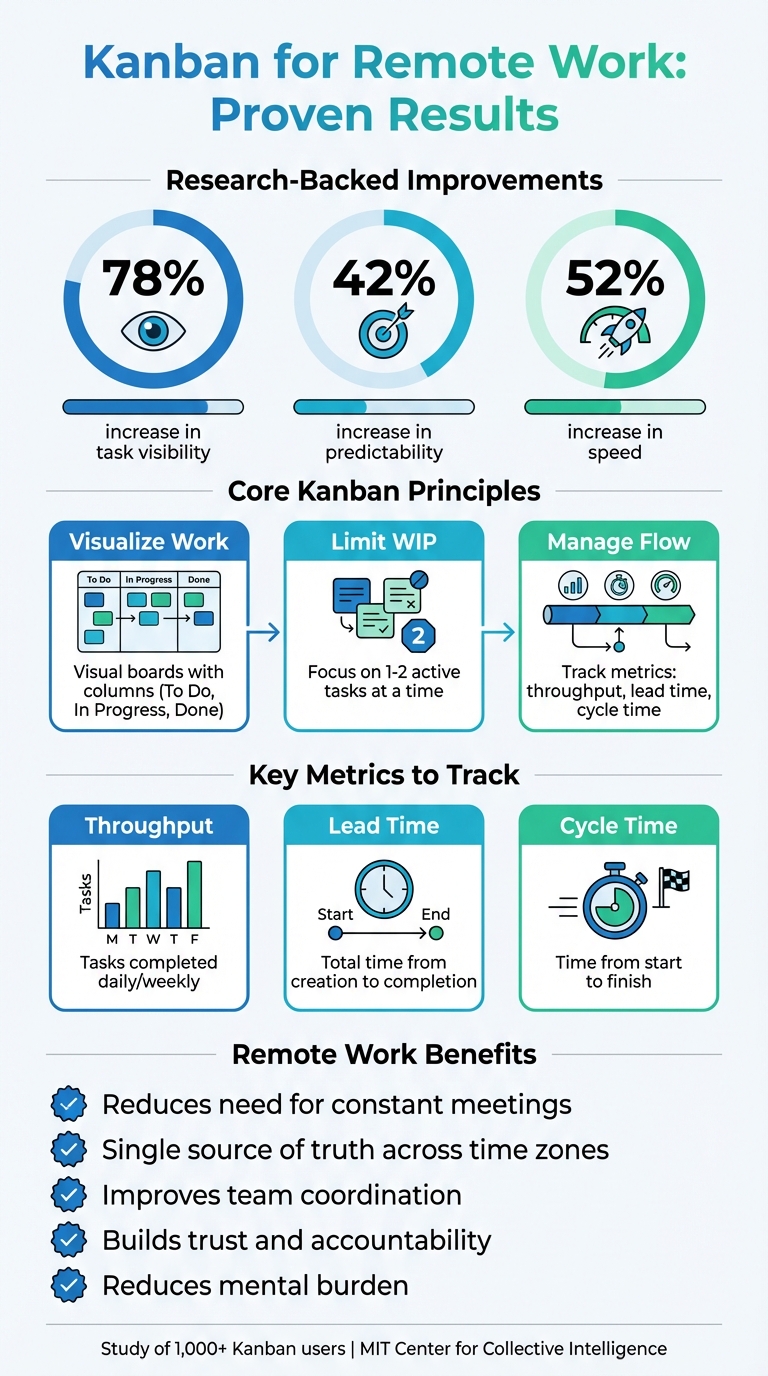
Kanban is a simple yet effective way to manage tasks, especially for remote teams. It uses visual boards to organize tasks into columns like "To Do", "In Progress", and "Done." This method improves task clarity, reduces overload, and boosts efficiency. Research shows Kanban increases task visibility by 78%, predictability by 42%, and speed by 52%. For remote workers, it minimizes the need for constant meetings and helps maintain focus across time zones.
Key takeaways:
- Visual boards: Track tasks clearly with stages like "To Do" and "Done."
- Limit work-in-progress (WIP): Focus on fewer tasks to avoid multitasking.
- Digital tools: Apps like malife streamline Kanban with features like "Today-Next-Later" views, voice input, and prioritization tools.
- Metrics: Use throughput, lead time, and cycle time to track progress and improve workflows.
- Reflection: Daily journaling and weekly reviews help refine your system.
Kanban isn’t just a task manager - it’s a system to help remote workers stay organized, reduce stress, and complete work efficiently.
Kanban Benefits for Remote Teams: Key Statistics and Impact Metrics
What Is Kanban and Why It Works for Remote Work
Core Principles of Kanban
Kanban is built on three key practices that reshape how remote workers tackle their tasks. The first is visualizing work, which involves laying out tasks on a board divided into columns like "To Do", "In Progress", and "Done." This simple setup replaces the mental chaos of keeping everything in your head with a clear visual representation of your workload.
The second practice, limiting work in progress (WIP), ensures you focus on fewer tasks at a time - usually no more than two active tasks. This approach acknowledges that multitasking often leads to inefficiency. By capping WIP, remote workers can lower stress, improve task quality, and better predict outcomes. For those navigating the distractions of remote work, this principle helps you finish tasks before jumping into new ones.
Lastly, managing flow ensures tasks move smoothly from start to finish. By tracking metrics like cycle time and throughput, you can identify bottlenecks and make adjustments . For instance, if tasks get stuck in one column, you might break them into smaller steps or tighten your WIP limits to keep everything moving steadily.
These practices not only make task management more efficient but also bring tangible benefits to remote teams.
Benefits for Remote Teams
Kanban’s principles offer clear advantages for remote teams, especially when physical office tools like whiteboards or casual desk check-ins are no longer available. With Kanban, distributed teams gain a transparent view of tasks, enabling seamless updates and reviews across time zones - from Eastern to Pacific. This reduces the need for constant status meetings and establishes a single source of truth for tracking progress and identifying blockers .
Additionally, clear process policies - like defining what "Done" means or when a task can move forward - help build trust and accountability. When everyone understands the expectations and workflows, misunderstandings are minimized . Digital Kanban boards become a central hub for communication, making it easier for teams to stay coordinated without needing face-to-face interactions .
For individual team members, Kanban simplifies task management by highlighting progress and reducing the mental burden of juggling too many things. Tools like malife’s Today & Next flow demonstrate how Kanban can prevent overload and keep motivation high. Research supports this: adopting Kanban increases workflow visibility by 78% and predictability by 42%. Meanwhile, MIT’s Center for Collective Intelligence found that virtual teams using digital Kanban tools can achieve the same level of collective intelligence as in-person teams .
Next, we’ll explore how to create your own personalized Kanban board in malife.
Setting Up Your Kanban Board in malife
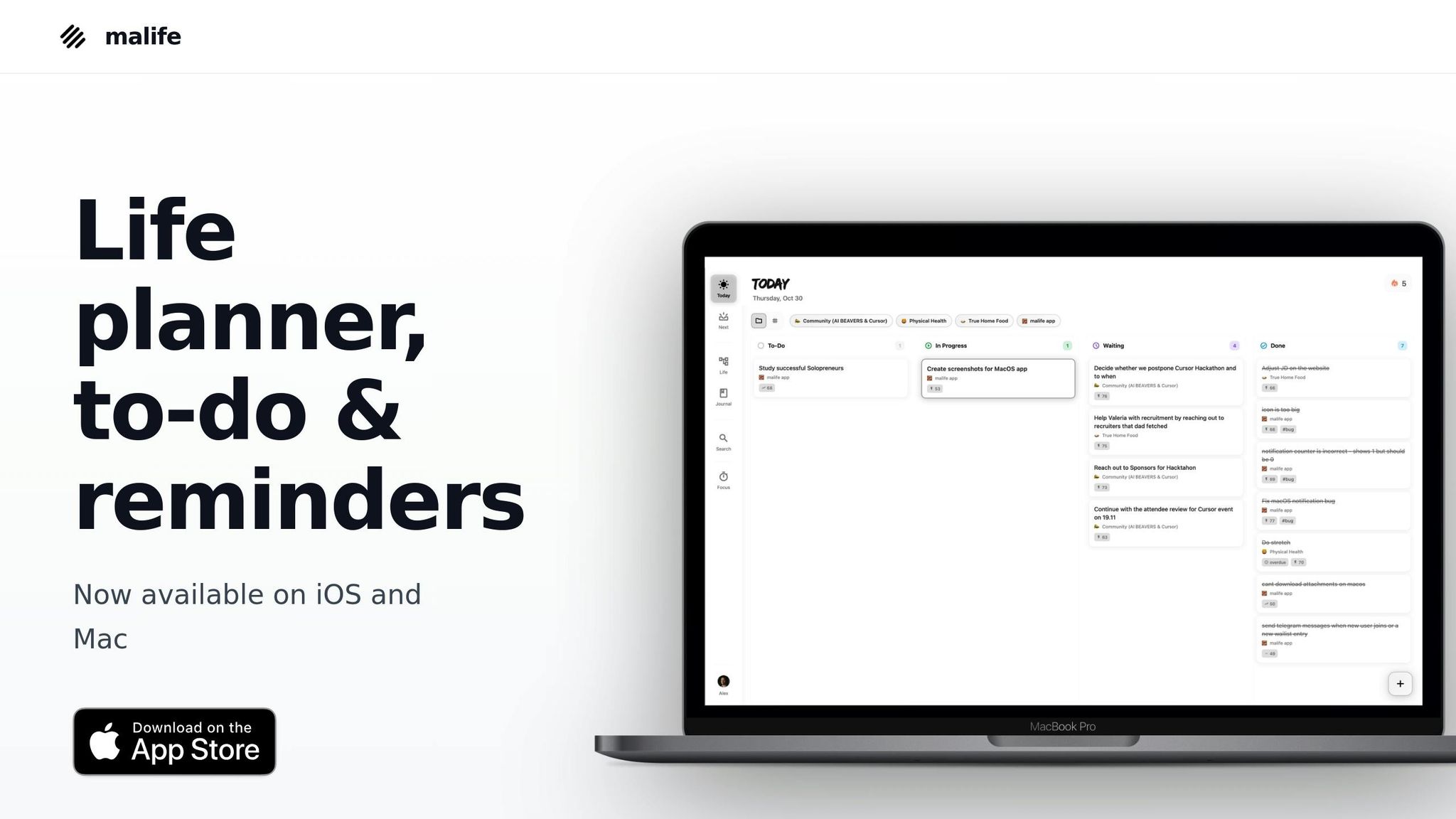
malife takes the essence of Kanban and transforms it into a streamlined digital workflow centered around three views: Today, Next, and Later. These views align with Kanban's stages - Today for active tasks, Next for upcoming priorities, and Later for future plans. This setup avoids the chaos of endless backlogs by focusing your attention on what matters most right now, while keeping future tasks organized and accessible. Let’s dive into how this structure simplifies task management and keeps your workflow crystal clear.
At the heart of malife are Life Areas - broad categories like Work, Health, Relationships, Finances, and Personal Growth. These allow you to organize tasks across all aspects of your life, not just work-related responsibilities. For remote workers juggling personal and professional duties, this integrated approach is especially useful. Within each Life Area, you can create Projects to break down specific goals or initiatives, forming a hierarchy of Life Areas → Projects → Tasks.
Using Life Areas and Projects for Workflow Stages
Start by identifying your primary Life Areas based on how you allocate your time and energy. For instance, a remote software developer might create a "Work" Life Area with nested Projects like "Q1 Client Deliverables" or "Bug Fixes Sprint." Each Project flows through malife’s Today, Next, and Later views, essentially creating its own Kanban lanes. This method ensures that urgent client work doesn’t get lumped in with personal to-dos or long-term goals - everything stays in its rightful place, making it easier to prioritize.
This structure reinforces Kanban’s focus on visual clarity. Opening a Life Area immediately shows which Projects have tasks in Today (active work), Next (short-term priorities), and Later (future planning). For example, a remote marketing manager might organize a "Campaigns" Project where Today includes "Finalize email copy by 12/15/2025", Next holds "Research Q1 trends", and Later stores "Explore new automation tools." Much like physical Kanban boards use swim lanes to separate workflows, malife’s digital hierarchy keeps everything organized while offering a unified view of your tasks. This setup makes it easy to see what needs attention and plan accordingly.
Customizing Views for Remote Work
The Today and Next views are the backbone of malife’s Kanban system, designed to keep you focused and avoid task overwhelm. Today is all about limiting work-in-progress (WIP), showing only the tasks you’ve committed to completing that day - usually just 1–3 items, based on what’s realistically achievable. Research supports this approach, showing that limiting WIP can cut down multitasking and improve task completion speed by 52%.
Next serves as a short-term backlog for tasks you plan to tackle soon, typically within the week. To make this view even more effective, malife includes an Impact/Effort priority matrix, helping you prioritize tasks that deliver the most value. For example, you might limit Next to 5–10 tasks, ranked by impact, ensuring you always know what to move into Today. Meanwhile, the Later view acts as a holding area for longer-term tasks, keeping them out of sight until you’re ready to address them.
This three-tier system significantly improves workflow visibility (by 78%) and predictability (by 42%) for remote teams. Since malife syncs in real time across devices, you can review Today during your morning planning, adjust Next during a quick break, and add tasks to Later using voice commands whenever inspiration strikes. This seamless system keeps you organized without interrupting your flow or requiring constant status updates.
Adding and Prioritizing Tasks in malife
Creating Tasks and Setting Schedules
Adding tasks in malife is designed to be quick and efficient, especially for remote work. One standout feature is voice capture, which allows you to simply speak your tasks. For example, you might say, "Draft client update email for Project Alpha" or "Review Q1 budget with marketing on Zoom", and malife will automatically populate the details. It even assigns the task to the appropriate Life Area or Project. This aligns perfectly with the GTD (Getting Things Done) principle of capturing tasks immediately and organizing them later.
For tasks with specific deadlines, use the MM/DD/YYYY format (e.g., 03/15/2026) and times in 12-hour format with AM/PM (like 2:30 PM). This keeps everything in sync with U.S. conventions and avoids confusion when collaborating across time zones. If you're working with a distributed team, it’s a good idea to include the time zone in the task note, such as "Standup at 9:00 AM PT", to ensure clarity and prevent delays.
Recurring tasks are also easy to manage in malife, making it ideal for routines like weekly standups, biweekly sprint reviews, or monthly invoicing. You can set recurrence rules to match your workflow, such as "Every weekday at 8:30 AM" for checking your Kanban board or "Every Friday at 4:00 PM" for a retrospective. This consistency helps you build reliable habits and reduces the mental effort of remembering repetitive tasks. Plus, these recurring entries seamlessly integrate into malife’s Kanban workflow.
Once your tasks are scheduled, the next important step is prioritizing them effectively.
Using the Impact/Effort Priority Matrix
After adding tasks, prioritization becomes key to maintaining a productive flow. The Impact/Effort matrix is a simple yet effective tool to help you decide what to tackle first. Each task is evaluated based on its impact and effort. For ease, use a three-level scale: low, medium, and high. For example, "High impact" tasks are those that directly contribute to a major deliverable, while "High effort" tasks require more than 2–3 hours or involve multiple steps.
The matrix divides tasks into four quadrants, which can guide your daily decisions:
- High Impact / Low Effort: These are the "quick wins", like sending a summary email after a client call or updating your Kanban board. Move these to your Today view immediately - they’re small but keep things moving forward.
- High Impact / High Effort: These tasks, such as preparing a quarterly strategy presentation or implementing a major product feature, should be broken into smaller steps. For instance, start with outlining slides or gathering metrics, and then schedule these steps in your Next or Today views.
- Low Impact / Low Effort: These are minor tasks, like tidying up outdated documents or skimming through an optional newsletter. Save these for low-energy moments and group them into a short, focused time block.
- Low Impact / High Effort: These tasks, like over-polishing a non-critical document, often aren’t worth the investment. Defer, delegate, or simplify them whenever possible.
| Impact / Effort | Low Effort | High Effort |
|---|---|---|
| High Impact | Quick wins - move to Today; e.g., send summary email, update Kanban board. | Strategic projects - break into smaller tasks and schedule; e.g., prepare quarterly strategy presentation, implement key feature. |
| Low Impact | Fill-ins - handle during low-energy periods; e.g., tidy documents, skim newsletter. | Questionable tasks - defer, delegate, or drop; e.g., redo slide theme for non-critical deck. |
To maintain focus, keep your Today view limited to 3–5 active tasks, ensuring at least one or two are high-impact items. Place any additional high-impact tasks in your Next queue, only moving them to Today once you’ve completed something. This approach ensures steady progress without overwhelming yourself. It’s especially helpful for remote workers who need to avoid multitasking traps that can drain energy and slow down productivity.
Managing Your Daily Workflow
With your Kanban board set up and tasks organized in malife, it's time to focus on managing your day-to-day workflow effectively.
Moving Tasks from Next to Today
Once your tasks are prioritized, the next step is to manage the flow between the Next and Today views. A crucial principle here is limiting your work in progress (WIP). Keeping WIP under control helps prevent overwhelm, which is especially important when working remotely.
Start your morning by reviewing your Today list and pulling 3–5 high-priority tasks from Next. If you typically complete around four tasks per day, don't plan for eight. Being realistic about what you can accomplish keeps your workflow steady and avoids unnecessary stress. In malife, simply drag tasks from Next to Today - this visual action makes the process intentional and clear.
As you move through your day, focus on finishing tasks already in Today before adding new ones. If something urgent comes up, you can use malife’s quick rescheduling options, like +10m, +1h, or +1d, to push a less critical task back to Next. This ensures you maintain your WIP limit. The idea mirrors Kanban's focus on flow: it’s not about how much you start but how much you complete. For remote workers balancing multiple areas - like client work, personal tasks, and side projects - this method helps ensure each area gets dedicated attention rather than scattered effort.
At the end of your workday, take a moment to wrap things up. Move any unfinished tasks back to Next or assign them a more realistic future date. Avoid letting overdue tasks pile up in Today - this keeps your board accurate and your planning reliable.
After organizing your tasks, consider taking a few minutes to reflect on your progress.
Using the Journal for Daily Reflections
malife’s Journal feature is a great way to close out your day while fine-tuning your system. Instead of just checking off tasks and logging out, spend five minutes reflecting on what you accomplished, what challenges you faced, and how you can improve. This daily feedback loop aligns with Kanban’s philosophy of continuous improvement and helps remote workers stay grounded, especially when there’s no team standup or casual office chats to provide perspective.
A simple daily template might include:
- Top 3 accomplishments today
- 1–2 unfinished tasks and why they slipped
- One change to make tomorrow smoother
For instance, you might jot down: "Finished client proposal and PR review. Bug fix postponed due to an unexpected Zoom call - need to block focus time in the morning." These notes help you identify patterns, like recurring interruptions or tasks that consistently take longer than planned. Over time, this insight can guide adjustments to your WIP limits, task sizes, or scheduling habits.
Don’t overlook small wins, like "cleared five admin tasks" or "shipped a feature update." Recognizing these achievements reinforces that limiting WIP allows you to finish more, not just start more. Over the weeks, your journal evolves into a personal retrospective log, showing whether your Today list is realistic and whether any areas of your life are being neglected.
You can also add quick notes about energy levels (e.g., "Energy check: 3/5 - too many meetings today") or highlight key insights. If you’re using malife’s AI-powered insights, these reflections can reveal emotional patterns or productivity trends, helping you fine-tune how you approach your days. This habit of daily reflection supports Kanban’s improvement cycle and helps you build a workflow that’s sustainable and balanced. The goal isn’t perfection - it’s about creating a system that respects your capacity and aligns your tasks with your life, not just your to-do list.
Tracking Progress and Improving Your System
Kanban is all about keeping your workflow smooth and efficient. When you're working remotely, it’s crucial to create feedback loops that help you identify bottlenecks, adjust workloads, and maintain a steady rhythm.
Monitoring Your Progress with Metrics
Keeping an eye on key metrics can give you a clear picture of how well your system is performing. Here are three metrics to focus on:
- Throughput: This tracks how many tasks you complete daily or weekly.
- Lead Time: This measures the total time a task spends in your system, from the moment it’s created to when it’s done.
- Cycle Time: This focuses on how long it takes to complete a task once you start working on it.
A study of over 1,000 Kanban users found that using these metrics can improve speed, visibility, and predictability.
In malife, you can monitor patterns using the Life Areas overview. This tool helps you spot where tasks tend to pile up versus where they flow smoothly. For example, if tasks in a particular stage are getting stuck, consider breaking them into smaller, more manageable pieces. You can also use voice capture to quickly create subtasks or apply the Impact/Effort matrix to prioritize tasks that make the biggest difference.
Compare your average throughput weekly. If you’re completing four tasks a day but scheduling eight, it’s time to adjust your Today list to avoid burnout. Similarly, tweak your Work In Progress (WIP) limit based on what you can realistically handle.
For lead time, use malife’s due dates to track when tasks start and finish. If most tasks are taking five days to complete, but you’re promising two-day turnarounds, you’re setting yourself up for missed deadlines and stress. malife’s persistent reminders (+10m, +1h, +1d) can help you reschedule tasks more realistically, making your lead time more predictable over time.
Once you’ve gathered these insights, use them to fine-tune your Kanban board.
Conducting Personal Retrospectives
Metrics are just one piece of the puzzle. Weekly retrospectives offer a chance to step back and reflect on your process. Dedicate 15–20 minutes each week to review what’s working, what’s not, and what could be improved. Open malife’s Journal alongside your Life Areas overview and ask yourself questions like:
- Which tasks moved through the system easily?
- Which ones got stuck, and why?
- Did you stick to a realistic WIP limit?
Look for patterns in your journal entries. For instance, if you’ve written “too many meetings” more than once, it might be time to block out dedicated focus time on your calendar. If high-priority tasks keep slipping through the cracks, try tackling one first thing in the morning. Check your Life Areas for any sections that might be neglected - like Health or Personal Growth - and consider adding tasks to bring balance.
malife’s AI-powered journal insights can also reveal emotional or productivity trends you might not notice on your own. Use these insights to guide your adjustments.
At the end of each retrospective, commit to one or two specific changes for the coming week. For example, you might lower your Today WIP limit from six tasks to four or start using the Focus Timer for uninterrupted work sessions. Record these experiments in your Journal so you can evaluate their impact during your next review.
Conclusion
Remote work thrives on clarity, balance, and dependable follow-through - without the need for endless meetings. Research highlights that Kanban can dramatically improve speed, visibility, and predictability, making it a powerful tool for managing tasks effectively.
malife brings Kanban principles to life with features like Life Areas, Today & Next views, the Impact/Effort matrix, and the Focus Timer. These tools help you focus on high-impact tasks within a typical 8–9 hour workday. By visualizing your workload, you can prioritize what truly matters, pull forward the most valuable tasks, and carve out time for both professional and personal priorities.
To get started tomorrow, review your Life Areas, capture tasks using voice input, assign impact and effort scores, and move 3–5 realistic tasks into your Today list. Tackle them one by one with the Focus Timer, and at the end of the day, take a moment in your Journal to reflect on what went smoothly and what didn’t. As discussed earlier, visualizing your tasks and limiting work in progress are essential for staying organized and reducing overwhelm. These small habits can help you establish a routine that adapts to your evolving workload.
Kanban’s strength lies in fostering continuous improvement, and malife supports this with tools like recurring tasks, reminders, and adjustable boards. Even simple steps - like keeping your Today list manageable and reflecting briefly at the end of the day - can help you reduce stress and gain better control over challenges like home distractions, unclear boundaries, and coordinating across time zones.
malife isn’t just about managing a to-do list - it’s designed for remote workers who want to manage their lives. By creating a calm, focused workflow, it helps make remote work sustainable for the long term.
FAQs
How does Kanban help remote teams communicate more effectively without frequent meetings?
Kanban simplifies communication for remote teams by offering a visual workflow that clearly outlines task progress, priorities, and any potential bottlenecks. This level of visibility helps team members stay on the same page and manage updates asynchronously, cutting down on the need for constant meetings.
With tools designed around Kanban principles, teams can concentrate on finishing tasks effectively while keeping track of ongoing work. This method encourages collaboration without disrupting individual workflows, making it a great fit for remote work setups.
What metrics should I track to use Kanban effectively for remote work?
To make Kanban work effectively in a remote setup, keep an eye on a few important metrics:
- Task progress: Keep track of how tasks move through different stages, such as To-Do, In Progress, Waiting, and Done. This gives you a clear picture of where everything stands.
- Task priority: Assess tasks by weighing their impact against the effort required. This helps you zero in on the work that truly matters.
- Completion rate: Monitor how many tasks are finished within a given time frame to get a sense of overall productivity.
- Cycle time: Measure the time it takes to complete a task, from start to finish. This can highlight areas where things might be slowing down.
- Focus time: Use tools like a focus timer to stay concentrated and efficient during work sessions.
By tracking these metrics, you can keep your workflow streamlined, productive, and aligned with your objectives.
How does limiting work-in-progress in Kanban improve productivity?
Limiting your work-in-progress (WIP) is a smart way to stay focused and cut down on distractions. By tackling fewer tasks at a time, you reduce the mental strain of constantly switching between duties and avoid taking on more than you can realistically handle.
This method not only helps you work more efficiently but also boosts the quality of what you produce. With fewer tasks competing for your attention, you can maintain a steady, organized workflow and make faster progress overall.