
Best Practices for Remote Teams in Different Time Zones

Best Practices for Remote Teams in Different Time Zones
Working across multiple time zones can feel overwhelming, but it doesn't have to be. Here’s the key takeaway: clear communication, structured workflows, and the right tools can transform time zone challenges into smoother collaboration.
Key Tips:
- Schedule overlapping hours: Identify 1–4 hours of shared work time for real-time discussions.
- Embrace asynchronous work: Document decisions, use video tools like Loom, and set clear task ownership.
- Rotate meeting times: Share the burden of inconvenient schedules to ensure fairness.
- Use time zone tools: Apps like World Time Buddy and Slack time zone settings simplify scheduling.
- Set communication rules: Define response times and choose the right channels for each message type.
By focusing on these strategies, teams can reduce delays, improve productivity by up to 25%, and maintain a healthy work-life balance - no matter where they’re located.
Set Up Core Overlapping Hours
When working across global time zones, creating core overlapping hours can make a huge difference in team collaboration. Start by identifying a shared window of time where work hours overlap for most team members. These "golden hours" - typically lasting one to four hours - allow for real-time meetings and urgent discussions, reducing delays. Even a two-hour overlap can be a game changer for productivity.
Map Out Your Team's Time Zones
Begin by listing each team member’s city and time zone in a shared calendar. This simple step helps everyone understand the team’s geographic spread. For instance, with team members in Dublin, Sydney, and New York City, you’ll notice that overlap is tricky. An 11:00 AM meeting in Dublin means it’s 9:00 PM in Sydney and 6:00 AM in New York - not ideal, but workable if everyone agrees to share the inconvenience fairly.
To make this process easier, use tools like World Time Buddy or Every Time Zone to visualize overlaps. These tools also let you factor in local holidays or observances that might affect availability.
Once you’ve mapped out time zones, the next step is to set clear expectations for availability.
Define Availability Expectations
Ask each team member to commit to a consistent four-hour block when they can be available for collaboration. This ensures predictability and helps streamline communication.
Document these core hours in a shared playbook. Encourage team members to update their messaging profiles with their local time zones so others can check availability before reaching out with urgent requests. Always specify the time zone when discussing deadlines or availability, such as "I’ll be available from 9:00 AM–10:00 AM EST". This small habit can prevent confusion and missed connections.
Build Asynchronous Work Habits
Waiting on someone to respond can bring progress to a standstill. Asynchronous work is all about moving forward with the resources you have, documenting everything, and seamlessly handing off projects to the next person - no real-time conversations required. This approach not only protects uninterrupted focus but also ensures projects keep moving, even when team members work in different time zones. Clear documentation helps maintain balanced collaboration, even when schedules don’t overlap.
Write Down Processes and Decisions
“If it isn’t documented, it didn’t happen”. Every process, update, and decision needs to live in a searchable repository. Take GitLab, for example. This fully remote company operates with team members spread across over 65 countries. They document everything in a public handbook that would span more than 2,000 pages if printed. This system allows anyone to find answers without waiting for someone in another time zone. To make documentation effective, include screenshots, links to related discussions, and all necessary context upfront. This eliminates the back-and-forth that can waste an entire day when time zones don’t align. In fact, 73% of Dropbox employees say clear documentation is the best way to support collaboration across time zones.
Assign a Directly Responsible Individual (DRI) for every project. A DRI has the authority to make final decisions, which keeps discussions from dragging on endlessly. Also, be specific with deadlines - use precise times like "Tuesday at 4:00 PM EST / 9:00 PM GMT" instead of vague references like "Tuesday".
Use Tools That Support Async Work
Having the right tools makes asynchronous work smoother. For instance, malife helps track tasks, set persistent reminders, and organize projects by Life Areas - no constant check-ins required. Its Today & Next view uses a kanban-style approach to keep everyone focused on immediate and upcoming tasks, while its voice capture feature allows you to add tasks naturally without breaking your workflow.
Instead of scheduling meetings, record short videos. Tools like Loom let team members watch walkthroughs at their convenience and revisit them later if needed. Standardize emoji reactions - like a checkmark for "completed" or an eyes emoji for "reviewing" - to provide quick status updates without cluttering communication threads. Additionally, share concise end-of-day summaries outlining progress, blockers, and pending questions for the next shift. This practice ensures a smooth handoff, keeping work moving seamlessly across time zones.
"Asynchronous work is a simple concept: Do as much as you can with what you have, document everything, transfer ownership of the project to the next person, then start working on something else." - Preston W., Remote Blog
Rotate Meeting Times
When your team operates across multiple time zones, someone inevitably ends up joining meetings at less-than-ideal hours. Whether it's 2:00 AM or 6:00 AM, the burden of inconvenient scheduling often falls unevenly. Rotating meeting times can help balance this out, ensuring no single person or region consistently sacrifices sleep or personal time for team calls.
Create a Meeting Rotation Schedule
Start by mapping out your team's locations and identifying overlapping work hours. From there, create a rotation schedule that shifts meeting times weekly, monthly, or quarterly to distribute the inconvenience fairly. For example, if your team spans Dublin, Sydney, and New York, one month's meeting might be at 11:00 AM Dublin time (9:00 PM in Sydney and 6:00 AM in New York). The following month, it could shift to 7:00 PM Dublin (5:00 AM in Sydney and 2:00 PM in New York).
"Rotate meeting times so all team members equally experience favorable and less convenient slots." - Owl Labs Staff
To make this work smoothly, send out agendas at least one business day in advance. For members unable to attend, encourage them to share their questions or discussion points beforehand. You might also consider assigning a "buddy" in each time zone to relay updates and feedback to those who missed the live meeting. Additionally, keep an eye on who consistently joins at odd hours - if someone is always making the sacrifice, it might be time to tweak the rotation.
Record All Meetings
Recording meetings ensures everyone stays in the loop, even if they can't attend in real time. Share these recordings promptly in a centralized location, but don’t just upload the raw video. Include a brief summary that outlines key decisions, action items, assigned responsibilities, and deadlines. This saves time for those catching up asynchronously and provides a searchable record for future reference.
For instance, Help Scout's design team, which operates across five time zones, uses tools like Loom and Soapbox to record daily walkthroughs. Team members explain concepts and share work-in-progress without needing to be there live. Occasionally, face-to-face meetings are also recorded to keep everyone connected.
This approach helps maintain alignment across the team until the next meeting rotation.
Use Time Zone Management Tools
Trying to manage time zones manually can lead to mistakes, especially when daylight saving changes or regional differences come into play. Using the right tools takes the guesswork out of the equation and ensures your team respects each other's schedules before sending urgent messages.
Add World Clocks to Your Workflow
Google Calendar's "Display secondary time zone" feature is a simple way to view your local time alongside a colleague's. For quick checks, tools like World Time Buddy make it easy to find overlapping hours before scheduling important meetings.
"A key to communicating with colleagues is knowing precisely what time it is - for everyone involved." - Katherine Kitchen, Digital Marketing Specialist, Workplaceless
For external meetings, platforms like Calendly simplify scheduling by automatically detecting participants' time zones and adjusting invitations accordingly.
Once you've chosen your tools, integrate them into your team's communication systems for better real-time awareness.
Display Team Time Zones
To complement calendar tools, update your communication platforms to show local times for each team member. This small addition can make a big difference in respecting everyone's working hours.
Encourage your team to set their time zones in tools like Slack or Microsoft Teams. Seeing a teammate's local time at a glance makes it easier to choose the right moment to message them, ensuring smoother communication.
Some teams go a step further by creating shared dashboards that list everyone's working hours and preferred contact methods. For example, Buffer developed an internal tool to track teammates' locations and local times, making it simple to see who's available. Alternatively, you can use Timezone.io to map out your team's distribution and current availability visually.
Create Clear Communication Rules
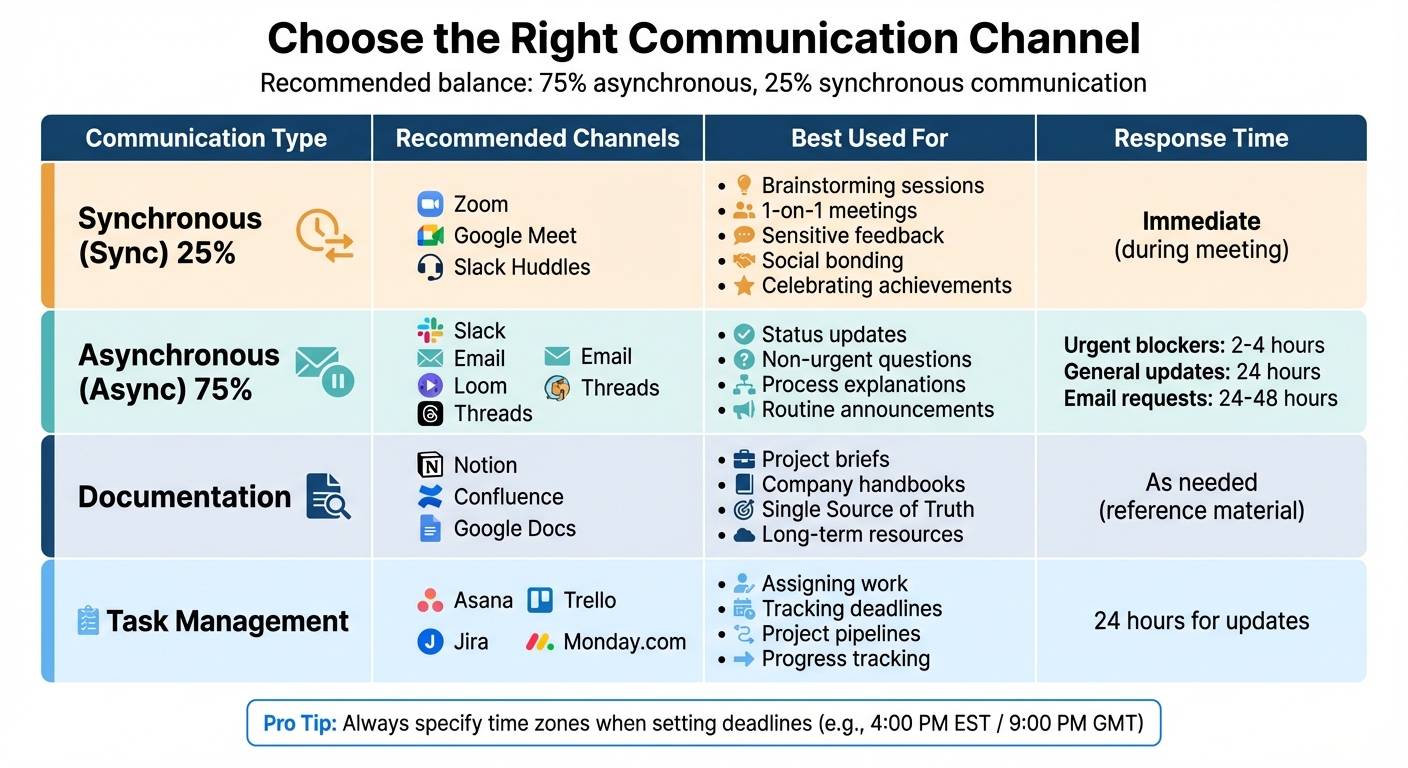
Communication Channel Guide for Remote Teams Across Time Zones
Without clear guidelines, communication in remote teams can easily go off track. Assumptions about timing and methods can lead to confusion, delays, and unnecessary stress. A documented communication playbook eliminates this guesswork, ensuring everyone stays aligned - even when working across different time zones.
Choose the Right Channel for Each Type of Message
Not all messages are created equal. Some require immediate attention, while others can wait. Remote teams should aim for a balance of about 75% asynchronous and 25% synchronous communication. Real-time tools like Zoom or Slack Huddles are ideal for complex discussions, sensitive feedback, brainstorming sessions, relationship building, or celebrating achievements. On the other hand, chat, email, or shared documents are better for routine updates, announcements, or general information sharing.
For more detailed explanations, like introducing new processes or breaking down complex ideas, skip the meeting and record a video message using tools like Loom. This saves time while ensuring clarity.
To further streamline communication, centralize task assignments and progress tracking using project management tools like Asana or Trello. This eliminates the need for constant status update meetings. Similarly, platforms like Notion or Confluence serve as excellent repositories for long-term resources, company policies, or project goals, keeping essential information accessible at all times.
In 2025, the remote team at Arc introduced a creative solution to streamline communication: a standardized set of emoji reactions in Slack. These emojis allow team members across different time zones to quickly understand task statuses, such as whether a colleague has completed a task, agrees with an idea, or needs more time.
| Communication Type | Recommended Channels | Best Used For |
|---|---|---|
| Synchronous (Sync) | Zoom, Google Meet, Slack Huddles | Brainstorming, 1-on-1s, sensitive feedback, social bonding |
| Asynchronous (Async) | Slack, Email, Loom, Threads | Status updates, non-urgent questions, process explanations |
| Documentation | Notion, Confluence, Google Docs | Project briefs, company handbooks, "Single Source of Truth" |
| Task Management | Asana, Trello, Jira, Monday.com | Assigning work, tracking deadlines, project pipelines |
Set Response Time Guidelines
Once the right communication channels are in place, it's essential to set expectations for response times. Asynchronous communication doesn’t mean responding instantly. A communication playbook should outline these expectations clearly and introduce them during onboarding so new team members understand the norms from the start.
Create tiered response times based on the urgency of the message and the channel used. For example:
- Urgent blockers sent via instant messaging might require a response within 2–4 hours during work hours.
- General updates in project management tools could wait up to 24 hours.
- Formal requests via email may take 24–48 hours.
"Include specific details in your documented guidelines, such as expected response times, preferred communication channels, and dependence on collaboration tools." – Deel Team, Global HR
When setting deadlines, always specify the time in both the sender's and recipient's local time zones to avoid confusion. Use "schedule send" features to ensure messages arrive during the recipient's working hours, respecting their personal time. Additionally, encourage public discussions in team channels rather than private messages. This fosters transparency and allows others to catch up on important context, even across time zones.
To keep projects moving smoothly, establish a "handover culture." Team members can provide end-of-day updates summarizing their progress, roadblocks, and any questions for colleagues just starting their workday in another region. This ensures continuity and minimizes delays, even when working hours don’t overlap.
Build Time Zone Awareness Into Your Culture
While tools and communication strategies make remote work easier, understanding and respecting time zone differences can take team collaboration to the next level. Time zone challenges go beyond scheduling - they involve recognizing and valuing diverse work environments. A team culture that prioritizes time zone awareness not only improves productivity but also shows genuine care for each member’s well-being.
Recognize Team Diversity
Start by introducing time zone awareness during onboarding. Highlight the team’s global presence and explain how communication flows across different regions. Encourage team members to include their local time zones in profiles so everyone understands each other’s working hours at a glance. But don’t stop there - acknowledge regional differences beyond just time. For example, maintain a shared calendar for holidays or local observances to avoid scheduling conflicts. You might also consider appointing regional leads who can offer insights into local practices and help bridge any cultural gaps.
"The travel costs for these two weeks every year spurs our team's performance for the other 50 weeks" – Donna Flynn, Director of FABRIC Research and Strategy, Steelcase
Even though virtual collaboration is the backbone of remote work, occasional in-person meetings can make a big difference. These gatherings help humanize digital interactions and strengthen relationships, creating a solid foundation for the time zone practices you’ve implemented.
Support Flexibility and Boundaries
Asynchronous workflows are great, but they need to be paired with clear boundaries. Flexibility doesn’t mean being available 24/7 - it’s about focusing on outcomes rather than constant activity. Managers can set the tone by logging off at consistent times and using tools like "do-not-disturb" modes to encourage balance. When leaders model these behaviors, it gives the team permission to do the same.
"Managing a globally dispersed team requires flexibility and trust. Autonomy aligns team goals while respecting cultural differences" – Josh Cremer, Business Owner
To help maintain this balance, consider using tools like malife. It helps team members organize their priorities, manage both professional and personal commitments, and set reminders for what truly matters. With a clear view of their responsibilities, they’re better equipped to stay productive without risking burnout over time.
Conclusion
Managing remote teams across multiple time zones doesn’t have to be complicated. By shifting away from the traditional 9-to-5 mindset and embracing an asynchronous approach, teams can move from merely getting by to truly excelling. Prioritizing outcomes over hours worked allows team members to operate during their peak productivity times while still maintaining a healthy work-life balance.
The strategies outlined above work together to create a rhythm that promotes both efficiency and respect for individual schedules. Companies that adopt the right tools and communication practices can see up to a 25% boost in global team productivity. This approach underscores the importance of valuing each team member’s time, no matter where they are in the world.
"If a team is skilled at working asynchronously, presence becomes secondary to getting work done." - The Holloway Guide to Remote Work
The "Follow the Sun" method ensures projects maintain momentum without forcing anyone into exhausting late-night calls or early morning meetings. It’s not just about working smarter - it's about creating a sustainable framework where everyone benefits.
Start small: implement two or three practices from the checklist this month. Track your progress, identify areas for improvement, and refine your workflow as needed. Tools like malife can help balance work and personal priorities, ensuring productivity without sacrificing well-being. With clear systems in place, distributed teams can collaborate seamlessly while maintaining boundaries that protect their time and energy.
FAQs
How can we schedule meetings fairly for team members in different time zones?
Scheduling meetings across time zones can be tricky, but it starts with finding overlapping work hours. Ask your team members to share their availability so you can identify time slots that work for everyone. To keep things fair, rotate meeting times periodically. This ensures no one is always stuck with inconvenient hours, like super early mornings or late nights.
You can also ease the burden by cutting back on live meetings and leaning on asynchronous tools. These allow team members to contribute at their own pace while still staying connected and productive. Open communication about availability and a flexible mindset go a long way in keeping remote teams balanced and inclusive.
What are the best tools and practices for managing asynchronous work across time zones?
Managing asynchronous work calls for a smart mix of tools and practices to keep communication and collaboration running smoothly. Tools like email, collaboration platforms, and task management apps play a key role in sharing updates, assigning tasks, and giving feedback - all without needing everyone to be online at the same time. For instance, apps like malife can help you stay on top of tasks, set reminders, and prioritize work, simplifying project management across various time zones.
To make asynchronous workflows more efficient, it’s important to set clear communication guidelines. This might include defining response time expectations and regularly sharing updates or progress reports. Practices like writing detailed end-of-day summaries or creating thorough handoffs can help keep the team on the same page, ensuring that work flows seamlessly even when schedules don’t overlap. With the right combination of tools and well-thought-out processes, remote teams can remain productive and connected, no matter where they’re working from.
How can remote teams balance work and personal life when working across time zones?
Maintaining a healthy work-life balance in remote teams spread across various time zones takes deliberate effort and good communication practices. Start by defining clear boundaries - team members should communicate their working hours and make an effort to respect each other's personal time. This approach helps prevent burnout and ensures everyone has the opportunity to rest and recharge.
Leaning on asynchronous communication tools can also make a big difference. These tools allow team members to contribute at their own pace without the pressure of responding immediately. On top of that, using shared calendars and scheduling meetings at times that work for everyone can simplify coordination and reduce unnecessary stress.
Encouraging a culture built on flexibility, understanding, and open communication allows teams to stay productive without sacrificing personal well-being. By focusing on these practices, remote teams can work together effectively while keeping a healthy balance, no matter how far apart they are geographically.