
Best Practices for Asynchronous Communication

Best Practices for Asynchronous Communication
Asynchronous communication is a game-changer for remote teams. It eliminates the need for instant responses, allowing people to work across time zones, reduce meeting fatigue, and focus on deep work. Here’s what you need to know:
- What it is: Communication without the expectation of immediate replies (e.g., emails, recorded updates).
- Why it matters: Saves time, reduces burnout, and ensures team members can work at their own pace.
- Core tools: Project management platforms (Asana, Trello), messaging apps (Slack, Microsoft Teams), and task managers like malife.
- Best practices: Set clear response windows, document decisions, respect time zones, and train teams on async workflows.
Tools for Asynchronous Communication
Successful asynchronous work depends on tools that keep conversations organized, protect focus time, and make it easy to find information later. The best platforms offer searchable archives, structured conversations, and features that respect your team's need for uninterrupted work.
Project Management Platforms
Project management tools act as the backbone for tracking work without endless meetings. Platforms like Asana, Trello, and Jira allow teams to assign tasks, monitor progress, and log updates - all without requiring live check-ins. These tools clearly outline who’s responsible for what and when it’s due, giving everyone the option to catch up on their own time instead of attending yet another status meeting.
"Assess the needs of your company in order to better choose the tools that support your larger goals." - Amira Hankin, Senior Product Designer, Stamen
While project management platforms handle task tracking, messaging tools help keep team communication organized and efficient.
Messaging and Collaboration Tools
Messaging tools that use threaded conversations help keep topics organized and prevent important details from getting lost in a flood of messages. Apps like Slack, Microsoft Teams, and Twist offer features like emoji reactions, status updates, and even delay-send options for thoughtful communication. For more visual communication, tools like Loom allow users to record and share screen videos, adding clarity when written messages aren’t enough.
To complement these communication tools, task and time management solutions ensure that asynchronous workflows stay smooth and productive.
malife for Task and Time Management
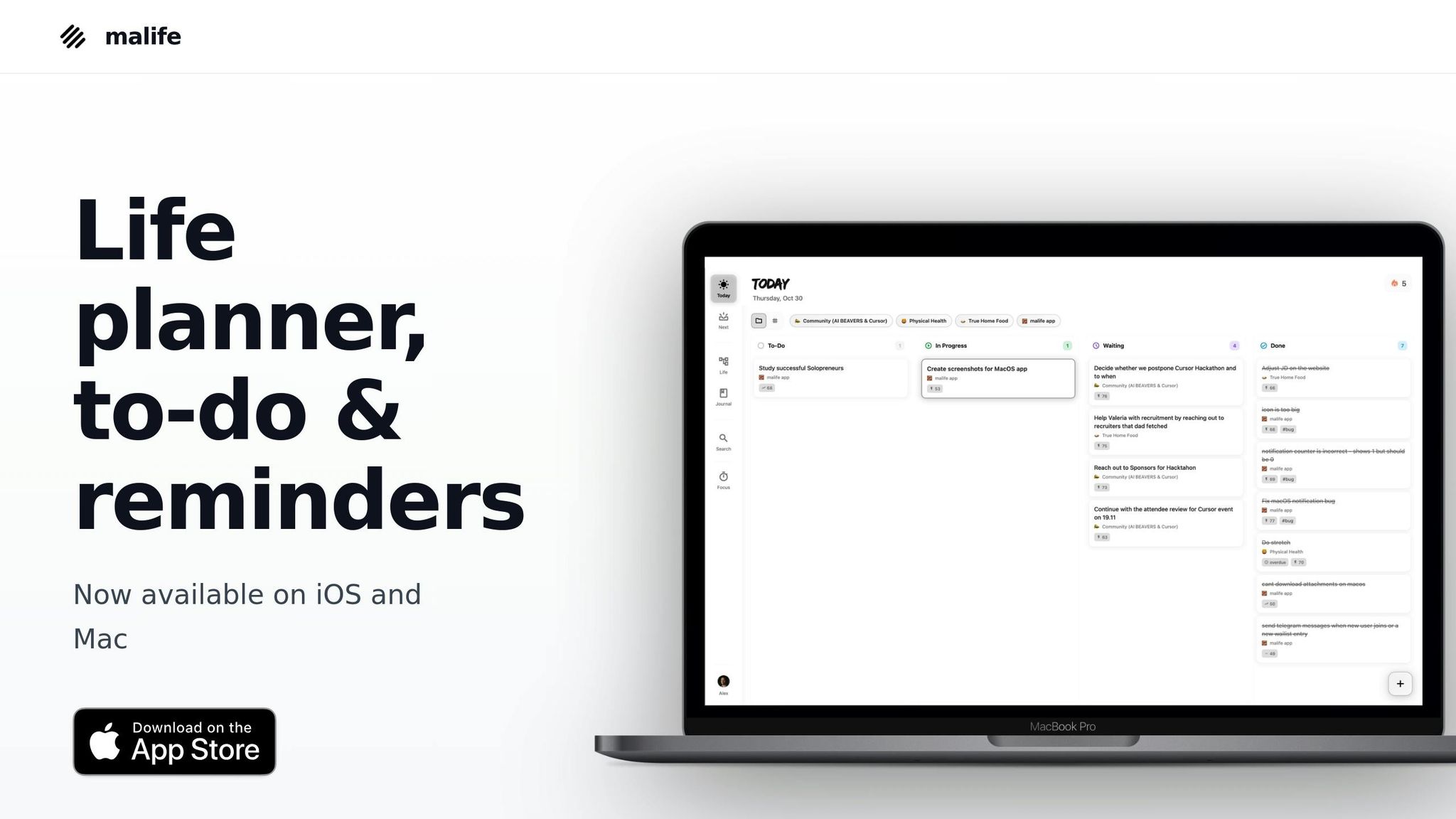
malife is designed to simplify asynchronous work by organizing tasks according to context with its Life Areas feature. This system ensures a clutter-free workspace and helps users focus on what matters. The Today/Next prioritization setup encourages a calm and manageable workflow by highlighting immediate tasks while keeping future work visible - avoiding the anxiety of an overwhelming to-do list. Its impact/effort matrix pinpoints high-value tasks that drive projects forward, which is especially important when knowledge workers spend the majority of their day communicating instead of engaging in deep work.
Other standout features include persistent reminders to ensure nothing gets overlooked, even when working across time zones, and a voice capture option for adding tasks on the fly without interrupting your flow. Inspired by David Allen's "Getting Things Done", malife uses a kanban-style approach to maintain clarity and momentum in asynchronous workflows. By combining structured task management with timely reminders, malife helps teams stay aligned and productive, no matter where or when they’re working.
Best Practices for Asynchronous Communication
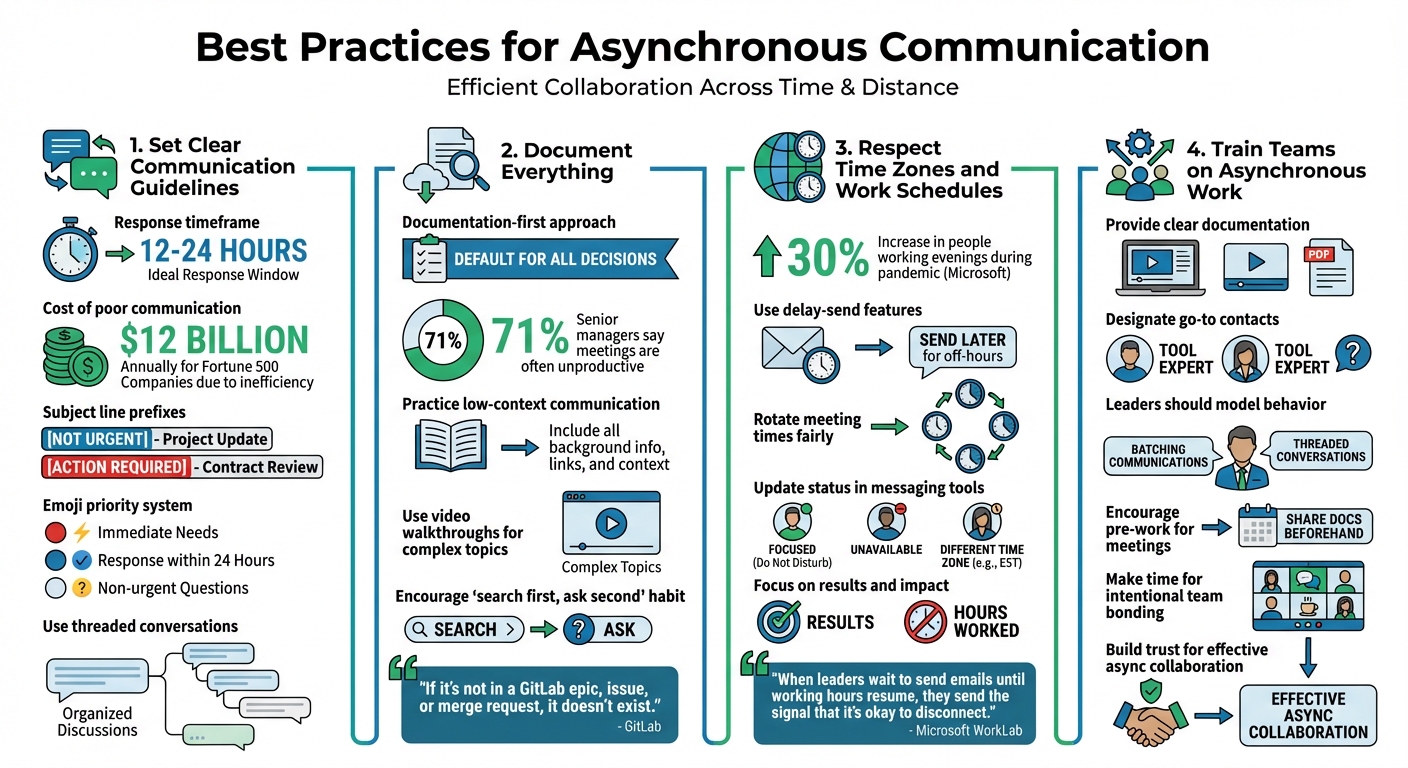
Best Practices for Implementing Asynchronous Communication in Remote Teams
Shifting to asynchronous work requires more than just new tools - it demands clear guidelines, a shift in team habits, and leadership that sets the tone for healthy boundaries. Without this foundation, async communication can quickly become overwhelming. Here are some practices to help create a productive and stress-free asynchronous workflow.
Set Clear Communication Guidelines
Effective async communication starts with setting expectations. Define response timeframes that align with your team's needs. A 12–24 hour response window is often ideal, allowing people to disconnect guilt-free while ensuring work doesn’t stall. Mismanaged communication can cost Fortune 500 companies $12 billion annually, so clarity here is key.
Use subject line prefixes like "NOT URGENT" or "ACTION REQUIRED" to indicate priority and help teammates manage their inboxes. You can also implement an emoji system to visually signal urgency:
- 🔴 for immediate needs
- 🔵 for responses needed within 24 hours
- ⚪ for non-urgent questions
This approach helps protect focus time by allowing people to batch their responses.
Additionally, establish channel-specific rules so everyone knows where to post different types of messages. For example, threaded conversations can keep discussions organized and easy to search, preventing important decisions from disappearing in a sea of chat messages.
Document Everything
Adopt a documentation-first approach where written records serve as the default for decisions, updates, and shared knowledge. If a key conversation happens in a side chat or meeting, ensure it’s documented in your project management tool, wiki, or shared drive. GitLab sums this up well:
"If it's not in a GitLab epic, issue, or merge request, it doesn't exist."
Practice low-context communication by providing all necessary background, links, and data upfront in your messages. This reduces unnecessary back-and-forth and helps everyone get the information they need without extra meetings. Considering that 71% of senior managers say meetings are often unproductive, thorough documentation can be a game-changer.
For more complex topics, supplement written documentation with video walkthroughs to explain visual or intricate processes. Encourage a "search first, ask second" habit, prompting team members to use search functions before reaching out to colleagues.
Respect Time Zones and Work Schedules
Maintaining boundaries around work hours is essential for preventing burnout. Microsoft found a 30% increase in people working evenings during the pandemic - a sign that work-life boundaries were blurring. Leaders can help by avoiding off-hours messaging and using delay-send features to ensure messages arrive during working hours.
Rotate meeting times to fairly distribute the burden of attending calls outside regular hours. Encourage team members to update their status in messaging tools to reflect when they’re focused, unavailable, or working in a different time zone.
"When leaders wait to send emails until working hours resume, they send the signal that it's okay to disconnect." - Microsoft WorkLab
Shift your team’s focus from tracking hours spent at a desk to evaluating results and impact. This mindset allows employees to structure their day around personal responsibilities while staying accountable for their work.
Train Teams on Asynchronous Work
Don’t assume everyone knows how to work asynchronously - it’s a skill that requires training. Provide clear documentation, create video tutorials, and designate go-to contacts for any tool-specific questions. Leaders should set an example by batching their communications, using threaded conversations, and openly sharing when they step away to focus.
Encourage pre-work for meetings by sharing documents and gathering feedback asynchronously before any live session. This ensures that synchronous time is used for decision-making, not information sharing. While async should be the norm, carve out time for intentional team bonding. Social connections build the trust needed for effective collaboration in an async environment.
Adding Asynchronous Communication to Daily Workflows
Shifting to asynchronous communication can help reduce interruptions and protect valuable focus time. The key is ensuring everyone knows exactly where to find the information they need without unnecessary back-and-forth.
Use Fewer Communication Channels
Juggling too many tools can create chaos. In fact, 64% of workers say their organization's collaboration tools actually make their jobs harder. The solution? Simplify and clarify.
Start by assigning specific roles to each platform. For example:
- Use instant messaging for quick questions.
- Reserve email for formal updates or documentation.
- Rely on project management tools to track tasks.
- Save video calls for discussions that require visual interaction.
Create a "how we communicate" guide for your team. This playbook should outline which tool to use for different situations, expected response times, and consistent naming conventions for files and channels.
"A multichannel communication process only works when each channel has a clear purpose." - Globalization Partners
Regularly review your tools and eliminate any that don’t add value. This is especially important given that 69% of remote workers report burnout from digital communication tools. By reducing the number of platforms, you can lighten the mental load and boost efficiency.
Once your communication tools are streamlined, pair them with a solid task management system to turn clarity into action.
Use malife for Workflow Efficiency
malife’s task management features can take your workflow to the next level. Its Today and Next views, along with a kanban-style layout, help you group tasks and avoid the constant pull of notifications.
For quick task additions, voice capture is a game-changer - especially when working across time zones. The Impact/Effort prioritization and Life Areas organization features empower team members to make decisions independently while staying aligned with shared goals.
Persistent reminders, with easy options to extend deadlines by 10 minutes, 1 hour, or 1 day, ensure commitments don’t slip through the cracks. These features support boundary-setting, a critical factor for work-life balance. Microsoft’s research found a 30% increase in employees working evenings during the pandemic, underscoring the importance of tools that help manage workloads effectively.
Measuring and Improving Asynchronous Communication
Tracking the effectiveness of asynchronous communication is essential for fostering collaboration while preventing burnout.
Track Metrics and Gather Feedback
Start by monitoring response times. For instance, setting a 24-hour reply window can replace the expectation of immediate answers. This approach reduces stress while maintaining steady communication flow.
Pay attention to meeting volume. Since the pandemic, time spent in meetings has surged by 253% as teams shifted to remote work. Keep tabs on the number and duration of meetings each week. If these metrics aren’t declining as you implement async practices, consider holding post-meeting reviews. These reviews can help determine if recent discussions could have been handled via a document or a recorded video instead.
Shift the focus to deliverables rather than time spent online. Use your project management system to evaluate performance based on completed tasks. This results-driven approach has been successful for async-first companies, which have seen high employee retention by emphasizing outcomes over availability.
Gather input from your team through surveys and retrospectives to identify pain points in your tools and workflows. A monthly pulse check can reveal whether async practices are enhancing work-life balance or introducing new hurdles. It’s worth noting that 71% of senior managers view meetings as unproductive and inefficient.
These metrics and feedback serve as a guide to fine-tune your async practices as your team adapts and grows.
Review and Update Processes Regularly
Asynchronous communication isn’t something you set and forget - it needs consistent evaluation and adjustment. Review team progress every quarter and assess tools twice a year. Update your working agreements to clearly outline which tools to use for specific scenarios and set expectations for response times.
Consider using an async maturity model to measure progress in areas like documentation, decision-making, work tracking, meetings, and leadership culture. This framework can highlight gaps, such as inconsistent documentation of key decisions, and help prioritize areas for improvement.
"The road to async maturity is a journey, not a destination. And it's one we're all on together." - Allison Matlack
Experiment with workflow changes, such as batching communication to create uninterrupted focus time. Test this method over a couple of weeks, evaluate its impact on task completion, and adjust based on what you learn.
Conclusion
Asynchronous communication marks a significant shift in how teams operate, offering the freedom to focus on meaningful work without the constant pressure of instant responses. It promotes deeper concentration and healthier work-life boundaries, as highlighted throughout this guide. For example, Doist has seen the benefits firsthand, achieving over 90% employee retention by prioritizing output over urgency.
The secret lies in being deliberate. Establish clear response expectations, document decisions in writing, and select tools that align with your workflows. Transitioning from real-time updates to written communication isn’t just about efficiency - it’s a cornerstone of effective collaboration.
Tools like malife can ease this transition, helping teams manage tasks and priorities without relying on constant real-time coordination. Features such as the Today & Next view and Impact/Effort prioritization keep the focus on what truly matters. Meanwhile, persistent reminders and voice capture streamline asynchronous workflows, reducing friction and saving time.
Start small - implement one or two practices, monitor progress, and refine your approach based on feedback.
As Darren M., Head of Remote at GitLab, aptly states:
"Remote is much better for your mental health and sanity than other settings because it forces you to work asynchronously".
Asynchronous communication doesn’t eliminate the need for real-time collaboration; rather, it makes those moments more intentional and impactful. By embracing these practices, you can create a work environment that values focus, balance, and productivity.
FAQs
What are the best ways to implement asynchronous communication in a remote team?
Asynchronous communication gives team members the flexibility to share information when it suits them, without the need for immediate replies. This approach helps ease the constant pressure of being "always available", accommodates varying time zones and work preferences, and cuts down on unnecessary meetings.
To make async communication work, start by analyzing your current habits and pinpointing which interactions actually need real-time responses. Keep decisions, tasks, and updates documented in a shared space so everyone can quickly find what they need. Leverage tools designed for async workflows - think task boards, recorded video updates, or threaded messages - and establish clear guidelines for response times.
Apps like malife can simplify asynchronous workflows with features such as the "Today & Next" view, voice-captured tasks, and prioritization tools that weigh impact against effort. These features keep tasks organized and provide clarity, enabling smooth collaboration without requiring live hand-offs. Over time, these practices can enhance team independence, reduce the drain of constant meetings, and align efforts more effectively across different time zones.
What tools are essential for effective asynchronous communication?
Effective asynchronous communication thrives on tools that allow team collaboration without requiring everyone to be online simultaneously. Start with a shared calendar or an availability tracker - this helps clarify schedules and sets clear expectations for response times. Pair this with a messaging platform where conversations can stay organized and easily revisited. For more detailed updates, consider using email or recorded videos to share information without needing live meetings.
It's also essential to incorporate a project management or documentation tool. These platforms centralize tasks, decisions, and key details, making sure everyone can access the information they need, whenever they need it. By combining these tools, you create a workflow that’s adaptable, transparent, and effective, even across different time zones.
How can my team effectively manage time zones and work schedules in an asynchronous environment?
To handle time zones and work schedules efficiently, start by establishing a clear team agreement. Define each team member's working hours, set expectations for response times (e.g., respond within 24 hours for non-urgent tasks or within 4 hours for high-priority issues), and decide whether there will be a brief overlap of core hours or if the workflow will depend entirely on asynchronous hand-offs. A shared calendar or status board can make everyone's availability visible, reducing confusion and guesswork.
Leverage tools designed for asynchronous workflows. For instance, apps like malife offer features such as Life Areas and a Today & Next view to help organize tasks, communicate availability, and highlight focus times. Use persistent reminders to stay aligned with reviews, and prioritize tasks by evaluating impact vs. effort to ensure essential work progresses smoothly. When availability and response expectations are clear to everyone, collaboration becomes more seamless, and time-zone challenges are easier to navigate.