
How Voice Commands Improve Accessibility
How Voice Commands Improve Accessibility
Voice commands are transforming how people interact with technology, especially for those with disabilities. Around 19% of working-age individuals face challenges with traditional input methods like keyboards and mice. Voice technology offers a practical solution, enabling users to navigate, create tasks, and communicate through speech alone. Here's why this matters:
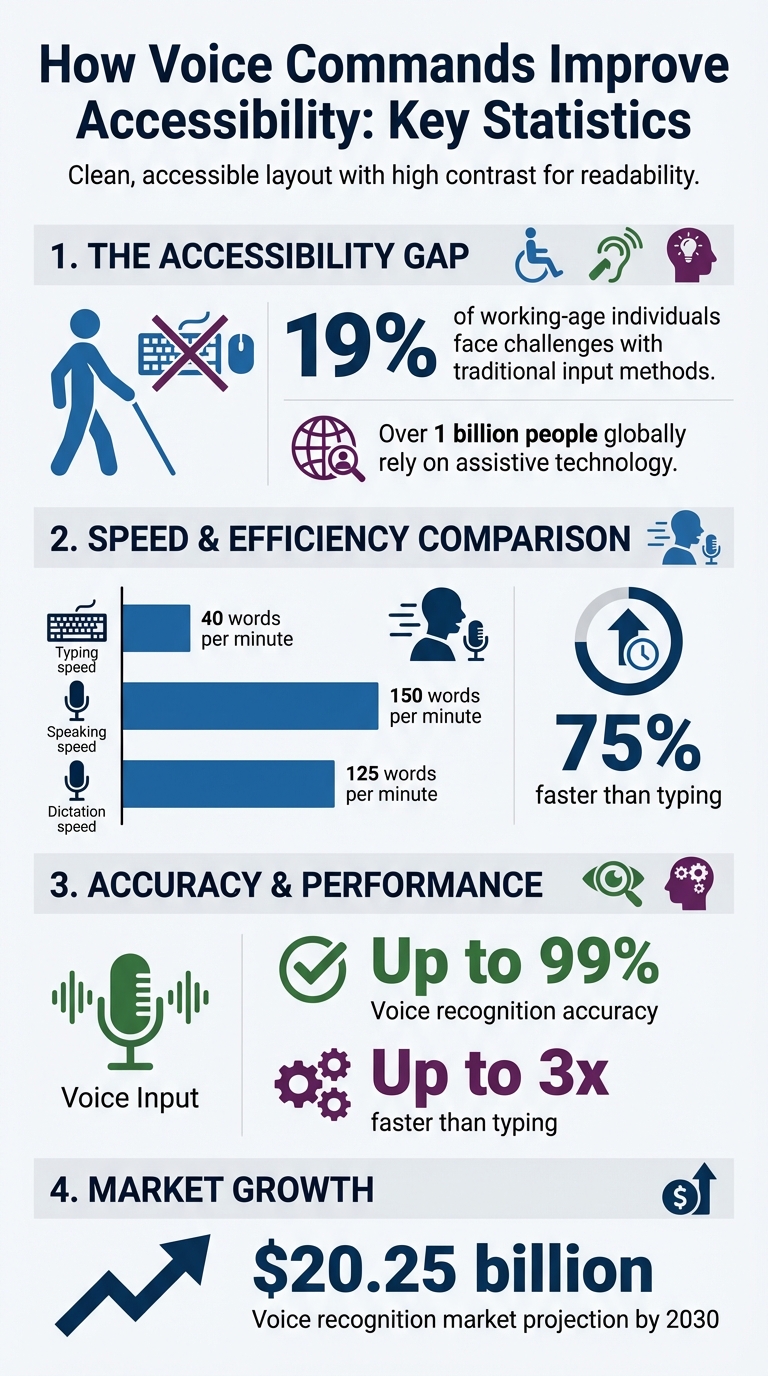
- Faster and more accurate input: Dictation can reach speeds of 125 words per minute, compared to 40 for typing, with up to 99% accuracy.
- Hands-free control: Users with mobility issues can perform tasks like opening apps or editing text without relying on physical devices.
- Enhanced usability for cognitive and visual impairments: Speech-to-text helps individuals with dyslexia write fluently, while voice overlays and audio feedback assist those with low vision.
Apps like malife demonstrate how voice commands simplify task management through natural language processing, automatic organization, and smart reminders. By removing barriers, voice technology ensures tools are accessible to everyone, while also boosting productivity for all users.
Voice Commands Accessibility Statistics and Benefits
Common Accessibility Problems in Productivity Tools
Physical Limitations
Traditional input methods can be a significant hurdle. For individuals with limited mobility, tasks like typing on physical keyboards or using touchscreens can be incredibly taxing. The repetitive motions involved in typing not only increase the risk of Repetitive Strain Injury (RSI) but also lead to physical exhaustion, especially for those dealing with upper limb disorders.
Navigation is another major obstacle. Most productivity tools rely heavily on precise mouse and keyboard interactions for tasks like selecting items, managing files, or navigating menus. These actions demand fine motor skills, which can be difficult for users with physical limitations. The disparity in efficiency is also worth noting: while the average typing speed is around 40 words per minute, dictation can achieve speeds of up to 125 words per minute. For someone facing mobility challenges, this difference can translate into lost time, reduced productivity, and mounting frustration.
But physical challenges aren’t the only barriers users face. Visual and cognitive impairments also pose significant issues.
Visual and Cognitive Challenges
Digital tools often fail to meet the needs of users with visual or cognitive impairments. For those with vision loss, everyday tasks like reading text, identifying icons, or navigating layouts can become daunting. Without auditory cues or alternative indicators, users may struggle - especially when status changes are conveyed solely through color.
Cognitive conditions such as dyslexia bring their own challenges. Spelling, sentence structuring, and reading fluency can become slow and stressful processes when relying on standard typing methods. Proofreading, for instance, can be particularly difficult, often requiring the use of text-to-speech tools to catch errors that aren’t immediately visible. Additionally, complex and cluttered interfaces can overwhelm users who have attention or memory-related difficulties, making it harder to process information and complete tasks effectively.
How Voice Commands Solve Accessibility Problems
Voice commands offer practical solutions to tackle physical, visual, and cognitive challenges, making technology more accessible for everyone. By enabling users to control tools and devices through speech alone, voice commands eliminate the need for keyboards, mice, or touchscreens. This approach is especially beneficial for individuals who face difficulties with traditional input methods due to mobility, vision, or cognitive impairments. Let’s explore how voice commands empower users with hands-free control and seamless speech-to-text functionality.
Hands-Free Input for Physical Disabilities
Voice commands eliminate the dependence on physical devices. With just their voice, users can open apps, switch between tasks, browse the internet, or adjust settings like Wi-Fi and volume. For individuals with limited mobility or repetitive strain injuries (RSI), this isn’t merely a convenience - it’s life-changing.
Today’s voice access tools go well beyond basic dictation. Features like "Show numbers" assign labels to on-screen elements, while "Spelling mode" allows for precise character input, making navigation and data entry possible without visual reliance. Numbered grids provide pinpoint cursor control, enabling actions like clicking, dragging, or zooming into specific areas. Users can even perform advanced text editing with commands such as "Insert [word] after [word]" or "Delete next 5 sentences".
Specialist voice recognition software can operate up to three times faster than typing, with near-perfect accuracy, offering a game-changing alternative for those with physical limitations.
"Voice recognition software helps prevent fatigue and injury by offering a comfortable, ergonomic alternative to the keyboard and mouse." - AbilityNet
Speech-to-Text for Visual and Cognitive Impairments
Beyond physical barriers, speech-to-text technology addresses challenges faced by users with visual or cognitive impairments. By leveraging natural language processing, these tools make writing and communication more accessible. For individuals with dyslexia, dictation reduces the burden of spelling and structuring sentences, instantly converting speech into text and easing cognitive strain.
For users with low vision, voice overlays simplify navigation. Commands like "Show numbers" or "Show labels" place visual markers over on-screen elements, enabling interaction with buttons or menus that may otherwise be difficult to see.
Audio feedback further enhances usability. Many speech-to-text systems include text-to-speech playback, allowing visually impaired users to listen to their transcribed text for accuracy, eliminating the need to rely on visual confirmation.
"For example, people with dyslexia can write more fluently, accurately and quickly using voice recognition and may find it less stressful than conventional handwriting or typing." - AbilityNet
These advancements make voice commands a powerful tool for creating a more inclusive digital experience, ensuring that productivity tools are accessible to everyone.
Voice Capture in malife for Accessible Productivity
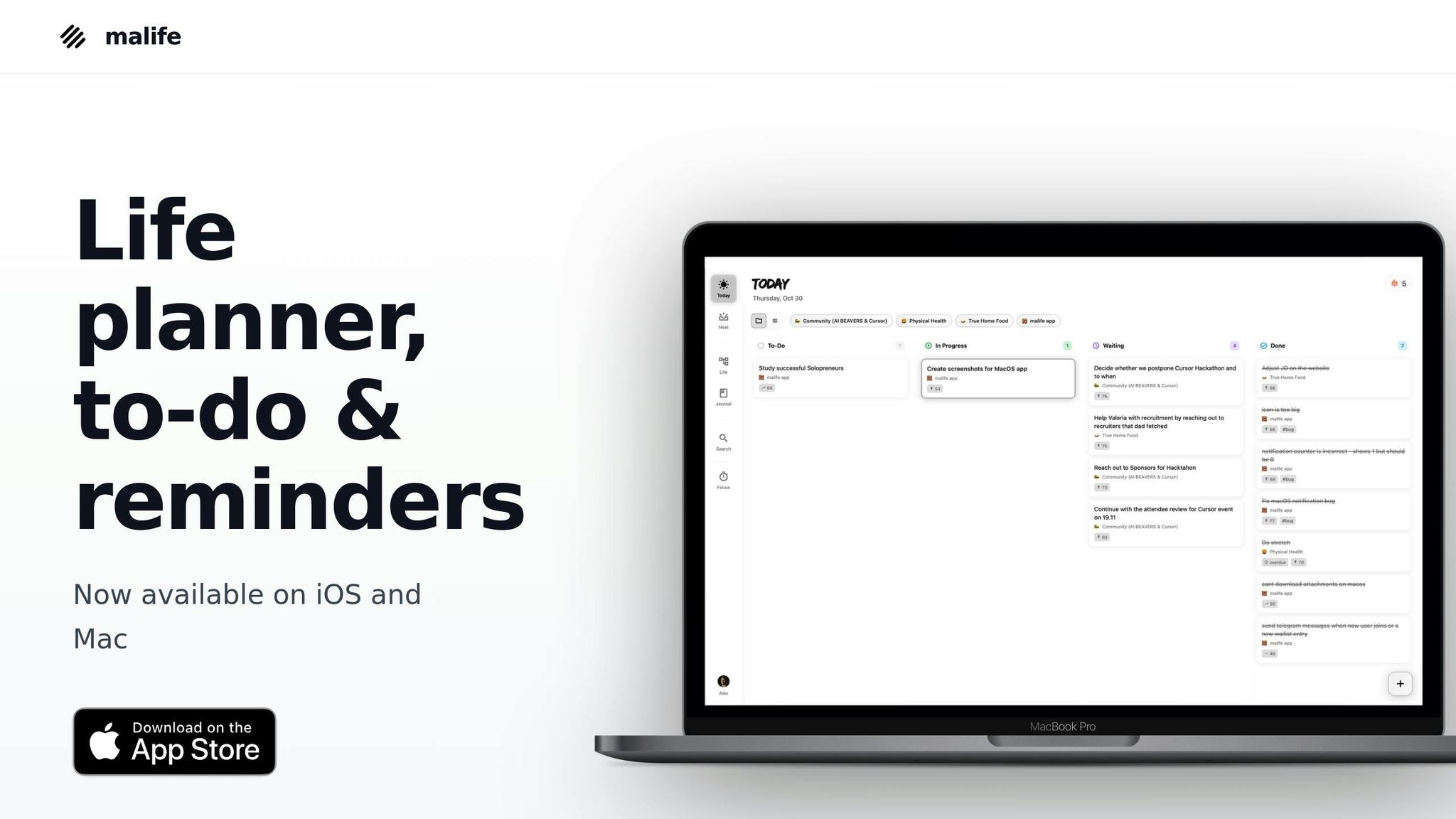
malife showcases how voice commands can redefine accessibility in productivity tools. With its voice capture feature, users can simply speak their tasks, and the app takes care of the rest - automatically filling in task details without the need for manual input. This hands-free approach is a game-changer, especially for individuals with disabilities, removing the barriers that often make traditional productivity tools frustrating or unusable.
Effortless Task Creation with Voice Input
malife doesn't just capture tasks efficiently - it organizes them seamlessly. For instance, saying, "Buy groceries tomorrow at 3:00 PM" prompts the app to extract the details, create the task, set the due date, and schedule the time - all without requiring additional steps.
This use of natural language processing lightens both cognitive and physical effort. On average, people speak at around 150 words per minute, compared to typing at just 40 words per minute. That’s a time-saving of roughly 75%. For someone dealing with chronic pain or mobility challenges, this isn’t just a convenience - it’s a lifeline for staying organized without unnecessary strain.
Clear Organization with Life Areas and Simplified Views
Once tasks are captured, malife sorts them into Life Areas - categories like Health, Work, Family, or Personal Growth. This system provides a clear overview of priorities, helping users with cognitive challenges or ADHD avoid being overwhelmed by endless lists.
The Today & Next views add further clarity, offering a streamlined kanban-style flow that focuses on what’s immediately relevant. Instead of digging through cluttered backlogs or scrolling through long lists, users see only what matters now and in the near future. For those using screen readers or voice navigation, this simplified interface reduces the number of interactions needed, making it easier to stay on track. A quick voice command can pull up today’s tasks or move items forward without hassle.
Smart Reminders and Prioritization Made Simple
malife’s voice capabilities extend to its persistent reminders, which are easy to set and adjust. Saying commands like "+10m" or "+1 hour" quickly adds or reschedules reminders. For users with memory issues or executive function challenges, these flexible and repeatable reminders provide structure without the need for constant manual adjustments.
The Impact/Effort prioritization matrix is another standout feature, helping users focus on tasks that deliver the most value. By categorizing tasks based on their impact and the effort required, malife guides users toward meaningful work. For those who struggle with decision-making or initiating tasks, this matrix simplifies the process. And with voice commands, updating priorities is as easy as speaking your thoughts. This thoughtful combination of organization and voice accessibility ensures that the 19% of working-age individuals with disabilities can manage their productivity without being hindered by physical or cognitive limitations.
Getting the Most from Voice Commands
Making the most of voice commands comes down to two things: users adopting smart practices and developers creating intuitive designs. When done right, voice commands can boost both accessibility and productivity.
Tips for Users
Start with good hardware. A quality headset or USB microphone is essential for clear voice input. Test your microphone in your system settings to ensure it captures your voice accurately. If you use a screen reader, wearing headphones can prevent the microphone from picking up the computer’s audio.
Use complete commands for better accuracy. For example, instead of saying "Meeting", try "Schedule team meeting tomorrow at 2:00 PM." Providing full context helps the system understand your intent. Most systems also pause briefly - about half a second - between commands, so give them time to process.
Customize the system to your needs. Use the "Add to vocabulary" feature to teach the system unique names or technical terms. For sensitive inputs like passwords or PINs, use the ICAO phonetic alphabet (e.g., "Alpha, Bravo, Charlie") to ensure accuracy.
"People are using voice because it makes the internet less complex and confusing." - Asif Baki and Jung E. Kim, Google
For unclear tasks or buttons, use commands like "Show numbers" or "Show grid." These commands assign temporary labels to on-screen elements, making them easier to interact with. Additionally, you can say "Stop listening" or "Mute" to temporarily disable voice recognition without closing the app.
While these strategies empower users, developers play a vital role in making voice command systems more effective and accessible.
Recommendations for Developers
Make voice features easy to find and use. Incorporate large, recognizable icons that require just one tap to activate. Include real-time transcription bars so users can see exactly what the system is hearing - this visual feedback helps them quickly spot and correct errors.
Design for context-awareness. Tailor voice commands to the active screen and offer specific modes for navigation, dictation, and spelling. This reduces accidental errors. AI models should also handle natural speech patterns, including pauses, without timing out too quickly. When giving audio feedback, keep it concise - break long messages into short, clear sentences. For secure tasks, like entering PINs, provide options such as phonetic labels or character-by-character input to minimize errors.
Prioritize local processing whenever possible. On-device speech processing enhances privacy and allows the system to function without an internet connection. For example, malife’s design demonstrates how integrated voice features can simplify task management. Interactive tutorials can also guide users in mastering essential commands. When a command could apply to multiple items, prompt users with a clarifying "Which one?" and display numbered options.
Specialized voice recognition software can achieve up to 99% accuracy and help users work up to three times faster than typing. By following these principles, developers can ensure that productivity tools remain accessible to the 19% of working-age individuals with disabilities.
Conclusion
Voice commands are reshaping accessibility for individuals with disabilities, offering transformative solutions to a global population of over 1 billion people who rely on assistive technology. These voice-driven tools provide independence in various ways - hands-free input for those with mobility challenges, speech-to-text for individuals with visual impairments, and cognitive support for those with learning disabilities.
But the impact of inclusive design extends far beyond individual empowerment. Features initially developed for accessibility, like voice capture, are now widely used to enhance productivity for everyone. They help reduce physical strain and enable multitasking in ways that benefit the broader population. As Joshua Hori, Accessibility Coordinator at UC Davis, puts it:
"The potential for AI as an accessibility tool is profound. By tailoring its capabilities to individual needs, AI can act as a personalized assistant, tutor, or even advocate".
Modern tools like malife show how thoughtfully integrated voice technology can break down barriers. The app allows users to naturally voice tasks while organizing them through intuitive features like Life Areas and Today & Next views. This design makes it easier for individuals with conditions like RSI, arthritis, or dyslexia to manage their productivity effectively. By prioritizing simplicity and accessibility, malife demonstrates how voice technology can create a seamless, inclusive environment for all users.
The economic significance of this shift is clear. The voice recognition market is expected to grow to $20.25 billion by 2030, signaling that accessibility is no longer just a consideration - it’s a core design principle. When developers focus on inclusive features and users embrace these tools, voice commands evolve from niche accommodations into essential, everyday resources that make digital interactions more efficient and equitable.
Beyond being a legal obligation - given that 19% of working-age individuals have a disability - implementing voice recognition is also a smart move for boosting workforce productivity. The future of productivity software lies in creating tools that cater to the widest audience possible, right from the start.
FAQs
How do voice commands support users with cognitive challenges?
Voice commands simplify the use of digital tools by cutting down on the mental effort needed to complete tasks. For people dealing with cognitive challenges, like memory difficulties or dyslexia, speaking naturally removes the burden of navigating complicated menus or remembering multi-step processes. This makes starting tasks easier and less stressful.
Take voice-driven reminders, for instance - they allow users to stay on track without having to recall every detail. Similarly, dictation makes text input quick and hassle-free. Apps such as malife let users add tasks just by speaking, automatically filling in the details. This provides a straightforward and stress-free way to stay organized and maintain focus.
How can voice commands make productivity tools more accessible?
Voice commands turn everyday tasks into quick, hands-free actions, streamlining how we interact with productivity tools. Imagine saying, "Add a task 'Submit project report' for tomorrow at 9:00 AM," and having it instantly recorded - no typing, no hassle. Beyond that, you can open apps, navigate programs, or scroll through content effortlessly with commands like "Open Gmail" or "Scroll down."
With malife, this convenience goes a step further. Its voice capture feature allows you to add tasks using natural speech, automatically filling in details like dates and priorities. This makes planning seamless and keeps you organized without lifting a finger. By reducing physical effort and speeding up workflows, voice commands make productivity tools more intuitive and accessible for everyone.
How can developers design voice commands to be accessible for everyone?
To make voice commands accessible to everyone, developers should prioritize simplicity and inclusivity. This means using clear, natural language for commands - keeping them short and straightforward. Additionally, providing visual and textual feedback is key. This lets users see what the system understood and gives them a chance to correct any mistakes before actions are carried out. Supporting multiple languages and dialects is equally important, allowing users to choose their preferred language in the settings.
Accessibility can go even further with fallback options like on-screen buttons or text input, which are helpful for users who can't speak or are in loud environments. Designing for error tolerance is essential too - users should be able to easily repeat, cancel, or tweak their commands. Customizable features, such as adjustable voice pitch or alternative activation phrases, can also make the experience more adaptable for users with specific needs. Testing with a diverse group, including individuals with disabilities, ensures the design truly works for everyone.
Take malife’s Voice Capture feature as an example. It allows users to add tasks naturally through voice, while also offering visual task management, persistent reminders, and keyboard shortcuts. By blending strong voice recognition with thoughtful design, malife makes sure voice commands are effective and accessible for a wide range of users.