
How to Start Activity-Based Time Tracking
How to Start Activity-Based Time Tracking
Activity-based time tracking breaks your day into specific tasks instead of just logging total hours worked. This method helps you understand where your time goes, uncover inefficiencies, and improve productivity. Here’s a quick guide to get started:
- Define Your Purpose: Are you tracking billable hours, reducing distractions, or avoiding burnout? Start with a clear goal.
- Choose a Method: Use a notebook for simplicity or digital tools for automation and detailed reports (e.g., malife app).
- Set Categories: Organize your time into 5–10 main categories like Work, Health, or Personal Growth, then list specific tasks under each.
- Log Time Immediately: Track tasks as they happen to ensure accuracy. Use tools with features like timers or voice capture for convenience.
- Review Weekly: Analyze your data, identify patterns, and adjust your schedule to focus on high-impact tasks using the Eisenhower Matrix.
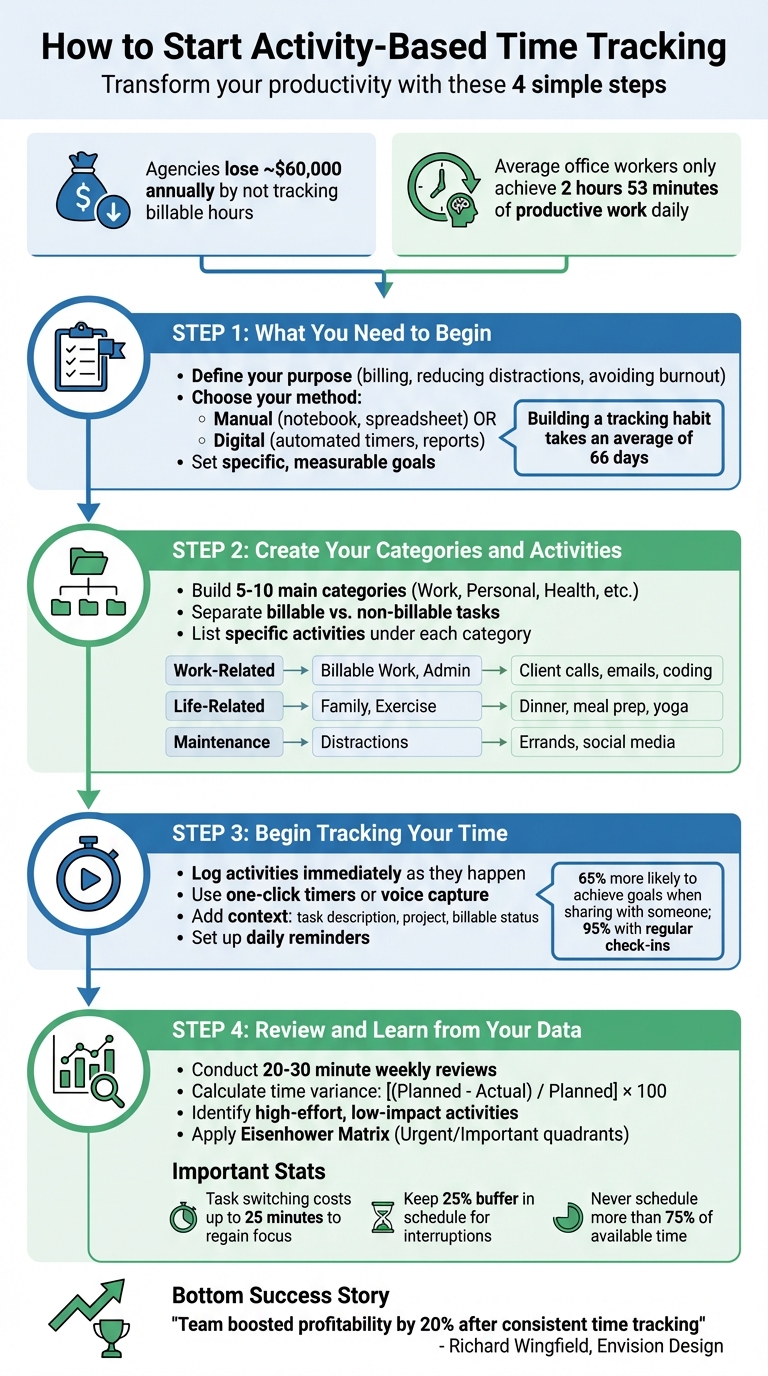
4-Step Guide to Activity-Based Time Tracking
Step 1: What You Need to Begin
Getting started with tracking doesn't require fancy gadgets or complicated software. All you really need is a pen, some paper, and your phone's stopwatch. The key isn't the tools - it's having a clear idea of what you want to accomplish. Begin by defining your purpose for tracking.
Ask yourself: Are you trying to ensure accurate billing (agencies lose around $60,000 annually by neglecting to track billable hours)? Do you want to pinpoint time lost to distractions? Or is your goal to protect your personal time and avoid burnout?
"The purpose of time tracking is not to track time in itself but to use the information as a means to an end, whether improving your quality of life or becoming more efficient at work." - Toggl
Pick Your Tracking Method: Manual or Digital
The method you choose should match your goals and preferences.
Manual methods are great if you prefer simplicity or want to avoid screens. A notebook can help you jot down activities throughout the day, and tools like Excel or Google Sheets can calculate durations with basic formulas. Keep in mind, though, manual tracking can be prone to errors, takes more time to analyze, and can be misplaced easily.
Digital tools, on the other hand, are ideal for more detailed tracking. They offer features like automated timers, syncing across devices, and detailed visual reports without the need for manual calculations. Some apps even track every minute automatically in the background, while others let you start and stop timers for specific tasks.
Looking for a middle ground? Check out malife (https://malife.app). It offers features like voice capture, where you just speak your activities, and the app fills in the details for you. The Life Areas view organizes your time into categories like work, health, relationships, and personal projects, helping you see where you're thriving and where you need to refocus. Plus, its Focus timer helps you zero in on one task at a time.
Set Your Time Tracking Goals
Start with a clear, measurable goal. Instead of something vague like "I want to be more productive", aim for something specific, such as "I want to track how much time I spend in meetings versus deep work each week" or "I need to log 40 billable hours weekly to hit my income target."
Research suggests you're 65% more likely to achieve a goal if you share it with someone else - and that number jumps to 95% if you set up regular check-ins with an accountability partner. Whether it's a colleague or a Friday self-review, having this structure can keep you on track.
Developing a tracking habit takes time - on average, about 66 days, though some people manage it in as little as 18 days. Start small. Focus on tracking just your main projects or work categories (stick to 8–10 at most) instead of trying to log every single minute. Once you've built the habit, you can always add more detail.
Step 2: Create Your Categories and Activities
Once you've chosen your tracking method and set your goals, the next step is to build a structure to organize your data. Think of categories as the broad themes where your time is spent - like Work, Personal, Exercise, or Admin. Under each category, you'll list the specific activities that make up your day, such as "answering emails" or "meal prep."
Keep it straightforward. Aim for 5–10 main categories to avoid overcomplicating things. As Annie Dillard wisely said, "How we spend our days is of course how we spend our lives". Your categories should reflect what’s most important to you - whether it’s client work, family time, or personal growth. This framework ensures every activity is accounted for and aligns with your priorities. You can also use an impact/effort matrix to ensure your categories focus on high-value tasks.
Build Your Main Categories
Start by identifying the key areas where your time goes. For work, you might want to separate billable tasks (like client projects) from non-billable ones (such as internal meetings or admin work). This distinction helps you see what directly generates income versus what supports operations.
In your personal life, categories could include Family Time, Exercise & Health, Leisure & Hobbies, Household Chores, and Personal Development. You might also create a Maintenance or Distractions category to capture "invisible" time - those small chunks of time lost to errands, social media, or browsing.
If you're using malife (https://malife.app), the Life Areas feature simplifies this process by sorting your time into predefined categories like Work, Health, Relationships, and Personal Growth. This feature also complements the Eisenhower Matrix, which organizes tasks by urgency and importance. With this setup, you can clearly see which activities deserve their own high-level category.
Once you’ve outlined your main categories, drill down to include the specific tasks that fill your day.
List Specific Activities in Each Category
After defining your main categories, break them into detailed activities. For example, under "Work", you might include tasks like "Client X Consultation", "Email Management", "Deep Work: Coding", and "Team Meetings." In "Exercise & Health", you could list "Yoga", "Meal Prep", and "Doctor's Appointments." These specific entries help you identify patterns in how you spend your time.
Use a two-tier system: categories act as the umbrella, while activities serve as detailed tags. For instance, if you’re managing a large project, divide it into phases like "Research", "Content Creation", "Design", and "Review." This breakdown makes it easier to spot bottlenecks and track where your time goes.
Consistency is key - use clear and uniform labels to avoid confusion in your tracking data. As Mercedes Soria, EVP and Chief Intelligence Officer at Knightscope, shares: "By setting priorities and creating a schedule for the week ahead, I've found that I am using my time more effectively and efficiently". A well-organized system with consistent labels ensures your time tracking works for you, not against you.
| Category Type | Main Categories | Specific Activity Examples |
|---|---|---|
| Work-Related | Billable Work, Non-Billable, Admin | Client consultations, internal training, email management, coding |
| Life-Related | Family Time, Exercise & Health | Dinner with family, meal prep, reading, cleaning |
| Maintenance/Other | Maintenance, Distractions | Running errands, social media scrolling, watching TV |
Step 3: Begin Tracking Your Time
With your categories ready and activities outlined, it’s time to take the next step: tracking your time. The key here is to log your time immediately as tasks start. Waiting too long can lead to forgotten details, which can throw off the accuracy of your records.
Log Activities as They Happen
Start tracking the moment you begin a task. Most tracking tools make this simple with one-click timers, so there’s no excuse for delays. For example, if you’re using malife (https://malife.app), the Focus timer feature helps you stay locked in on a single task while automatically recording its duration. Want something even easier? Use malife’s voice capture feature to log tasks by simply speaking - no need to pause your workflow.
For tasks you do often, mark them as favorites for quick access. This way, you can restart them with just one tap. If you’re juggling multiple tools, browser extensions can embed "Start Timer" buttons directly into apps like Jira, Asana, or Trello. Having these tools right where you work makes tracking almost effortless.
Once you stop the timer, make sure to add essential details about the task.
Write Down Important Details
Tracking isn’t just about start and stop times. Add context to your logs by including details like the task description, associated project or client, and whether the work was billable or not. If you’re using a task manager or ticketing system, include reference numbers like "Jira Ticket #123" to keep everything connected to your workflow.
In malife, there’s an option to log the impact vs. effort for each task. This can help you figure out which activities are driving results and which might be draining your energy. Tanya Kovalyova, COO at NineTwoThree AI Studio, puts it this way:
"We position [time tracking] as a supporting tool to help them track what they've done during the day. And to help us ensure they aren't overloaded."
Keep a Regular Tracking Habit
The real magic happens when tracking becomes a habit. Research shows that committing to someone else makes you 65% more likely to achieve a goal, and this jumps to 95% with regular check-ins. Use tools like malife’s reminder system to set up daily nudges to review your logs before finishing work. You can also schedule brief weekly check-ins with an accountability partner to stay on track.
Over time, tracking won’t feel like an extra task - it’ll just be part of how you work.
Step 4: Review and Learn from Your Data
Tracking your time is just the beginning. The real value comes from analyzing that data to make better decisions and improve how you manage your time.
Do a Weekly Time Review
Set aside 20–30 minutes each week - perhaps on Friday afternoon - to go over your tracked activities. Use summary reports or tools like malife's Journal feature to see where your time went. Compare the totals in each category to what you intended to accomplish during the week.
Here’s a surprising fact: Most people overestimate their productive time by more than 4 hours per day. On average, office workers only achieve about 2 hours and 53 minutes of actual productive work daily. If your logs reveal a similar pattern, it’s time to reassess your plans. Look at how the rest of your time is being spent - whether it’s on meetings, emails, switching between tasks, or even mindless scrolling.
To better understand the gap between your plans and reality, calculate your time variance using this formula:
[(Planned hours – Actual hours) / Planned hours] × 100.
If you find that you consistently underestimate how long tasks take, tweak your future plans to be more realistic. A good rule of thumb? Never schedule more than 75% of your available time. Keep a 25% buffer for the inevitable interruptions that your data will likely highlight.
Once you’ve reviewed your weekly totals and identified variances, it’s time to turn those insights into actionable changes.
Find Patterns and Change Your Habits
After your weekly review, dive deeper into the data to spot inefficiencies. Pay close attention to high-effort, low-impact activities - those tasks that consume a lot of time but don’t bring you closer to your goals. Tools like malife's impact vs. effort ratings can help you evaluate whether these tasks are worth your time.
Break your tasks into three categories: Deep Work (focused, high-impact tasks), Shallow Work (routine activities), and Distractions (unplanned interruptions). Research shows that switching between tasks can cost you up to 25 minutes to regain focus. If your logs reveal frequent task-hopping, consider batching similar activities together. For instance, limit checking your email to twice a day rather than constantly throughout the day.
Another helpful framework is the Eisenhower Matrix, which categorizes tasks into four quadrants:
- Urgent/Important: Handle immediately.
- Not Urgent/Important: Schedule for focused work.
- Urgent/Not Important: Delegate or minimize.
- Neither: Eliminate entirely.
The goal? Spend most of your time in Quadrant 2 - important but not urgent tasks that contribute to long-term success. As Clay Christensen wisely said:
"Your decisions about allocating your personal time, energy, and talent ultimately shape your life's strategy."
With these insights, adjust your schedule for the upcoming week. Block off your most productive hours (e.g., 9–11 AM) for deep work, and save low-energy times for routine tasks. By continuously tracking, reviewing, and refining, you’ll create a cycle of ongoing improvement.
Conclusion
Activity-based tracking has the power to transform how you manage your time, helping you make every moment count. This approach isn't about scrutinizing every second - it’s about understanding your patterns and working smarter. By implementing the four steps outlined earlier, you’ll gain clarity on where your time truly goes, spot inefficiencies, and gradually develop more purposeful habits.
The trick is to start small. Begin with tracking your main tasks, then expand as you get comfortable. Habit-building takes time, so allow yourself room to adjust. Simple strategies like the "Seinfeld Method" can help - mark an "X" on your calendar for each day you successfully track your time, and aim to keep the streak alive.
The benefits are tangible. Richard Wingfield, Head Geek at Envision Design, shared that his team boosted profitability by 20% after consistently tracking their time. Overlooked tasks can come at a cost, so even small improvements in tracking accuracy can significantly enhance your productivity and earnings.
Make it a habit to log tasks as they happen, review your progress weekly, and fine-tune your process. The goal isn’t to achieve perfection - it’s about making steady progress. Tools like malife's Life Areas and impact vs. effort ratings can guide you in focusing on what truly matters, turning your time-tracking insights into meaningful changes.
Stay consistent, be honest with yourself, and watch how daily tracking reshapes your approach to work and life. Use these insights to prioritize impactful tasks with a priority matrix and keep moving toward greater productivity.
FAQs
How detailed should my categories be?
When setting up categories, aim for a balance between detail and simplicity. Start with broad, top-level categories such as "Work", "Personal," or "Household." Only add subcategories if they genuinely help, like breaking "Work" into "Meetings" or "Projects." The key is to align these categories with your goals, making it easier to evaluate how you spend your time without overcomplicating the tracking process.
What if I forget to track in the moment?
If you forget to log your activity right away, no need to stress - you can update it later. Just go back and adjust your entries to reflect the correct start and end times. Taking time to review and update your logs regularly can help you stay on track and keep your data accurate. This makes time tracking based on activities easier to manage and more forgiving.
How do I turn weekly data into changes?
To make the most of your weekly data, take a closer look at your activities to uncover patterns, trends, and areas where you can improve. Break tasks into categories, evaluate how much time you’re spending on each, and pinpoint opportunities to boost efficiency or create a better balance.
Set specific, measurable goals - like cutting down on distractions or prioritizing key tasks. Introduce changes gradually, check your progress at the end of each week, and tweak your schedule as needed. This ongoing process can help sharpen your time management skills and lead to better outcomes.