
How to Use Mental Maps for Task Prioritization
How to Use Mental Maps for Task Prioritization
Mental maps simplify task prioritization by turning scattered ideas into clear, visual plans. Here’s how they work:
- What they are: Visual diagrams starting with a central idea, branching into categories and tasks.
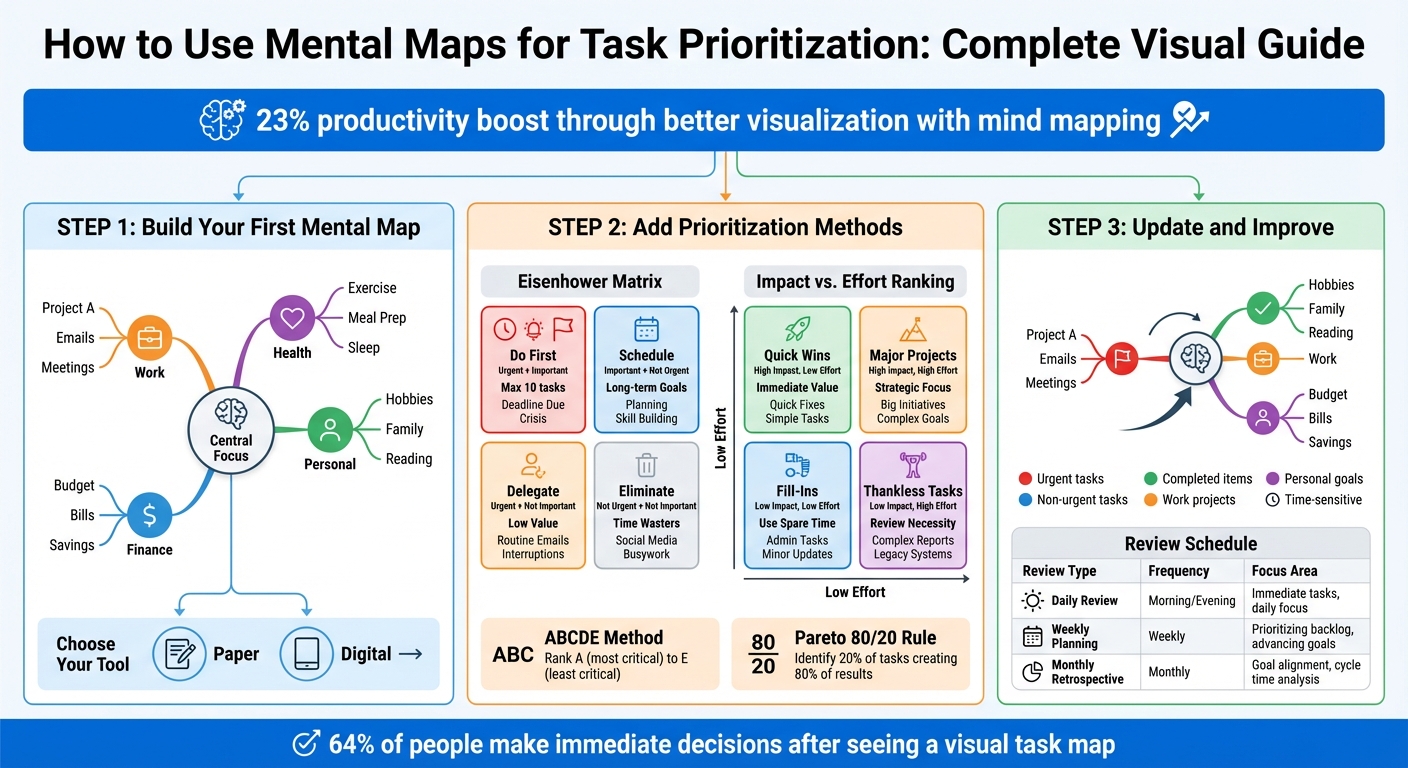
- Why they help: They improve focus, cut mental clutter, and boost productivity by 23% through better visualization.
- How to create one: Start with a central focus, add main branches for key areas (e.g., Work, Health), and break them into subtasks.
- Prioritization frameworks: Use tools like the Eisenhower Matrix or Impact vs. Effort ranking to organize tasks by importance and urgency.
- Keep it updated: Regular reviews and visual tweaks (e.g., colors, icons) ensure your map stays relevant and actionable.
Tools like malife can streamline this process with features like drag-and-drop organization, task prioritization, and progress tracking. Whether on paper or digitally, mental maps help you focus on what matters most.
Mental Map Task Prioritization: 3-Step Process with Frameworks
Step 1: Build Your First Mental Map
Making your first mental map is straightforward. Start with a clear main idea and let it branch out naturally. Here’s how to get started:
Pick Your Central Focus
The central focus is the foundation of your map - it’s where everything begins. Place it at the center of your workspace so ideas can grow in all directions instead of being squeezed into a linear structure. Use a short keyword or phrase. For example, "New Hire Onboarding" is more effective than "Complete all tasks related to onboarding new employees."
Your focus should align with what’s most important to you right now. It could be a project goal like "Website Redesign", a time-based plan such as "Weekly Schedule", or even a specific problem you’re trying to solve. If you’re unsure, jot down your tasks or priorities to uncover the central theme.
Add Main Branches and Subtasks
From your central focus, create 3–5 main branches. These branches represent major categories or areas of your life, such as Work, Health, Personal, or Finance. Keeping the number of branches small ensures your map stays easy to follow.
Each main branch can split into smaller, more specific tasks. For example, under a "Work" branch, you might include "Client Meetings", "Project Deadlines", and "Team Updates." Stick to using single words or short phrases for each item - this keeps the map clean and easy to understand. If tasks overlap across branches, use arrows or lines to show connections and dependencies. This can help you spot patterns or areas that might need extra attention.
Select Your Mental Mapping Tool
Decide whether you prefer a paper-based approach or a digital one. Tools like pen and paper or whiteboards encourage creativity and let you work without distractions. On the other hand, digital tools offer flexibility with features like drag-and-drop organization, real-time updates, and app integrations.
For example, malife (https://malife.app) is a digital tool designed to simplify task management. Its Impact vs. Effort feature and Today & Next view help you focus on what’s important while avoiding unnecessary stress.
Step 2: Add Prioritization Methods to Your Mental Map
After crafting your mental map, the next step is to incorporate prioritization frameworks. These tools help you figure out which tasks demand immediate attention and which can wait. Mind mapping, when paired with prioritization, can boost productivity by up to 23%. This step turns your visual map into a practical action plan.
Apply the Eisenhower Matrix
The Eisenhower Matrix organizes tasks into four categories based on urgency and importance. To integrate this into your map, create four main branches stemming from your central focus:
- Do First: Urgent and Important tasks
- Schedule: Important but Not Urgent tasks
- Delegate: Urgent but Not Important tasks
- Eliminate: Neither Urgent nor Important tasks
Use distinct colors for each quadrant to make them visually clear. Icons or numbered stickers can also help you quickly identify task priorities. This framework ensures you’re concentrating on what truly matters.
Keep each quadrant limited to 10 tasks. Place urgent and important tasks where they’re easy to spot. If you’re using a digital mapping tool, you can drag and drop tasks between quadrants as priorities shift, giving you flexibility that static lists lack.
Use Impact vs. Effort Ranking
The Impact vs. Effort method helps you zero in on tasks that deliver the best results with the least effort. Tasks are grouped into four categories:
- Quick Wins: High Impact, Low Effort
- Major Projects: High Impact, High Effort
- Fill-Ins: Low Impact, Low Effort
- Thankless Tasks: Low Impact, High Effort
To implement this, score each task on a 1–10 scale for both impact and effort. Focus on Quick Wins for immediate results. Major Projects should be scheduled carefully to avoid overshadowing those quick wins. Fill-Ins can be saved for downtime, while Thankless Tasks should be minimized or avoided altogether.
Tools like malife (https://malife.app) simplify this process with built-in Impact/Effort prioritization features. Instead of calculating scores manually, you can assign impact and effort levels directly to tasks, and the app handles the rest.
If needed, you can combine this method with others to fine-tune your priorities.
Try Other Prioritization Approaches
If you want even more precision, consider experimenting with additional strategies. The ABCDE method ranks tasks from A (most critical) to E (least critical). You can further organize tasks within each category by adding numbers, like A1, A2, and so on. To make this visual on your map, use labels or even emojis - add a 🚀 for high-priority tasks or a ⏳ for those that can wait.
Pareto’s 80/20 rule is another powerful tool. It helps you identify the 20% of tasks that create 80% of your results. Highlight these high-value tasks on your map with larger nodes or brighter colors to make sure they stand out and grab your attention.
Step 3: Update and Improve Your Mental Map
Keeping your mental map up-to-date is key to staying organized and focused. Without regular updates, it can become cluttered and less effective. A quick daily review and a few visual tweaks can help keep it clear and actionable.
Add Visual Elements for Better Clarity
Colors and symbols can make your mental map easier to understand at a glance. For example, use red for urgent tasks, blue for non-urgent ones, and green for completed items. This kind of color-coding helps your brain process information faster. You can also assign specific colors to different areas of your life - like orange for work projects and purple for personal goals.
Icons and symbols are another great way to simplify your map. A flag could mark high-priority tasks, while a clock icon might highlight time-sensitive items. If you're using digital tools like malife (https://malife.app), you can organize tasks by life area and use Impact/Effort markers to set visual priorities.
To keep things clean and straightforward, stick to single keywords or short phrases instead of full sentences.
Review and Adjust Regularly
Once you've optimized your map visually, the next step is to keep it relevant. This means reviewing it regularly. Check short-term tasks daily, revisit long-term goals weekly, and do a more in-depth review monthly. A quick morning check can help you zero in on urgent tasks, while an evening review is a great time to capture new ideas and mark off completed tasks. Weekly reviews let you reprioritize as needed, and digital tools make this process even easier with drag-and-drop features.
Interestingly, research shows that 64% of people make immediate decisions after seeing a visual task map. That’s a good reason to keep your map up-to-date and visually appealing.
Archive Completed Tasks and Track Progress
Tracking your progress is just as important as planning your tasks. Seeing what you’ve accomplished can be a huge motivator. Archive completed tasks to maintain context and keep your map clear. Use checkboxes or completion markers to track progress in real time.
Tools like malife simplify this process with features like the Today & Next flow, where completed tasks automatically move out of your active workspace. This keeps your focus on what’s next while still preserving a record of your achievements. The app also includes a journal feature, giving you a space to reflect on your wins and track long-term progress without cluttering your task map.
Archiving isn’t just about feeling accomplished - it’s practical, too. During monthly reviews, looking back at archived tasks can help you measure things like cycle time (how long tasks take) and throughput (how many tasks you complete in a week). Regular archiving ensures your map stays clear and effective.
| Review Type | Frequency | Focus Area |
|---|---|---|
| Daily Review | Morning/Evening | Immediate tasks, daily focus, and energy alignment |
| Weekly Planning | Weekly | Prioritizing the backlog, advancing goals, and system upkeep |
| Monthly Retrospective | Monthly | Aligning goals, analyzing cycle time, and refining structure |
Conclusion
Mental maps take the stress out of task prioritization by turning it into a clear and visual process. By creating a focused map, applying frameworks like Impact vs. Effort, and using visual cues to keep it updated, you develop a system that works with your brain instead of fighting against it. Since our brains process visuals much faster than text, a well-crafted mental map not only speeds up decision-making but also helps you remember what truly matters.
The secret lies in consistency: daily reviews keep urgent tasks front and center, weekly check-ins help you adjust priorities, and monthly retrospectives ensure your system evolves with your long-term goals. This visual clarity makes it easier to act quickly and efficiently.
Integrating these practices into your routine bridges the gap between planning and doing. Tools like malife (https://malife.app) bring these principles to life without unnecessary complexity. Features such as Impact/Effort markers help you identify Quick Wins, the Today & Next flow sharpens your focus, and Life Areas offer a big-picture perspective. Plus, the journal feature allows you to track progress over time, turning your mental map into an evolving system that grows with you.
Whether you're juggling work projects, personal goals, or both, combining mental maps with smart prioritization frameworks ensures you stay focused on what truly moves the needle. Start small, keep it simple, and let visual clarity guide your actions.
FAQs
How can mental maps help prioritize tasks and boost productivity?
Mental maps are incredibly effective for prioritizing tasks because their visual and adaptable layout mirrors the way our brains process and organize information. Instead of following a rigid, linear structure, they allow you to lay out tasks in a way that highlights key priorities, reveals connections, and makes it simple to shift focus when needed. This approach brings clarity, which speeds up decision-making and helps you finish tasks faster.
In fact, using mental maps can boost productivity by up to 23%. They help you zero in on what’s most important, cut through the feeling of being overwhelmed, and keep your workflow both organized and manageable.
What are the advantages of using digital tools like malife for mental mapping?
Digital tools take mental mapping to a whole new level, offering a level of flexibility and ease that traditional paper methods just can’t match. With these tools, you can quickly add, rearrange, or remove ideas, use color coding to organize tasks, and even attach images or notes. This creates a clean, easy-to-read visual layout that makes it simple to focus on what’s most important without getting bogged down.
Take a tool like malife, for example. By combining mental mapping with task management features - like to-do lists, reminders, and effort-versus-impact prioritization - it transforms your ideas into actionable steps. You can assign due dates, schedule repeating tasks, and get timely reminders, all in one place. This blend of visualization and productivity tools helps you stay organized and zero in on what matters most, whether it’s work, personal goals, or anything in between.
How often should I update my mental map to stay productive?
To keep your mental map working smoothly, it's important to update it regularly to match your tasks and goals. For daily tasks, take a few minutes each morning or evening to review and adjust. This lets you tweak priorities, check off completed items, and ensure your "Today" view stays relevant. For bigger projects or long-term objectives, a weekly review works best. Use this time to reassess what’s important, add any new tasks, and clear out anything that no longer fits your goals.
If you’re using malife, this process is even easier. You can quickly add new tasks with voice commands, review your "Today & Next" view every day, and use the impact/effort priority matrix during your weekly reviews. Plus, built-in reminders and prompts make sure your mental map stays current without requiring extra effort - keeping you focused on what truly matters.