
Impact vs. Effort: Prioritization Framework
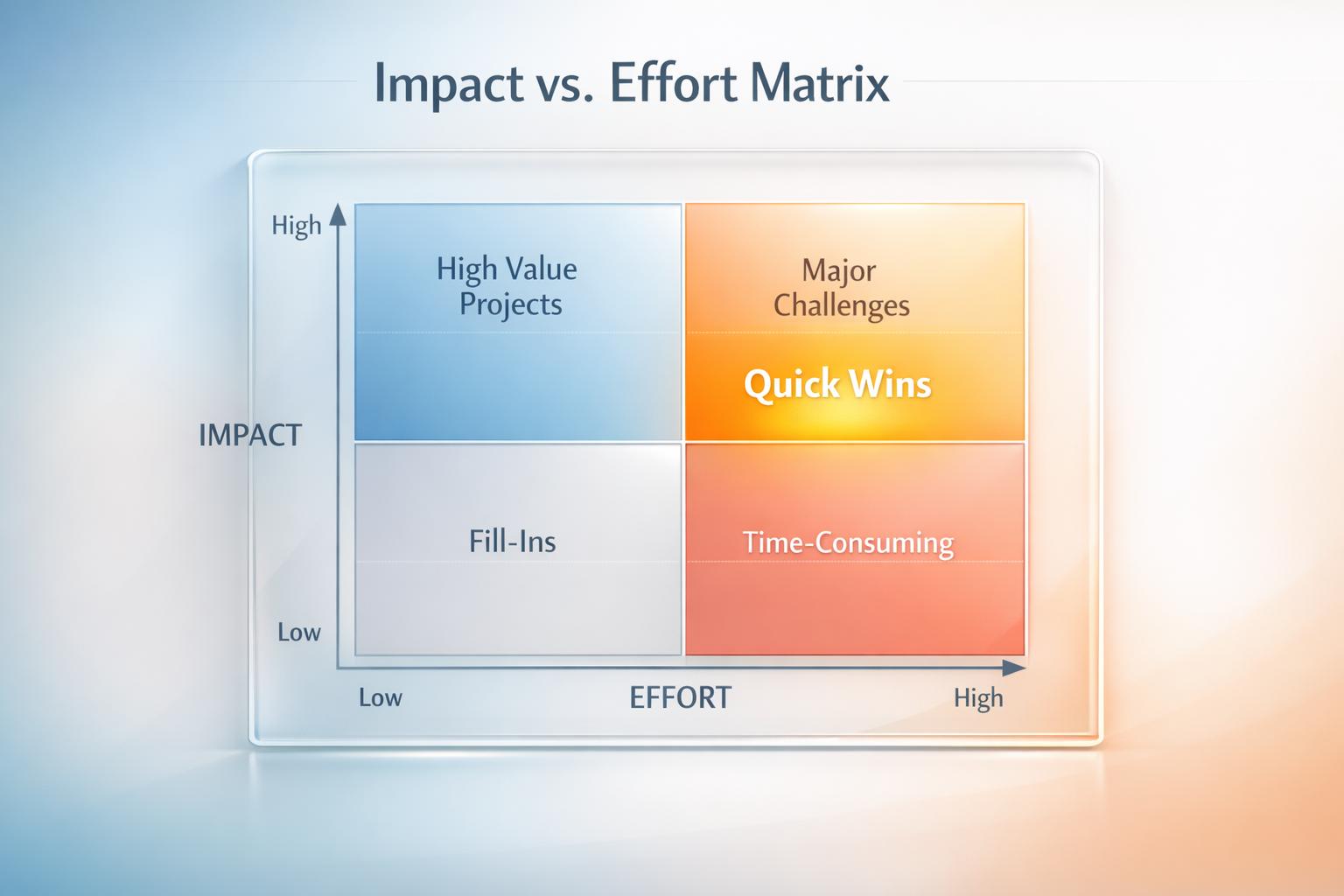
Impact vs. Effort: Prioritization Framework
Every day, you're faced with tasks that vary in importance and complexity. The Impact vs. Effort framework is a simple way to prioritize these tasks by evaluating their value (impact) against the resources they require (effort). Tasks are categorized into four quadrants:
- Quick Wins: High-impact, low-effort tasks that deliver immediate results.
- Big Bets: High-impact, high-effort tasks with long-term rewards.
- Fill-Ins: Low-impact, low-effort tasks suited for downtime.
- Money Pits: Low-impact, high-effort tasks to avoid or delegate.
Tools like malife integrate this framework into task management apps, automating prioritization with real-time updates. Alternatively, the manual approach uses sticky notes or spreadsheets but requires consistent maintenance.
Choosing between digital tools like malife and manual methods depends on your needs:
- malife offers speed, real-time collaboration, and automated updates.
- Manual methods provide flexibility but can be slower and harder to maintain.
The right approach helps you focus on tasks that matter most while avoiding wasted time.
How the Impact vs. Effort Framework Works
The impact vs. effort framework uses a simple 2x2 grid to evaluate tasks based on two key factors: Impact - the value or benefit a task provides - and Effort - the resources, time, or complexity required to complete it.
- Quick Wins: These tasks sit in the high-impact, low-effort quadrant. They deliver immediate results and help build momentum. This approach aligns with the Pareto Principle, which suggests that 80% of your outcomes often come from just 20% of your efforts.
- Big Bets: Found in the high-impact, high-effort quadrant, these tasks require significant resources but offer substantial rewards. Breaking these into smaller, manageable steps can often reveal additional Quick Wins along the way.
- Fill-Ins: These tasks need minimal effort and deliver limited impact. They’re ideal for moments when your focus is lower or during downtime.
- Money Pits (or Time Wasters): These fall into the low-impact, high-effort quadrant. They demand significant resources but yield little to no value. Whenever possible, these tasks should be eliminated, delegated, or minimized.
Next, we’ll explore how this framework, when integrated into tools like malife, compares to using a manual approach for assessing tasks.
1. malife
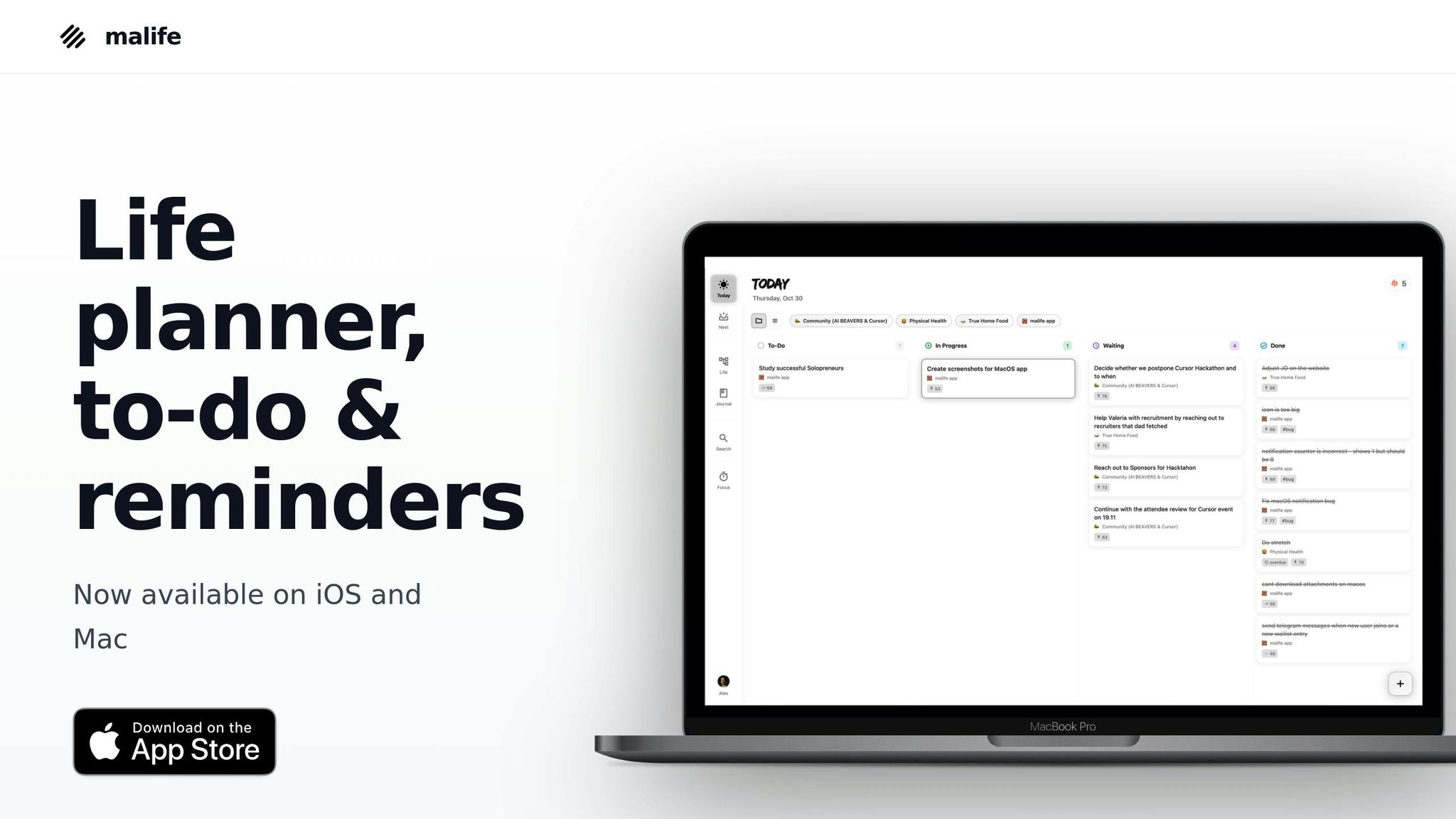
Task Prioritization
malife takes the guesswork out of task management by embedding the impact vs. effort framework right into its system. Every time you create a task - whether by typing or using voice commands - you can instantly assign it impact and effort ratings. This ensures that tasks are prioritized as soon as they’re added. Instead of staring at an overwhelming to-do list, the app organizes tasks into Life Areas, highlighting Quick Wins that deliver maximum results with minimal effort. It’s a smarter way to zero in on what truly matters.
Visualization of Impact/Effort
malife’s Today & Next view uses a kanban-style layout, inspired by David Allen's "Getting Things Done" methodology. This approach focuses your attention on what’s important right now, without the distraction of a chaotic backlog. Tasks with high impact and low effort naturally rise to the top of your Today view, making it easy to spot Quick Wins. No more endless scrolling or second-guessing - malife visually prioritizes your workflow so you can act with confidence.
Ease of Implementation
Setting up the impact vs. effort framework in malife is refreshingly simple. The scoring system is intuitive: assess each task’s value and effort, then assign ratings directly within the app. Even when adding tasks by voice, malife captures the details seamlessly, removing the need for complicated spreadsheets or manual plotting. The app integrates this framework into your daily routine effortlessly, whether you’re scheduling tasks with deadlines, setting reminders (+10m, +1h, +1d), or breaking down Projects into smaller, actionable steps within each Life Area.
malife ensures that prioritizing tasks doesn’t feel like another task itself.
Sustainability
What sets malife apart is its ability to make the impact vs. effort system sustainable over time. Recurring tasks retain their priority settings, so you’re not constantly re-evaluating the same items. The Journal feature lets you review what’s working and adjust as needed, helping you distinguish between tasks that are genuinely impactful and those that just feel urgent. To keep you on track, the Focus timer encourages you to tackle high-priority tasks without distraction. By structuring everything around Life Areas rather than a single overwhelming list, malife helps you maintain balance across all aspects of life, ensuring you consistently focus on high-impact, low-effort tasks for the long haul.
2. Manual Impact vs. Effort Approach
While malife automates this process, a manual approach provides a more hands-on, flexible alternative for prioritizing tasks and projects.
Task Prioritization
Start by defining your main goal and listing the tasks that directly contribute to it. Keep the list focused on what’s essential. Instead of assigning complicated scores, compare tasks directly: ask questions like, “Does Task A require more effort than Task B?” or “Which task will have a bigger impact?” This straightforward comparison is quicker and often more intuitive than detailed calculations. Once ranked, sort tasks into four categories: Quick Wins, Major Projects, Fill-ins, and Time Wasters. Eliminate anything that doesn’t align with your goal.
Visualization of Impact/Effort
Using a 2x2 matrix can make prioritization clearer. Draw the matrix on paper or a whiteboard, labeling one axis as Effort and the other as Impact. Write each task on a sticky note so you can easily rearrange them as your understanding evolves. The axes work as spectrums, allowing for more nuanced evaluations. A collaborative session to fill out the matrix typically takes about an hour. Include team members from various roles - those executing the tasks can estimate effort, while others closer to the customer can assess impact.
Ease of Implementation
This manual approach is straightforward but comes with some requirements: you’ll need space, time, and clear definitions for “impact” and “effort.” For example, decide if “high impact” means driving revenue or improving user retention, and if “high effort” involves projects longer than three months or requiring a specific budget. For tasks in the Major Projects quadrant, consider breaking them into smaller parts - some might even qualify as Quick Wins. However, keeping this system effective requires regular updates and clear communication among team members.
Sustainability
One of the biggest challenges with the manual system is keeping it up to date. If treated as a one-time exercise, the matrix can quickly become outdated as priorities shift. To avoid this, revisit it regularly - during weekly sprints, monthly reviews, or quarterly planning sessions. Assign someone, like a Product Manager or Team Lead, to take ownership of maintaining it. Keep the process simple and avoid adding unnecessary layers or scoring systems that slow decision-making. Unlike malife, which updates automatically, the manual method requires consistent effort to stay relevant. That said, when done right, it can be a collaborative and effective tool for aligning on priorities.
Pros and Cons
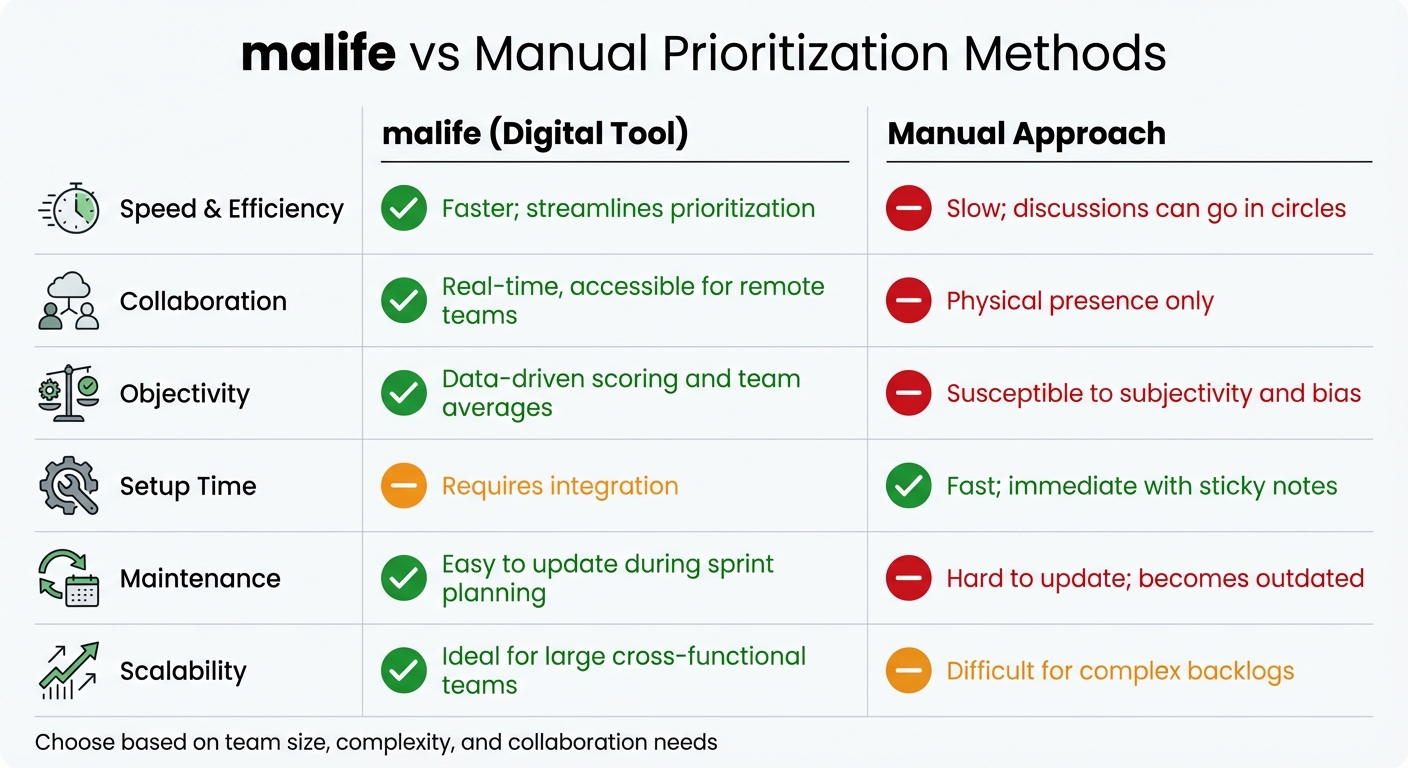
malife vs Manual Prioritization: Feature Comparison
Both malife and manual prioritization methods come with their own set of strengths and weaknesses. Here's a closer look at how they compare, helping you decide which approach aligns better with your needs.
When it comes to speed and efficiency, digital tools like malife have a clear edge. They simplify the prioritization process, enabling teams to quickly identify high-priority tasks without the hassle of manual sorting. On the other hand, manual prioritization can be a slow grind, especially for teams juggling long lists of projects or ideas. Automating these assessments can save a significant amount of time. For instance, what might take 15 minutes per item manually can be done in seconds with digital tools, potentially saving hours every week. As Shen Liu, Principal at Logickube, explains:
"Even spending 15 minutes per candidate with a manual test would be huge - hours per week, but with [digital tools] we just see the numbers immediately".
This efficiency often extends to how teams collaborate on their priorities.
Collaboration and accessibility are another area where these approaches diverge. Manual methods often require team members to be physically present or rely on static files, which can limit participation. In contrast, malife supports real-time collaboration, making it easier for cross-functional teams - such as Product, Engineering, and Sales - to work together and stay aligned. Carlos Gonzalez de Villaumbrosia, Founder & CEO of Product School, highlights this benefit:
"The more accessible and engaging the matrix, the more likely teams are to use it. Digital tools... allow teams to collaborate on the matrix in real time, making it easier to update and share".
However, manual systems do have their advantages, especially when it comes to setup speed and flexibility. With sticky notes and a whiteboard, you can get started right away. Digital tools, on the other hand, often require time for integration and training. Manual methods also allow for completely customized frameworks without the constraints of software. That said, this flexibility comes with a downside: manual approaches are prone to subjectivity and bias. Meanwhile, malife relies on data-driven scoring and team averages, making decisions more objective.
| Criteria | malife | Manual Approach |
|---|---|---|
| Speed | Faster; streamlines prioritization | Slow; discussions can go in circles |
| Collaboration | Real-time, accessible for remote teams | Physical presence only |
| Objectivity | Data-driven scoring and team averages | Susceptible to subjectivity and bias |
| Setup Time | Requires integration | Fast; immediate with sticky notes |
| Maintenance | Easy to update during sprint planning | Hard to update; becomes outdated |
| Scalability | Ideal for large cross-functional teams | Difficult for complex backlogs |
One major drawback of manual systems is their lack of long-term sustainability. Without regular updates, priorities can quickly become outdated as circumstances change. malife, on the other hand, integrates seamlessly with workflows like sprint planning and quarterly reviews, ensuring the prioritization matrix stays current. This makes digital tools particularly valuable in fast-paced, evolving work environments.
Conclusion
Manual methods work well for straightforward and quick tasks, especially when you need an immediate solution. For personal planning or small-scale projects, keeping it simple can often get the job done.
However, as tasks become more complex, digital tools take the lead. Platforms like malife use AI to automatically generate tasks and offer effort-versus-impact suggestions based on data. This removes much of the guesswork that comes with manual planning. Many professionals rely on these digital insights to prioritize effectively and avoid confusion.
Digital systems also excel at centralizing and updating priorities in real-time, reducing bias and planning errors. The key difference lies in precision and long-term reliability. Manual planning often falls victim to the "Planning Fallacy", where people underestimate how long tasks will take - regardless of experience. malife addresses this by consolidating all task and project information, minimizing the mental load of switching contexts, and integrating seamlessly with workflows using a kanban-style "today-next-later" view.
An integrated system like malife brings everything together for ongoing clarity. Features such as the Life Areas framework provide structure that manual methods struggle to sustain over time. The platform’s Impact/Effort prioritization helps pinpoint high-value tasks, while persistent reminders and voice capture ensure nothing falls through the cracks. Whether you’re managing recurring tasks, one-off projects, or long-term goals, having everything centralized is far more efficient than juggling scattered notes and plans.
Regular reviews are still crucial as priorities shift over time. As Dwight D. Eisenhower wisely said:
"What is important is seldom urgent, and what is urgent is seldom important".
The right tool simply makes it easier to act on that wisdom.
FAQs
How do I use the Impact vs. Effort framework to prioritize tasks effectively?
The Impact vs. Effort framework is a simple yet effective way to prioritize tasks by focusing on those that bring the most benefit with the least amount of work. Here’s how it works:
Start by listing all your tasks. For each one, give it a score for impact (how much value it offers) and effort (how much time or resources it requires) using a straightforward scale, like 1 to 5. Once scored, group your tasks into these four categories:
- Easy wins: These are the high-impact, low-effort tasks. They should be your top priority since they deliver great results with minimal effort.
- Major projects: These involve high impact but also require significant effort. Plan and schedule these tasks carefully to avoid feeling overwhelmed.
- Fill-ins: Tasks with low impact and low effort. These are ideal for filling spare time but shouldn’t take precedence over more important work.
- Avoid: Low-impact, high-effort tasks. Skip or delay these whenever possible, as they drain resources without offering much in return.
If you’re using malife, the process becomes even easier. You can assign impact and effort scores directly to your tasks and have them automatically sorted by priority. Plus, it’s a good idea to review and update these ratings regularly to ensure you’re always working on what truly matters.
What makes a digital tool like malife effective for prioritizing tasks?
A digital tool like malife makes prioritizing tasks easier by embedding the impact-vs-effort framework directly into its workflow. This means you can quickly spot those high-impact, low-effort tasks - your "quick wins" - and focus your energy where it matters most. As you add or update tasks, the prioritization view automatically adjusts in real time, saving you from the hassle of manual tracking and cutting down on decision fatigue.
But malife doesn’t stop at prioritization. It brings all your tasks, deadlines, and reminders together in one place. You can set due dates, schedule recurring alerts, and even add tasks on the go, so you’re always on top of what needs to be done. These features turn task management into a smooth, data-driven process, helping you stay clear-headed, balanced, and productive.
How can I create a task prioritization system that works long-term?
To create a prioritization system that stands the test of time, start with the Impact vs. Effort matrix. This tool helps you evaluate tasks by dividing them into four categories:
- Quick wins: High impact, low effort
- Major projects: High impact, high effort
- Fill-ins: Low impact, low effort
- Thankless tasks: Low impact, high effort
This straightforward method ensures you concentrate on what truly matters while avoiding unnecessary decision-making fatigue.
Keep your system running smoothly by scheduling a weekly review. Use this time to update the status of tasks, adjust priorities, and eliminate or postpone tasks that fall into the low-impact, high-effort category. To maintain a sense of balance, consider a life-area view - this helps you distribute your attention across personal, professional, and other important areas. Simple tools like reminders or voice notes can keep you organized without breaking your flow.
Lastly, incorporate the matrix into a Kanban-style workflow with three clear stages: Today → Next → Later. Focus only on what you can realistically tackle today, while keeping future tasks in "Next" until you're ready to dive in. This setup minimizes over-committing and ensures your system stays straightforward and effective over time.