
How to Combine GTD and Time Blocking
How to Combine GTD and Time Blocking
Feeling overwhelmed by endless to-do lists and constant interruptions? Combining GTD (Getting Things Done) with time blocking can help you stay organized and focused. GTD helps you organize tasks into actionable lists, while time blocking schedules specific times to complete them. Together, they ensure you know what to do and when to do it.
Key Takeaways:
- GTD: Organize tasks into clear, actionable steps using stages like capture, clarify, and reflect.
- Time Blocking: Reserve dedicated time slots for focused work, minimizing distractions.
- Benefits: Reduces mental clutter, improves focus, and helps manage time effectively.
How It Works:
- Capture tasks in an inbox (e.g., app or notebook).
- Clarify and organize tasks by context or priority.
- Block Time for specific task categories (e.g., deep work, admin).
- Work on tasks during scheduled blocks.
- Review daily and weekly to stay on track.
This approach ensures tasks are clear, priorities are set, and your time is protected for meaningful work.
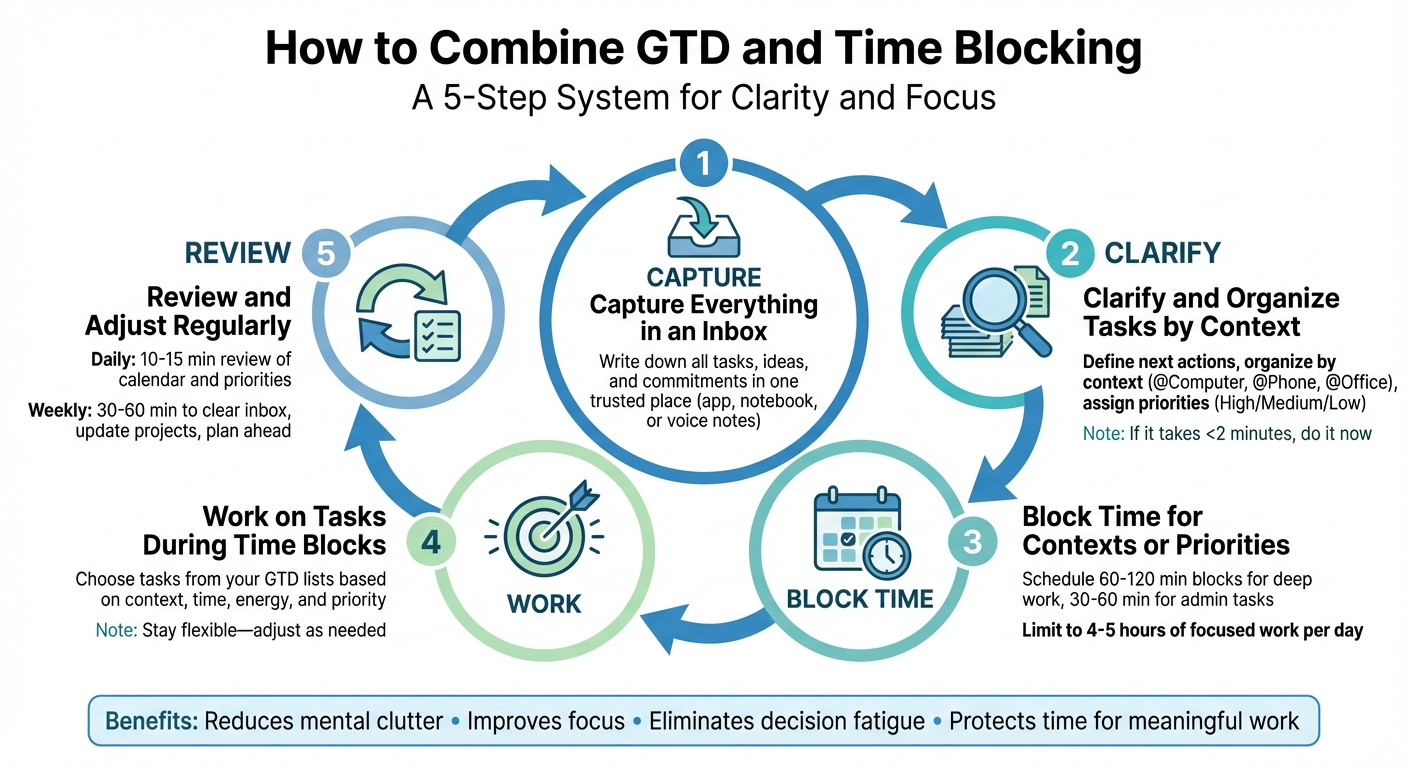
5-Step Process to Combine GTD and Time Blocking for Productivity
Understanding GTD and Time Blocking
To combine these two productivity methods effectively, it's essential to understand their individual roles: GTD helps you figure out what needs to be done, while time blocking ensures you know when to do it. Each addresses a different challenge, which is why they complement each other so well. Here's a closer look at both.
GTD Overview: Capture, Clarify, Organize, Reflect, and Engage
GTD, short for "Getting Things Done", is a workflow system developed by David Allen. Its central idea is simple yet powerful: your brain is for generating ideas, not storing them. By moving tasks and thoughts into an external system, you free up mental space to focus on the work itself.
The system revolves around five key stages:
- Capture: Write down everything demanding your attention - tasks, ideas, commitments - in a single "inbox", whether that's a notebook or an app.
- Clarify: Decide if each item is actionable. If it is, define the next specific step (e.g., turn "Prepare report" into "Draft Q2 sales outline").
- Organize: Sort actionable items into lists based on context (e.g., @phone, @computer, @home), project, or priority. Non-actionable items go into reference files or a "someday/maybe" list.
- Reflect: Regularly review your lists - daily to stay on top of tasks and weekly to clear your inbox, revisit projects, and update priorities.
- Engage: Choose what to work on based on your context, available time, energy levels, and priorities, rather than reacting to what feels most urgent.
A crucial rule in GTD is to reserve your calendar for time-specific or day-specific commitments like meetings, deadlines, or appointments. This keeps your calendar reliable and prevents it from becoming an overwhelming to-do list.
Time Blocking Basics: Scheduling Time for Specific Tasks
While GTD helps you define and organize tasks, time blocking ensures those tasks actually get done by scheduling them into your calendar. Time blocking involves assigning specific time slots to specific tasks. For instance, you might block 9:00–10:30 a.m. for "Product research", 1:30–3:00 p.m. for "Deep work", and 3:30–4:00 p.m. for "Email and admin."
Unlike traditional to-do lists, which often leave you scrambling to decide what to tackle next, time blocking proactively protects time for your priorities and minimizes context switching. Research from the University of California shows that after an interruption, it can take over 23 minutes on average to refocus on the original task. This is why dedicated focus blocks are so effective.
Most productivity experts suggest limiting yourself to 4–5 hours of deep, focused work per day, leaving the rest of the time for meetings, administrative tasks, and short breaks.
Benefits of Combining GTD and Time Blocking
Bringing together the principles of Getting Things Done (GTD) and time blocking creates a powerful approach to managing your tasks and schedule. GTD helps you capture and organize your tasks into actionable lists, while time blocking ensures those tasks are assigned specific time slots on your calendar. This combination not only simplifies your workflow but also helps you stay focused and manage your time more effectively.
Better Clarity and Focus
When it's time for a "Deep Work" block, you don’t waste energy figuring out what to do next - you already have a clear list of next actions from your GTD system. This approach boosts your focus and reduces the time lost to jumping between tasks. Instead of staring at an overwhelming to-do list, you simply pull up the relevant GTD context list for that time block. Grouping similar tasks together within dedicated blocks also minimizes context switching, so you’re not constantly shifting between emails, writing, meetings, and analysis. Studies show that knowledge workers can lose up to 40% of their productivity due to interruptions and task switching.
Less Overwhelm and Improved Time Management
With GTD, every task is captured and clarified, so you’re not stuck mentally revisiting what each task requires. This reduces mental clutter and frees up your brain for actual work. Time blocking complements this by limiting the number of tasks you plan to tackle in a day. You make your planning decisions during a review session, then simply follow your schedule - cutting down on decision fatigue and helping you stay on track.
How to Combine GTD and Time Blocking
To merge the "Getting Things Done" (GTD) method with time blocking, follow these five steps: capture, clarify, block, work, and review. Each step builds on the last, creating a streamlined system for managing tasks and time effectively.
Step 1: Capture Everything in an Inbox
Start by capturing every task, idea, or commitment in a single trusted inbox. This could be a physical notebook, an app, or even voice notes - whatever works best for you. The key here is to jot things down as soon as they come to mind. Don’t worry about organizing or prioritizing yet; just focus on collecting everything. Think of your inbox as a temporary holding area, not your to-do list. This simple habit helps reduce mental clutter and keeps you from constantly trying to remember things.
For instance, in malife, you can use voice commands like, "Call tax advisor tomorrow for money life area, high priority", and the app will automatically assign the task, set a date, and organize it for you. Alternatively, use keyboard shortcuts (like ⌘+N) to quickly add tasks. Everything lands in a clear, centralized spot - either a "Later" view or a general inbox - ready for the next step.
Step 2: Clarify and Organize Tasks by Context
Once you’ve captured everything, it’s time to clarify. Go through your inbox and decide what each item means. If it’s not actionable, either delete it, save it as a reference, or move it to a "Someday/Maybe" list. For actionable items, decide on the next step. Be specific - write "Draft outline for Q2 report" instead of something vague like "Work on report." If a task takes less than two minutes, handle it right away.
Next, organize actionable tasks. Assign them to projects if they’re part of a larger goal and group them by context, such as @Computer, @Office, @Phone, or @Errands. Adding simple priority markers (like High, Medium, or Low) can also help you identify what’s most important when planning your day.
With malife, tasks are automatically sorted into Life Areas, making it easier to plan your time. You can also use its Kanban board for a visual flow of your daily tasks or Miller columns for a structured view of projects and priorities.
Step 3: Block Time for Contexts or Priorities
Instead of scheduling individual tasks on your calendar, block out chunks of time for specific types of work. For example, reserve a block labeled "Deep Work – Writing" rather than listing "Draft Q2 report" on your calendar. This approach aligns with GTD’s idea that calendars should only include time-specific commitments, while still allowing for structured planning.
Choose block durations based on your focus capacity. Deep work often requires 60–120 minutes, while administrative tasks might only need 30–60 minutes. Be sure to include 5–15 minute breaks between blocks to reset. Schedule your most demanding tasks during your peak energy times, like mid-morning, and save lighter tasks for when your energy naturally dips, such as after lunch.
It’s also important to leave room for meetings, breaks, and unexpected tasks. Aim to block about 4–5 hours of focused work each day, leaving the rest of your time for reactive tasks or interruptions. In malife, you can create custom recurring tasks with set times, ensuring you stay consistent without constantly rescheduling.
Step 4: Work on Tasks During Time Blocks
When it’s time to work, refer to your GTD lists to pick the best task for the block you’re in. For instance, during a "Deep Work – Computer" block, focus solely on tasks tagged @Computer. Let context, available time, energy, and priority guide your choices.
Be flexible and adjust as needed. If something urgent arises, shift tasks within the block to accommodate it. Tools like malife’s Kanban board make this easier - you can drag tasks between "To-Do", "In Progress", "Waiting", and "Done" columns. The app also offers reminders with quick snooze options, so you can defer tasks without losing track, aligning with GTD’s "Engage" principle.
Step 5: Review and Adjust Regularly
To keep this system running smoothly, commit to regular reviews. Spend 10–15 minutes each day reviewing your calendar and time blocks for the next day. Reschedule any unfinished tasks, clear small items from your inbox, and confirm your top priorities.
Once a week, take 30–60 minutes for a more thorough review. This involves clearing all inboxes, updating project lists, and evaluating each area of responsibility. Use this time to adjust the upcoming week’s time blocks, ensuring your most important projects get the deep focus they need. Reflect on what worked and what didn’t - adjust block lengths, timing, and frequency as necessary. This weekly habit keeps your GTD lists and calendar in sync, helping you trust the system and stay on track.
Common Mistakes to Avoid
Even with the best intentions, combining GTD and time blocking can go off track if you're not careful. Two frequent missteps are overloading your calendar and neglecting regular reviews. By recognizing these pitfalls, you can adjust your approach and keep your productivity system running smoothly.
Overbooking Your Calendar
Packing every hour of your day with time blocks might seem productive, but it often leads to burnout and frustration. When your schedule is too rigid, you lose the flexibility that GTD thrives on - choosing tasks based on context, time, energy, and priority. Instead of a practical plan, your calendar becomes an overwhelming to-do list. Experts suggest limiting deep work to 4–5 hours a day within an 8-hour workday. The remaining time should be reserved for meetings, emails, administrative tasks, and unexpected interruptions.
How can you tell if your calendar is overbooked? Look for these red flags: frequently rescheduling or canceling blocks, ending your day with unfinished tasks, feeling rushed without breaks, or consistently working through lunch or late into the evening. A good rule of thumb: if you're rescheduling more than 25–30% of your time blocks, it's time to reassess. To prevent this, aim to cap focused work at 4–5 hours daily, create broader blocks like "Deep work – writing" instead of overly specific tasks, and build in buffers - such as 15-minute breaks between blocks and 30–60 minutes for unplanned work. These strategies help align your task lists with your calendar, making the GTD and time blocking combo more effective. Tools like malife can also simplify this process by letting you assign tasks to "Today" or "Next" and block time only for high-priority items, keeping less urgent tasks on your list.
Skipping Regular Reviews
Regular reviews are the backbone of GTD, and skipping them can derail your entire system. Without consistent reviews, your lists, priorities, and calendar can quickly become outdated, making it harder to trust your system. In GTD, the Reflect step - especially the weekly review - is key to ensuring your projects, next actions, and waiting-for items stay current. When you combine GTD with time blocking, skipping reviews can leave you with outdated time blocks that no longer align with your commitments, leading to missed deadlines or double-booking. Once trust in your system fades, it's easy to fall back on unreliable methods like relying on memory or email.
To keep things on track, schedule a daily 5–15 minute review and a weekly 30–60 minute session. Daily reviews should include checking your calendar and time blocks, scanning your Today/Next lists to match tasks with your available time and energy, adjusting for new meetings or urgent tasks, and capturing any loose ideas from the day. Treat this as a fixed appointment - either at the start or end of your workday - to make it a consistent habit. Weekly reviews, on the other hand, are essential for clearing and organizing inboxes, reviewing projects to ensure each has a clear next action, updating waiting-for and someday/maybe lists, and planning deep work for the next one to two weeks before your calendar fills up. Apps like malife can help by setting recurring tasks for these reviews and sending persistent reminders so you never miss them.
Using malife to Streamline GTD and Time Blocking
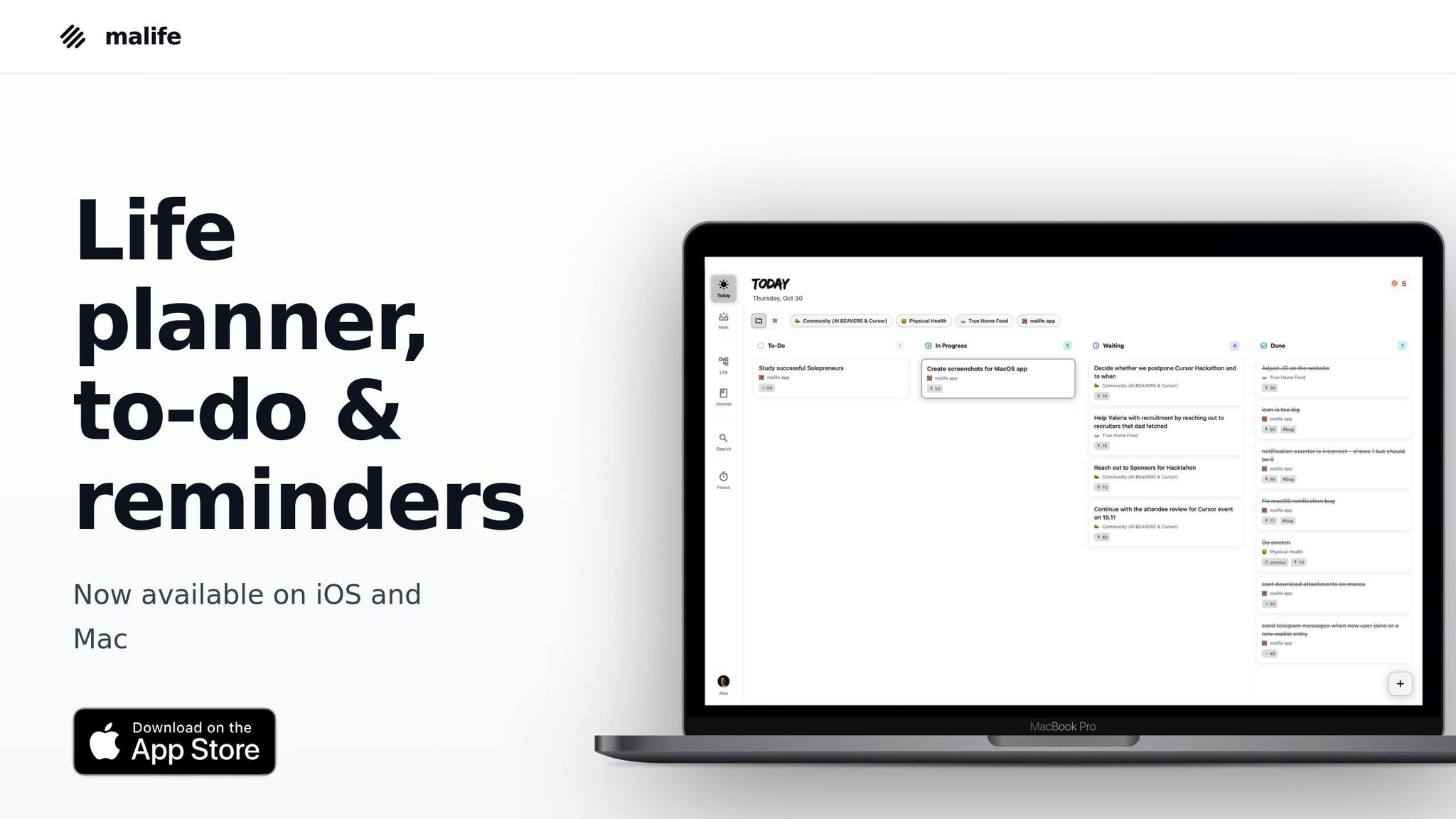
If you've followed the steps so far, you've already got a solid foundation for merging GTD (Getting Things Done) and time blocking. The tricky part? Finding a tool that seamlessly handles both approaches without forcing you to juggle multiple apps for tasks, calendars, and timers. That’s where malife steps in. Built with GTD in mind, it uses a Today–Next–Later kanban system to bring task organization and time blocking together in one place.
Let’s take a closer look at how malife simplifies task capture, organization, and execution through its unique features.
Capture and Clarify with Today & Next
The first step in GTD is capturing everything - every idea, task, or commitment - into an inbox, then clarifying what each item means and deciding on the next action. malife’s Today & Next feature acts as your digital inbox and next-actions list, all in one spot. You can quickly add tasks - whether it’s an email follow-up, an errand, or a random idea - by typing or even using voice commands. For example, you could say, “Call tax advisor tomorrow for money, high priority,” and malife will automatically assign a due date, categorize the task, and prioritize it.
During your daily review (a quick 10–15 minutes, perhaps at 8:30 a.m.), you’ll go through the Next list. If a task takes less than two minutes, you can handle it right away. Otherwise, you’ll define a clear next action and decide whether to leave it in Next or move it to Today if it needs attention during your scheduled time blocks. Tasks can be assigned due dates and times in familiar U.S. formats like “today 4:00 p.m.” or “Fri 3/20,” ensuring they appear on the right day. This setup mirrors GTD’s approach of separating time-specific tasks (calendar items) from non-time-specific ones (lists), while still allowing for light scheduling.
malife’s system makes it easy to capture, clarify, and prioritize tasks so you can focus on what matters most.
Organize Tasks with Life Areas and Impact/Effort Prioritization
GTD emphasizes sorting tasks by context, project, or priority to minimize decision fatigue. malife helps you do this effortlessly with Life Areas like Work, Health, and Family. Within each Life Area, you can manage projects and tasks - for instance, tracking a Q2 Sales Report under Work or planning a Summer Trip under Family. When mapping out your week, you can block calendar time for categories like "Work – Deep Focus", "Home – Admin", or "Health – Exercise", staying true to GTD’s advice to block types of activities, not individual tasks.
When it’s time for a "Work – Deep Focus" block, say from 9:00–11:00 a.m., you simply open the Work Life Area. Here’s where malife’s Impact/Effort prioritization comes into play: instead of locking in a rigid task beforehand, you select the highest-impact task that fits your energy and time. For example, during a 90-minute morning session - often the most productive window for many knowledge workers - you’d focus on tasks marked as high impact and ensure the effort matches the available time. This method ensures that your deep-work blocks, typically around 10–15 hours in a standard 40-hour U.S. workweek, are spent on meaningful, results-driven work rather than reactive tasks.
Stay on Track with Persistent Reminders and Focus Timer
Time blocking works best when you protect your blocks from interruptions and stay focused on a single type of task. malife’s persistent reminders help reinforce GTD’s concept of the “hard landscape” by attaching reminders to truly time-sensitive tasks. For example, “Join 2:00 p.m. client call” or “Pick up prescription by 6:00 p.m.” Quick snooze options like +10 minutes, +1 hour, or +1 day make it easy to adjust for real-life changes while keeping your commitments visible at the right time - especially in fast-paced U.S. work environments filled with meetings.
When you’re ready to dive into a task, start malife’s focus timer - say, for a 50-minute deep work session. During this period, you commit to staying within the same Life Area and context. For instance, you might move from “draft outline” to “revise proposal” within the Work/Deep Focus category but avoid jumping to unrelated tasks. This approach maintains GTD’s flexibility while steering clear of distractions. Many users find that working in 25–50 minute intervals with short breaks (5–10 minutes) keeps them productive. malife’s timer helps ensure your time blocks translate into real, focused work, rather than slipping into distractions like email or social media.
Conclusion
Blending the "capture and organize" method of GTD with the structured focus of time blocking offers a powerful way to bring clarity and order to your day. Instead of being forced to pick between the flexibility of lists or the discipline of schedules, this approach allows you to capture everything on your plate, sort tasks by context, and assign realistic time slots to prevent overloading your calendar.
Consistency is the secret to making this system work over the long haul. Regular daily and weekly reviews ensure your system stays relevant, avoiding the clutter of outdated tasks or mismatched time blocks. David Allen’s GTD emphasizes flexibility by considering context, energy, and time, while time blocking safeguards deep work by reserving specific blocks for activities like “writing projects” or “admin tasks.” This way, GTD’s natural task selection fits neatly within the structure of scheduled blocks.
To make this approach even easier, a dedicated tool can bring these two systems together. For instance, malife integrates GTD and time blocking with features like Today & Next for task capture, Life Areas for organization, Impact/Effort prioritization for identifying high-value tasks, persistent reminders for scheduling, and a focus timer to keep you on track - all in one place, eliminating the need to juggle multiple tools.
With an integrated system like this, you can reduce stress, maintain balance between work and personal life, and make meaningful progress on your top priorities. Whether you’re navigating a packed work schedule, family responsibilities, or personal ambitions, this combined strategy equips you to handle it all with confidence.
FAQs
How can I effectively combine GTD and time blocking in my daily schedule?
To begin, gather all your tasks and responsibilities in malife. You can either use voice input to add them naturally or enter them manually. Once captured, organize these tasks into Life Areas and rank them using the impact vs. effort method to identify what needs your attention first.
Then, take advantage of malife’s Kanban-style view to categorize tasks into Today, Next, or Later, staying true to GTD principles of focusing on actionable steps and relevant contexts. For high-priority tasks, set aside dedicated time blocks and depend on persistent reminders to keep you on track throughout the day.
By blending GTD’s clear organization with the structured focus of time blocking, you’ll establish a productive routine that helps you stay in control of what truly matters.
What challenges should I watch out for when using GTD with time blocking?
When blending GTD with time blocking, some challenges often arise. One major issue is packing your schedule too tightly, which can leave no breathing room for unexpected events or adjustments. This lack of flexibility can make it easy to feel swamped or miss important deadlines.
Another common mistake is not prioritizing tasks properly. Without clear priorities, you might end up spending time on less impactful activities, which can drain your energy and reduce productivity. To sidestep these hurdles, build some buffer time into your schedule for unforeseen changes and concentrate on tasks that genuinely move the needle.
How does time blocking help you stay focused and avoid distractions?
Time blocking is a powerful way to stay on track by dedicating specific time slots to individual tasks. This method provides a clear roadmap for your day, helping you stick to your priorities. With a well-defined schedule, distractions become easier to avoid, and you’re better equipped to say no to interruptions. Knowing exactly what to focus on and when allows you to channel your energy effectively and get more done without feeling overwhelmed.