
How to Set Time Boundaries for Work and Rest

How to Set Time Boundaries for Work and Rest
Feeling overwhelmed by work creeping into your personal life? Setting clear time boundaries between work and rest can help you reclaim your energy, reduce stress, and improve productivity.
Key Takeaways:
- Track your time: Log daily activities to identify patterns and triggers for overworking.
- Create a schedule: Use time blocking to set work hours, breaks, and personal activities.
- Communicate boundaries: Let coworkers and family know your availability.
- Use tools: Apps like malife can help enforce limits with reminders and task organization.
- Prioritize rest: Schedule meaningful downtime to recharge and avoid burnout.
By defining when work stops and rest begins, you can regain control over your time and improve both your personal and professional life.
Define Your Time Boundaries
The first step to reclaiming your time is understanding how you currently use it. This involves taking an honest look at your daily habits, deciding what your ideal schedule should look like, and sharing those limits with the people around you. The goal isn’t to create a rigid routine but to establish a structure that protects your energy and keeps you in control. By analyzing your habits, you can identify where boundaries are being crossed and take steps to restore balance.
Review Your Current Time Habits
Start by tracking your activities in 30-minute increments for an entire week. Write down when you begin and end work, check emails, take breaks, and do personal activities like eating, exercising, or spending time with loved ones. Pay attention to how you feel during each block - are you energized, focused, drained, or distracted? After a week, patterns will begin to emerge. You might notice, for example, that you frequently work past your planned end time, skip meals, or check work messages on weekends. Take note of when your energy peaks and dips during the day to see where boundaries are either missing or need reinforcement.
Ask yourself questions like: When do I typically start and stop working? How often do I extend my workday? Do I genuinely rest on weekends, or do I use them to catch up on work? What personal activities am I sacrificing? Which parts of my day feel restorative?
Also, keep an eye out for triggers that cause you to overstep your boundaries. These might include late-night phone notifications, unspoken expectations from your manager, or a habit of agreeing to tasks without checking your availability. Identifying these triggers will help you address them while setting new limits. Additionally, pinpoint your most productive hours so you can tackle demanding tasks during those times and reserve evenings for rest. This self-awareness is the foundation for reclaiming your time.
Set and Write Down Your Ideal Schedule
Once you’ve identified your habits, create a schedule that aligns with your job, energy levels, and life outside of work. Writing it down will help solidify your boundaries.
Use time blocking to break your day into clear segments. Assign specific blocks for focused work, meetings, admin tasks, commuting, meals, exercise, family time, leisure, and sleep. For instance, you might set work hours from 8:30 a.m. to 5:30 p.m., include a dedicated lunch break, and reserve evenings for downtime. A remote worker might schedule deep work in the morning, check messages during short intervals, and shut down their laptop at a set time each day. If you’re a parent or freelancer, adjust your schedule to prioritize family or personal commitments.
Don’t forget to schedule breaks. For example, you could set aside 30 minutes at the end of each day to wind down, close out emails, review your accomplishments, and plan for the next day. Include personal activities - like a yoga class at 7:00 p.m. or a Saturday morning hike - to ensure work doesn’t take over every available moment.
Make your boundaries visible. Add your work and rest blocks to a digital calendar or post a note near your workspace. Some people even create a simple "time agreement" with clear rules, such as: "I don’t check work email after 7:00 p.m." or "Meetings are limited to 4:30 p.m. or earlier." Tools like malife can help you organize tasks into categories like Work, Health, Family, Finances, and Personal Growth. Features such as reminders, focus timers, and task views can keep you on track.
Be specific with your rules. Instead of saying, "I’ll work less", try something more concrete like, "I check email only during designated times", or "Lunch is a 30-minute, screen-free break every day." To avoid burnout, define what qualifies as an "emergency" and ensure these situations are rare. Once your schedule is finalized, communicate these boundaries clearly to others.
Share Your Boundaries with Others
Even the most well-thought-out schedule won’t work if others don’t respect your limits. Make sure your manager, coworkers, and family understand when you’re available and when you’re not. This reduces interruptions and reinforces your boundaries. You can update your email signature with your typical hours, adjust your digital calendar to show work and off hours, or place a note near your workspace. Open and consistent communication helps ensure that the people around you respect your efforts to maintain balance.
Create a Structured Daily Schedule
After setting clear boundaries and communicating them, the next step is crafting a daily schedule that reinforces those limits. A structured schedule isn’t about micromanaging every moment but about creating a balance where work and rest stay in their respective zones. This approach ensures your day includes time for both productivity and recovery, preventing one from overshadowing the other. It’s the bridge between your boundary-setting efforts and practical, daily routines.
Start by establishing clear start and end times for work and carving out specific blocks for personal activities. Studies show that planning your day in advance with structured time blocks leads to better work–life balance and reduced stress. Think of your schedule as a framework that separates focused work from personal time, not an endless to-do list that spills into every available hour.
Use Time-Blocking Techniques
Time-blocking is an effective way to separate work from rest. Instead of tackling tasks as they pop up, divide your day into dedicated blocks with a defined purpose, start time, and end time. This method helps you see how your time is spent and prevents work from creeping into evenings or weekends.
Begin by listing your fixed commitments: work hours, appointments, meals, and personal priorities. Then, structure your day around these anchors. For example:
- 8:00–10:00 a.m.: Deep work (high-focus tasks)
- 10:00–10:15 a.m.: Break
- 10:15–11:30 a.m.: Meetings
- 11:30 a.m.–12:00 p.m.: Emails and admin tasks
- 12:00–12:45 p.m.: Lunch (screen-free)
The University of Pennsylvania’s College of Liberal and Professional Studies highlights how detailed schedules with blocks and breaks can significantly enhance performance.
Batch similar tasks together to minimize context switching. For instance, group emails, approvals, and document reviews into one admin block instead of scattering them throughout the day. This preserves focus and reduces interruptions.
Pay attention to your peak energy hours and schedule demanding tasks during those times. If mornings are when you’re sharpest, reserve that period for strategic projects or creative work. Save lighter tasks - like emails or routine admin - for when your energy dips. If you’re more productive later in the day, adjust your schedule accordingly. Aligning tasks with your natural energy levels helps you get more done without extending your workday.
Don’t forget to schedule short transition periods between tasks. Brief 5–10 minute breaks allow you to stretch, grab a drink, or reset. Longer transitions at the end of the workday - like a walk, changing clothes, or journaling - help you shift from work mode to rest mode. These buffers also absorb unexpected delays, keeping your schedule realistic.
Here’s an example of a weekday schedule for a remote worker in the U.S.:
- 7:00–7:30 a.m.: Wake up, light stretching, coffee
- 7:30–8:00 a.m.: Plan the day
- 8:00–10:00 a.m.: Deep work
- 10:00–10:15 a.m.: Break
- 10:15–11:30 a.m.: Meetings
- 11:30 a.m.–12:00 p.m.: Emails and admin
- 12:00–12:45 p.m.: Lunch walk (screen-free)
- 1:00–3:00 p.m.: Deep work
- 3:00–3:15 p.m.: Break
- 3:15–4:30 p.m.: Admin and emails
- 4:30–5:00 p.m.: Wrap-up, review, and plan for tomorrow
- 5:00–9:30 p.m.: Family time, dinner, hobbies, and relaxation
For office workers with a commute, this structure may shift to accommodate travel and in-person meetings, but the principles remain the same: designated work blocks, clear transitions, and protected personal time.
Digital tools can simplify time-blocking. Apps like malife can help you organize your schedule across different areas of life - Work, Health, Family, and Personal Growth - ensuring your calendar reflects all priorities, not just work.
Schedule Personal Activities Deliberately
One common mistake is treating personal time as an afterthought, crammed into whatever’s left after work. Without deliberate planning, exercise, hobbies, family time, and relaxation often get sidelined by looming deadlines. Research shows that scheduling personal activities with the same care as work commitments improves follow-through and balance.
Once your work blocks are set, give personal activities equal importance.
- Add personal activities to your calendar with specific times. For example, block 6:00–6:45 p.m. for exercise, 7:00–8:00 p.m. for family time, or 8:30–9:00 p.m. for reading. Treat these as non-negotiable appointments.
- Apps like malife let you create separate categories for Health, Relationships, and Fun. Tasks like “Take a 30-minute walk,” “Call a friend,” or “Read for 20 minutes” can be added to your daily view alongside work tasks. If you need to reschedule, move the activity instead of canceling it.
- Avoid marking personal events as optional. If it’s on your calendar, honor it unless there’s an emergency. This consistency reinforces the habit of prioritizing rest and personal time.
- Use recurring tasks for regular activities. For instance, schedule exercise every Monday, Wednesday, and Friday at 6:30 a.m. or 6:00 p.m. Or set a nightly 15-minute block for journaling. These recurring slots reduce decision fatigue and help establish routines.
When you intentionally schedule personal time, you’re not just protecting moments of rest - you’re actively investing in the parts of life that recharge you. A balanced daily schedule isn’t just practical; it’s essential for maintaining health, productivity, and a sense of fulfillment.
Enforce Boundaries with Tools and Strategies
Planning boundaries is one thing; sticking to them is another. Without the right tools and strategies, even the most well-thought-out schedule can crumble when work emails keep buzzing in the evening or your laptop stays open on the kitchen table. The trick? Build systems that make boundaries automatic. That way, you're not constantly relying on willpower to resist checking Slack or answering just one more email.
Research on work-life balance consistently shows that work expands to fill the time you give it. If you don't actively protect your downtime with practical tools and clear strategies, work will inevitably seep into your evenings, weekends, and even breaks. The solution isn't just about discipline - it's about creating an environment where your apps, devices, and workspace naturally reinforce those boundaries. Here's how you can make that happen.
Use Productivity Tools Like malife
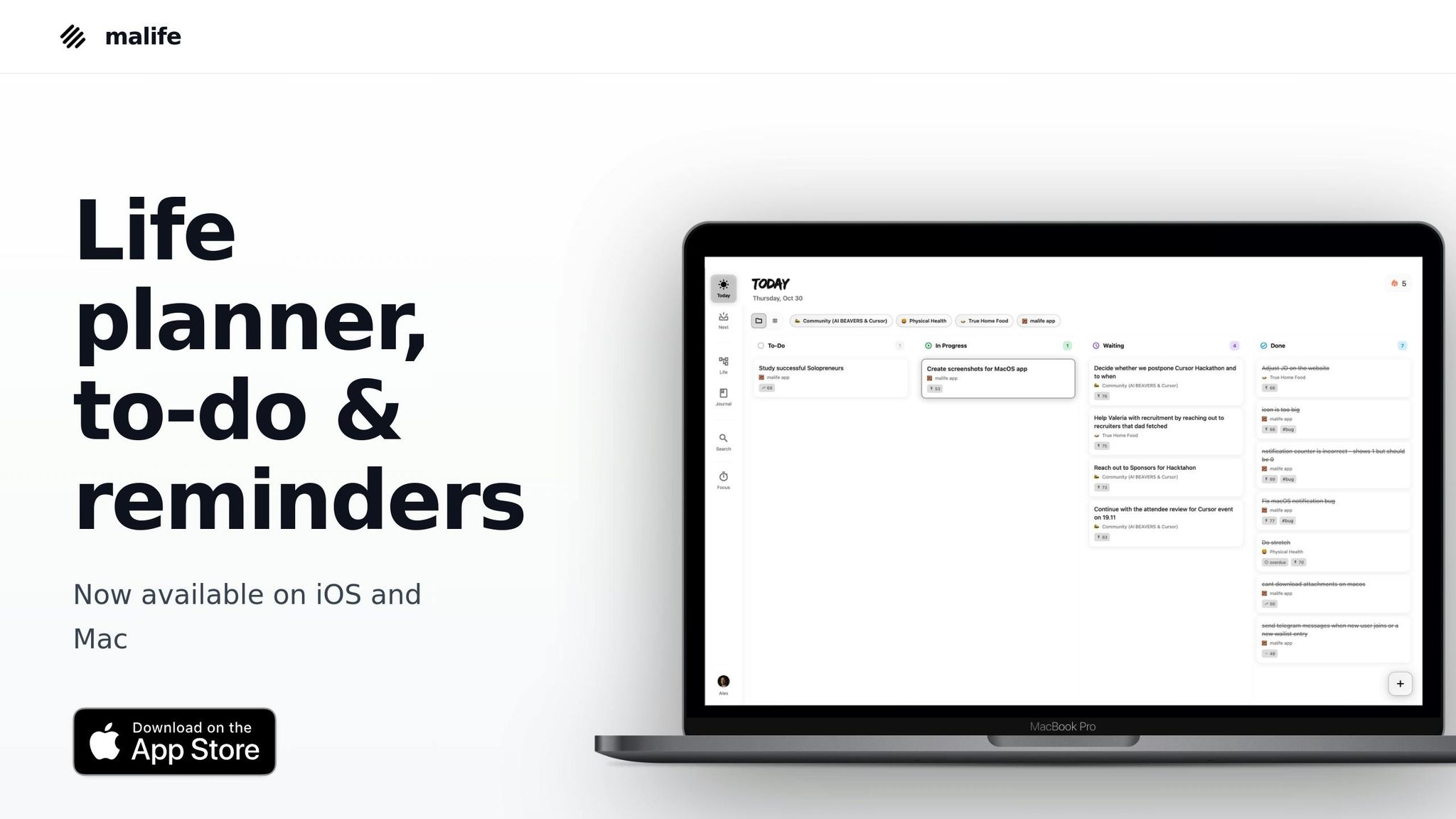
A great productivity tool doesn’t just help you get more done - it helps you know when to stop. Apps that clearly organize your tasks, separate work from personal priorities, and remind you to switch gears can make all the difference between a balanced day and one where work takes over.
Take malife, for example. It’s designed to organize your life, not just your work. By dividing your tasks into distinct Life Areas - like Work, Health, Relationships, Finances, and Personal Growth - you can visually see if work is dominating your time.
Here’s how malife can help enforce boundaries:
- Separate work from personal tasks. By creating distinct Life Areas, you can visually compartmentalize your responsibilities. This helps prevent work from overshadowing other priorities.
- Limit your daily workload with Today & Next. malife’s kanban-style feature lets you focus on a manageable number of tasks each day. Once your "Today" list is cleared, it signals that it’s time to stop working.
- Prioritize with the Impact/Effort matrix. This tool helps you focus on high-impact tasks during your peak hours. By knocking out the most critical work early, you reduce the pressure to work late.
- Set reminders for shutdown rituals. malife’s persistent reminders can prompt you to stop working at a set time - like a recurring task at 5:15 p.m. that says, "Shut down work and plan tomorrow." You can also schedule reminders for breaks every 60–90 minutes, which aligns with expert advice for reducing fatigue and staying energized.
- Use the focus timer to contain work sessions. Set a timer for a 90-minute deep work session, then take a break when it’s up. This helps prevent endless work sessions and creates natural stopping points.
These features work hand-in-hand with your schedule, making boundary enforcement almost second nature.
Turn Off Work Notifications During Rest Periods
Once you’ve set up systems with productivity tools, the next step is to minimize digital interruptions. One of the biggest threats to maintaining boundaries is constant work notifications. Every ping from email, Slack, or Teams can pull your attention back to work - even when you’re supposed to be relaxing. Turning off or limiting work notifications during personal time is critical.
Start by deciding what truly counts as "urgent" and what can wait. Genuine emergencies - like safety issues or critical system outages - are rare. Most work messages can wait until the next business day. Once you’ve defined what needs immediate attention, adjust your devices accordingly.
- On iOS and Android, use Focus modes or Do Not Disturb settings to silence work apps after a certain time. For example, set a "Personal" Focus mode to activate at 6:00 p.m. on weekdays and remain on during weekends. This mutes work emails and chat apps but still allows calls or messages from close family to come through.
- On Windows and macOS, schedule Focus Assist or Do Not Disturb for evenings and weekends. Hide notification badges to reduce the temptation to check work apps. Logging out of work email and chat apps at the end of the day adds an extra layer of separation.
- Batch your communications by creating set times to check work messages instead of responding immediately. This helps you manage work without letting it intrude on your personal time.
Clearly communicate your boundaries with your team so they know you won’t respond to messages after hours. Protecting your downtime starts with turning off those digital distractions.
Create Physical and Digital Separation
Your environment plays a huge role in maintaining boundaries. When work and personal life share the same spaces - both physically and digitally - it’s easy for the lines to blur. A laptop left open on the couch or work tabs pinned in your browser can make it hard to mentally switch off from work. Creating clear separation helps signal to your brain that it’s time to relax.
Physical separation is particularly important if you work from home. Ideally, set up a dedicated workspace - a desk, table, or even a specific corner - that’s only for work. At the end of the day, close your laptop, store work materials, and physically leave that space. Simple rituals like shutting down your computer, turning off a desk lamp, or packing away work items can signal that the workday is over. If space is tight, consider using a rolling cart to store work supplies and move them out of sight when you’re done.
Research shows that environmental cues are essential for switching out of work mode. Even small actions - like closing an office door, tidying up your workspace, or changing out of work clothes - can help you transition into relaxation.
Digital separation is just as important. Keep work and personal digital spaces distinct. Use separate logins or profiles for work and personal accounts, and only access work accounts during designated hours. On your phone, group work apps into a folder and restrict access during off-hours using Focus mode settings. This reduces the temptation to check work apps when you’re supposed to be unwinding.
Build Flexibility and Adjust Boundaries When Needed
Once you've set clear boundaries, it's equally important to leave room for flexibility when life throws you a curveball. Boundaries aren’t rigid walls - they’re more like guidelines designed to protect your time and energy. But life? It’s messy and unpredictable. Deadlines get moved up, emergencies arise, or sometimes you just catch a cold. The key is to create boundaries that can bend when needed and then snap back into place.
Research on work-life balance highlights that boundaries work best when they strike a balance between being clear and adaptable. In the U.S., where long hours and constant connectivity are often the norm, healthy flexibility might look like sticking to your usual stop time most days but occasionally extending it for urgent deadlines - and then intentionally carving out extra rest later. The goal is to adjust when necessary, without letting those adjustments become your new normal.
Know When to Adjust Your Boundaries
Not every request or situation justifies bending your boundaries. Before you agree to work late or check emails during your downtime, take a moment to evaluate whether it’s truly necessary. Genuine reasons to adjust might include:
- Emergencies like server outages, safety concerns, or urgent medical or family matters.
- Time-sensitive projects, such as product launches, audits, or key client deliverables.
- Expected busy periods, such as quarter-end financial close or holiday retail peaks.
- Personal situations like illness, travel, or unexpected childcare needs.
Experts recommend planning ahead for these “spikes” by building in buffer time rather than expecting every week to run like clockwork. Treat these deviations as temporary, with clear start and end points. For instance, if you work late a couple of nights during a launch, make it a point to return to your regular schedule once the project wraps up.
Before making an adjustment, ask yourself:
- Is this task truly urgent and important?
- What will I be giving up - sleep, exercise, or time with loved ones?
- Could this task fit into my existing schedule without disrupting boundaries?
- Have I made too many exceptions recently?
If the task isn’t urgent, can wait 24 hours, or has already caused repeated interruptions, it might be better to hold firm on your boundaries and propose an alternative solution.
Tools like malife’s dashboard can provide a quick overview of your commitments across work, health, relationships, finances, and personal growth. This visibility can help you decide whether you can take on more or if it’s time to say no. To stay ahead, leave small blocks of unscheduled time - 30 to 60 minutes, for example - for spillover tasks or unexpected surprises. You can also group similar tasks together, estimate time realistically, and mark particularly busy days to protect your downtime on surrounding days.
It also helps to set clear exception rules for yourself. For example, you might decide that only critical incidents, major deadlines, or one-off projects qualify for a boundary adjustment. Limit these exceptions - perhaps no more than two late evenings per month or one weekend per quarter - and communicate these limits to your manager, colleagues, and family. This way, they’ll understand when adjustments are reasonable and when your “no” is non-negotiable.
Once you’ve made an adjustment, it’s equally important to reset quickly to avoid losing your balance.
Reset After Boundaries Are Crossed
Even the best plans can go off track. Maybe a product launch requires late nights, or an urgent client issue has you answering emails over the weekend. The real danger isn’t in breaking your boundaries occasionally - it’s in letting those breaks become your new routine.
To reset, return to your usual stop time as soon as possible, even the very next day. Schedule recovery time immediately, whether that means starting work later the next morning or blocking off an evening to relax. Reflect briefly on why the boundary was crossed and make adjustments to prevent it from happening again.
A simple reset could include noting when and why you worked late, rescheduling non-urgent tasks for later in the week, and dedicating time to recharge - like taking a walk, going to bed earlier, or spending screen-free time with family. Instead of viewing these breaches as failures, treat them as opportunities to refine your approach and tools, ensuring your boundaries stay intact moving forward.
After particularly hectic periods, ask yourself: Could the extra work have been avoided? What changes - like better time estimates, earlier communication, or a firmer “no” - could help next time? Block out recovery time immediately to ensure that these exceptions remain temporary.
Use tools like malife to enforce your boundaries. Set recurring reminders and calendar settings to signal when your workday ends and when it’s time to focus on rest or personal activities. Communication is also key - let your manager and colleagues know when you’re available during busy periods and when you’re not. Similarly, inform family or roommates about temporary schedule changes and when you’ll return to your usual routine. Shared calendars or status updates can help reinforce these boundaries.
For special projects, define a clear sprint period with a start and end date, extra hours, and a recovery plan. Once the sprint ends, go back to your normal schedule and avoid letting those extended hours become routine.
Finally, pay attention to warning signs that your boundaries are slipping. If you’re consistently working late, checking emails after hours, skipping breaks, or feeling burned out, it’s time to reevaluate. Regularly track your actual versus planned hours to spot patterns. If your calendar shows frequent after-hours work, if buffer time is always overtaken by routine tasks, or if personal activities like exercise or social time are constantly canceled, it’s a signal to tighten your boundaries. Tools like malife can help you identify these patterns and rebalance your schedule.
Clear boundaries can boost your productivity, and resetting them when needed ensures you maintain a healthy balance between work and life.
Prioritize Rest for Long-Term Well-Being
Setting clear boundaries between work and personal life is a great start, but it’s just as important to recharge your energy with meaningful rest. Skipping rest doesn’t just hurt your productivity - it takes a toll on your health. Rest isn’t something to earn or a reward for working hard; it’s a basic necessity that keeps your mind sharp, your body healthy, and your performance steady over time.
In the U.S., rest often gets sidelined. Around 1 in 3 adults don’t get enough sleep regularly, and many find it tough to disconnect fully during downtime. Research highlights the risks of overwork: clocking 55+ hours a week raises the risk of stroke by 35% and coronary heart disease by 17% compared to a standard 35–40-hour week. Those extra hours don’t just leave you tired - they can lead to serious health problems.
Understand the Value of Rest
Rest is about more than just easing fatigue. When you sleep, your brain clears out waste, which helps maintain cognitive function. Quality rest lowers cortisol levels, reducing risks like high blood pressure, a weakened immune system, and weight gain. The American Academy of Sleep Medicine recommends 7–9 hours of sleep per night, which enhances memory, focus, and decision-making. Short breaks - like a quick stretch or walk every 60–90 minutes - can also boost performance and fend off mental fatigue.
Beyond sleep, regular mental breaks activate your brain’s default mode network, which plays a key role in creative thinking and problem-solving. Truly disconnecting from work during evenings and weekends lowers stress, reduces burnout, and improves overall well-being. People who unplug during their off-hours report feeling less exhausted, more satisfied with life, and better prepared to tackle work when they return. In short, rest isn’t wasted time - it’s the fuel that powers everything else.
Make Rest Time Meaningful
Once you’ve carved out time for rest, the key is to make it count. Not all downtime is equally refreshing. Scrolling through social media or binge-watching TV might feel relaxing at first, but if it leaves you feeling drained or restless, it’s not giving your body and mind what they truly need.
Active rest - like walking, cycling, or yoga - can ease stress and improve sleep quality. Even 120 minutes per week in nature is linked to better health and mood, according to research. Spending time outdoors, even briefly, can lift your spirits and lower stress.
Socializing is another powerful way to recharge. Connecting with friends or family can restore emotional energy far more effectively than passive screen time. For others, meaningful rest might involve quiet activities like reading, journaling, or solo walks - anything that leaves you feeling refreshed.
Mindfulness practices, such as deep breathing, meditation, or progressive muscle relaxation, offer proven ways to lower stress and improve sleep. Even just 5–10 minutes can make a noticeable difference. For parents, incorporating rest into family routines - like tech-free dinners, evening strolls, or shared reading time - can be both restorative and bonding. Remote workers might benefit from simple rituals, like a short walk or a 10-minute stretch after work, to signal the shift from work to personal time.
malife helps you stick to your rest goals by scheduling and reminding you to prioritize recharge time. By organizing your life into categories like Work, Health, Family, and Recharge, it ensures rest-related tasks appear alongside work commitments in your Today & Next view. You can create recurring blocks for activities like "Evening Walk" or "Phone-Free Hour" to make them a consistent part of your routine. Features like persistent reminders, quick snooze options, a built-in journal, and a focus timer support distraction-free rest and reflective wind-downs.
To see if your rest is effective, try tracking it for 1–2 weeks. Log your sleep hours, rate your daily energy levels (on a 1–10 scale), and note your mood. Pay attention to how often you feel the urge to work outside your planned schedule. Warning signs of insufficient rest include afternoon energy crashes, reliance on caffeine to get going, mental fog, irritability, frequent minor mistakes, or losing interest in hobbies. Physical signs like headaches, muscle tension, or frequent colds may point to chronic stress and inadequate recovery.
Think of rest as maintenance - like charging your phone or servicing your car. Studies consistently show that overwork leads to diminishing returns: productivity drops, errors increase, and health suffers. By making rest a priority, you’re reinforcing the boundaries that protect your well-being. Rest is what allows you to show up for the things that matter most: spending time with loved ones, enjoying hobbies, and building a career that lasts for the long haul.
Taking rest seriously isn’t about slacking off - it’s about setting yourself up for success. The boundaries you set around work only matter if you use your free time to truly recover. When you treat rest as a non-negotiable part of your routine, you’re investing in your ability to perform, think clearly, and stay healthy for years to come.
Conclusion
Drawing clear lines between work and rest is essential for maintaining your energy, health, and focus.
To recap the strategies discussed: Set defined work hours and rest periods - like ending work at 6:00 p.m. - and plan your tasks and personal activities with equal care. Studies show that structured planning and working in focused blocks can not only enhance productivity but also improve overall well-being.
Digital tools can be a game-changer in keeping these boundaries intact. For example, apps like malife help organize tasks into distinct categories and support focus with reminders and timers, reducing the mental strain of juggling work and personal responsibilities.
While flexibility is important, limit schedule changes to true emergencies, and return to your routine as soon as possible. This approach ensures consistency without falling into an all-or-nothing mindset.
A better work-life balance doesn’t just mean feeling good - it leads to greater energy and better performance. Small, consistent changes can make a big difference over time.
Here’s a simple step to try: Block out your work hours and reserve at least one rest period this week by marking it as non-negotiable on your calendar. Set a specific cutoff time, like 5:30 p.m. or 6:00 p.m., and add it as a recurring event with a notification. Once that time hits, turn off work-related alerts and stick to it for an evening. Also, schedule one meaningful rest activity - whether that’s a walk, spending time with loved ones, or enjoying a hobby - and treat it like any other appointment.
Ultimately, these strategies - from setting boundaries to leveraging helpful tools - give you the power to take back control of your time. Protecting your rest isn’t a sign of laziness; it’s an investment in your ability to think clearly, perform at your best, and stay healthy in the long run. The guide provides the framework - now it’s your turn to put it into action, refine it, and create a balance that honors both your work and your life.
FAQs
How can I clearly share my work and rest boundaries with coworkers and family without creating confusion?
Effectively setting and communicating your time boundaries starts with clarity and respect. Let your coworkers and family know when you’re available for work or personal time by sharing your schedule ahead of time. Use polite yet firm language to explain why these boundaries matter for your productivity and overall well-being.
For instance, you could say: "I set aside evenings for personal time, so I won’t be available after 6:00 PM. If something urgent comes up, please let me know during work hours." The key here is consistency - when you stick to your boundaries, others will learn to respect them over time.
To make managing and sharing your schedule easier, tools like malife can be incredibly helpful. With features like voice task capture, persistent reminders, and a clear breakdown of your priorities, it helps you stay organized and maintain balance in your daily life.
How can I handle unexpected work demands without compromising my work-life boundaries?
Unexpected work demands can throw off your day, but there are ways to handle them without sacrificing your boundaries. Start by evaluating how urgent and important the request really is. If it’s a true priority, you might need to shift your schedule temporarily - but don’t let this become a regular pattern. For tasks that aren’t as pressing, set clear expectations by communicating when you can reasonably tackle them.
Tools like malife can make staying organized easier. This app allows you to categorize tasks into areas like work or personal life, giving you a clear picture of what’s on track and what needs attention. Features like persistent reminders and effort-versus-impact prioritization help you focus on what matters most while ensuring your boundaries remain intact. Prioritizing your time isn’t just about getting things done - it’s also key to maintaining your overall well-being.
How can I make sure my downtime feels truly refreshing and not just another task to check off?
To make your downtime truly refreshing, it's important to set clear boundaries between work and relaxation. One way to achieve this is by using malife, a tool designed to help you organize your tasks and different areas of life. This way, you can focus on what truly matters without feeling buried under a mountain of responsibilities. By deliberately scheduling rest periods and keeping them separate from your to-do list, you give yourself the chance to recharge completely.
Features like persistent reminders and the Today & Next view in malife help you stay grounded and focused on the present. These tools make it easier to enjoy your downtime without constant interruptions, ensuring your moments of rest feel like a genuine break - not just another task to check off.